MCP server · Analytics · official
Limzo Telegram Group Stats MCP server
by LimzoCom · official
Ask your AI for public stats on Telegram groups tracked by the Limzo anti-spam bot.
This is a small helper that lets your AI look up public statistics for Telegram groups that use the Limzo moderation bot. You can ask about activity, top members, levels and moderation summaries. It is handy if you run or follow a Telegram community and want quick numbers without digging through pages yourself.
What is an MCP server? The 30-second version
On its own, your AI can only chat with you. An MCP server is a small helper program that gives your AI a new skill or a connection to an app or service. This one connects your AI to Limzo, the Telegram anti-spam and moderation bot, so it can look up public group stats for you. You just ask in normal words, and the AI uses this helper behind the scenes.
What this MCP server does
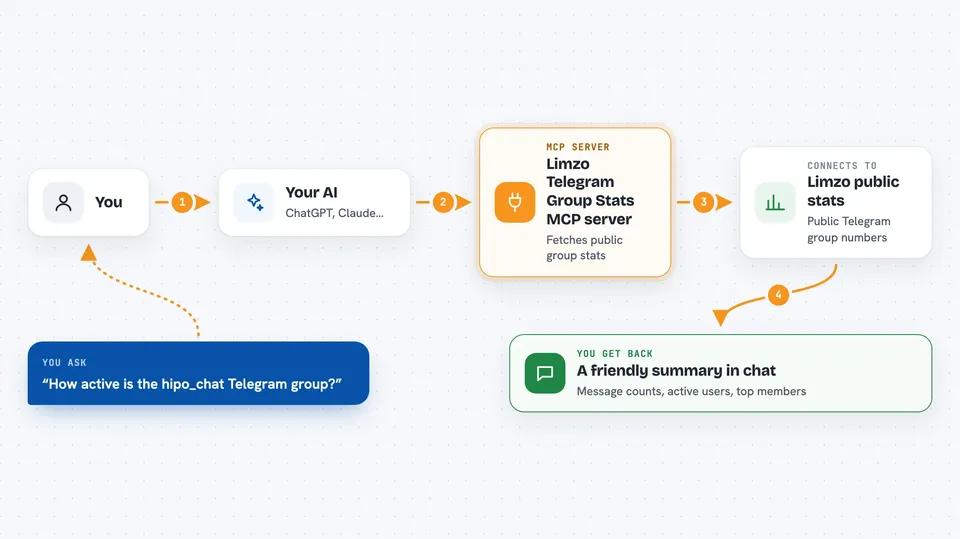
You ask your AI something like how active a certain Telegram group is. The AI sends that request to this helper. The helper talks to Limzo's public stats pages and pulls the numbers. Then it hands the results back to your AI, which explains them to you in the chat. Everything it reads is already public, and it never shows actual member messages.
 Click to zoom
What you can do with it
- Look up public stats for a Telegram group by its slug
- Browse or search the public directory of Limzo groups
- See activity trends over the last few days
- Check the top members and their message counts
- Read member levels, badges and weekly awards
- Get a moderation summary for a group
- See network-wide Limzo stats across all groups
Try asking your AI
- “How active is the hipo_chat Telegram group?”
- “Show me the top members in the hipo group this week.”
- “Find public Telegram groups tracked by Limzo that talk about tech.”
- “What is the overall activity across all Limzo groups right now?”
What it gives back to you
You get back a friendly summary in the chat, usually with numbers like message counts, active users, a mood label and a list of top members. It can also list groups that match a search, or show levels, awards and a moderation summary. Everything is read-only, so nothing in the group is changed.
Before you start
What you need
- An MCP client like Claude Desktop, Claude Code or Cursor
- Node.js installed if you use the npx bridge (the direct web address needs nothing)
Good to know
It only reads public stats, so it cannot change or delete anything, but keep in mind the numbers come from Limzo's public pages and may not reflect a group's private activity.
Install it with your AI
Add Limzo Telegram Group Stats MCP server to your AI, no technical skills needed
You don't install anything by hand. You copy one prompt, paste it into an AI that can work on your computer, and it checks, installs and connects the server for you, asking you when it needs something.
Sign in to get the install prompt
Members get a ready-made prompt that lets the Claude desktop app check Limzo Telegram Group Stats MCP server, install it and connect it for them, step by step. You don't need any technical skills: you copy, paste and answer a few questions. Your connected AI can also find and install any of the 4,361 MCP servers here for you.
Who it's for
Telegram community admins, moderators and anyone curious about activity in public Limzo-tracked groups.