
MCP server · Social media
Shopstr / Nostr marketplace MCP server
by llmops-pro
Let your AI create and update your Shopstr or Nostr marketplace shop and product listings for you.
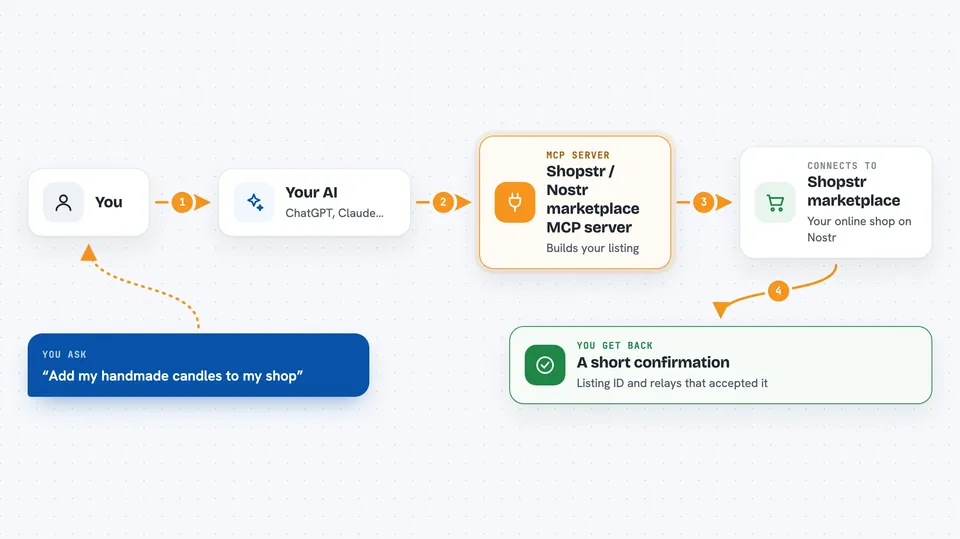
This is a small helper that lets your AI set up and update a shop on Shopstr, a marketplace built on Nostr where people sell things for Bitcoin over Lightning. You describe your shop and your products in plain words, and the AI turns that into the right listings. It is handy if you sell things online and would rather not click through a storefront dashboard by hand.
What is an MCP server? The 30-second version
On its own, your AI can only chat. An MCP server is a small helper program that gives your AI a new skill or a connection to an app or service. This one connects your AI to Shopstr and to Nostr relays, which are the shared servers where marketplace listings live. Once it is connected, you can ask your AI to publish or update your shop and products, and it will do the actual posting for you.
What this MCP server does
You tell your AI what you want, for example a new shop profile or a product with a name and a price. The AI uses this helper to build the right kind of listing behind the scenes. The helper signs the listing with your Nostr identity and sends it out to the relays your audience reads from. For Shopstr, it also nudges Shopstr's own database so your listing actually shows up on the storefront, not just on the relays. Then you get back a short confirmation with the listing's ID and which relays accepted it.
 Click to zoom
What you can do with it
- Create or update your shop profile on Shopstr
- Publish a product listing with a title, price, images and categories
- Add several photos and category tags to a product so it shows up in search
- Create or update a stall and products in the older NIP-15 format for other clients
- List your own existing stalls and products so you can see what is published
- Turn on a two-step confirm so nothing goes live until you approve it
- Set a rate limit or a read-only mode to keep publishing under control
What it gives back to you
You get back a short confirmation in the chat. It usually includes the listing's ID, the type of listing it created, and a list of the relays that accepted it. For Shopstr listings it also tells you whether the storefront update worked. If you ask it to list your items, it gives you a readable rundown of your stalls and products.
Before you start
What you need
- Node.js version 20 or newer
- A Nostr signer, ideally a bunker link from an app like Amber or nsec.app (a kind of login that signs things for you)
- The addresses of the Nostr relays you want to publish to
- An internet connection that can reach shopstr.store if you want your listings to show up there
Good to know
This server can publish and change your live shop listings, so check what your AI is about to post before you confirm, especially if you turn off the confirm step.
Install it with your AI
Add Shopstr / Nostr marketplace MCP server to your AI, no technical skills needed
You don't install anything by hand. You copy one prompt, paste it into an AI that can work on your computer, and it checks, installs and connects the server for you, asking you when it needs something.
Sign in to get the install prompt
Members get a ready-made prompt that lets the Claude desktop app check Shopstr / Nostr marketplace MCP server, install it and connect it for them, step by step. You don't need any technical skills: you copy, paste and answer a few questions. Your connected AI can also find and install any of the 4,609 MCP servers here for you.
Who it's for
People who sell things online on Shopstr or Nostr and want to manage their shop and listings by just describing what they want to their AI.




