MCP server · Research
Sieve MCP server
by lmwharton
Screen a startup by name and get a scored investment memo with a take-the-meeting or pass call.
Sieve is a helper that lets your AI look into a startup and write up a proper investment memo for you. You give it a company name, and it researches the business, scores it across seven areas, and tells you whether it is worth a meeting. It is made for investors who look at a lot of early-stage companies and want a fast first read.
What is an MCP server? The 30-second version
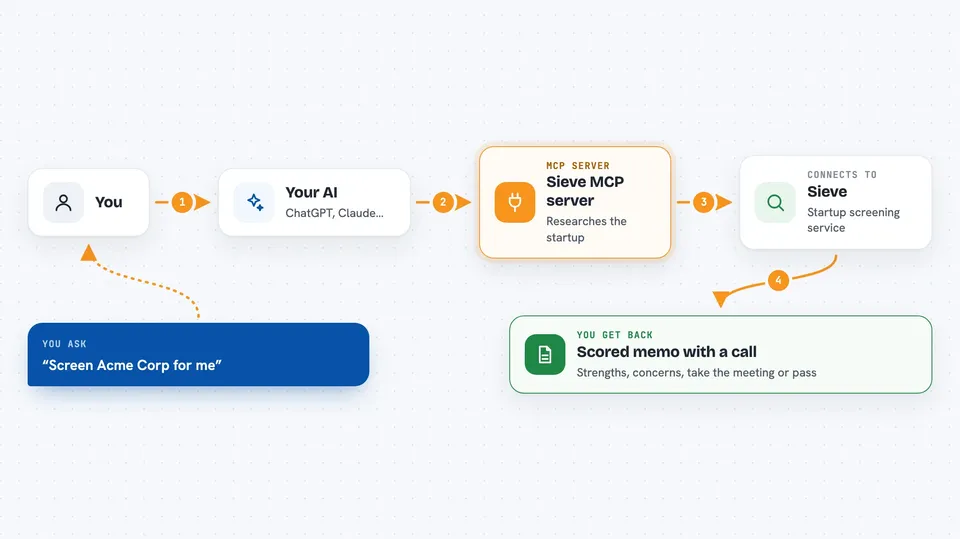
On its own, your AI can only chat with you using what it already knows. An MCP server is a small helper program that gives your AI a new skill or a connection to another service. This one connects your AI to Sieve, a due diligence service for startup investing. Once it is connected, you can just ask your AI to screen a company, and it will go and do that work through Sieve for you.
What this MCP server does
You ask your AI to screen a startup, and it passes that request to Sieve. Sieve then runs its own research on the company, looking at things like the team, the market, the product, the competition, the business model, and any traction signals. It checks claims against real-world evidence and tags each finding by how well it is supported. When it is done, you get back a scored memo with a recommendation, and you can keep asking follow-up questions about the deal.
 Click to zoom
What you can do with it
- Screen a startup by name and get a scored memo
- See the Sieve Score broken down across seven dimensions
- Spot red flags and deal-breakers early
- Check how well a pitch deck claim is backed by evidence
- Compare a deal against others you have screened
- Ask follow-up questions about any part of the analysis
- Check how many screens you have left this month
Try asking your AI
- “Run a Sieve screen on Acme Corp at acme.com”
- “What is the status of that Sieve analysis?”
- “Show me the Sieve results for Acme Corp”
- “What are the red flags and should I take the meeting?”
What it gives back to you
You get back a written investment memo with an executive summary, key strengths, critical concerns, and a clear recommendation. It also gives you a Sieve Score from 0 to 140, broken down across seven dimensions, and each finding is tagged as Documented, Discovered, Inferred, or Missing. In the chat, this shows up as readable text you can scroll through and ask questions about.
Before you start
What you need
- A Sieve account (you can sign up free)
- A Sieve API key from your account settings (a kind of password for apps)
- An AI app that supports MCP servers, like Claude Desktop, Claude Code, Cursor, or Windsurf
Good to know
Screens use up your monthly allowance, and the free tier only includes two per month, so check your usage before running a batch.
Install it with your AI
Add Sieve MCP server to your AI, no technical skills needed
You don't install anything by hand. You copy one prompt, paste it into an AI that can work on your computer, and it checks, installs and connects the server for you, asking you when it needs something.
Sign in to get the install prompt
Members get a ready-made prompt that lets the Claude desktop app check Sieve MCP server, install it and connect it for them, step by step. You don't need any technical skills: you copy, paste and answer a few questions. Your connected AI can also find and install any of the 4,361 MCP servers here for you.
Who it's for
Investors, angels, fund managers, and accelerator teams who look at a lot of startups and want a fast, consistent first read on each one.