
MCP server · Finance and crypto
Toreador MCP server
by Logitale
Let your AI make crypto payment QR codes and payment sessions for you, right in the chat.
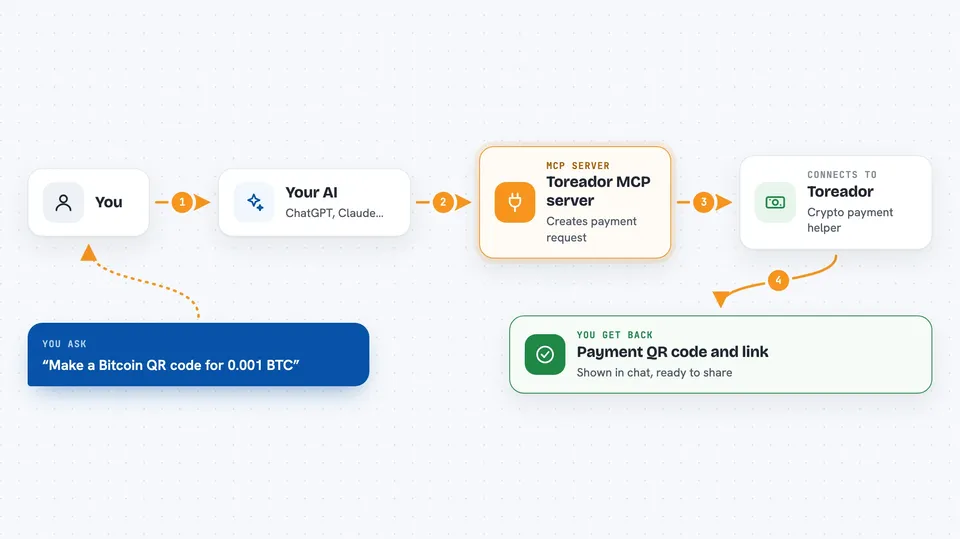
This is a small helper that connects your AI assistant to Toreador, a service that makes crypto payment links and QR codes. Once it is set up, you can just ask your AI in plain words to create a Bitcoin QR code or a USDC payment session, and it will do it for you. It is handy if you take crypto payments and want to skip the fiddly copy-paste work.
What is an MCP server? The 30-second version
On its own, your AI can only chat. It cannot reach out to other apps or services. An MCP server is a little helper program that gives your AI one new skill, here the skill of talking to Toreador. So when you ask for a crypto QR code, your AI passes the request to this helper, the helper talks to Toreador, and the answer comes back to you in the chat.
What this MCP server does
You type a request like "make me a Bitcoin QR code for 0.001 BTC to this address". Your AI reads it and picks the right Toreador tool. The helper then calls Toreador with your API key and gets back the payment details. You see the QR code and the payment link right in the chat. You can also ask about past payments or check whether a session has been paid.
 Click to zoom
What you can do with it
- Generate a QR code for Bitcoin, Ethereum, Solana or Polygon payments
- Make a QR code for USDC on Solana
- Create a hosted payment session for USDC, USDT or EURC
- Check the status of a payment session
- List your last 50 QR codes
- List your last 50 payment sessions
Try asking your AI
- “Generate a Bitcoin QR code for 0.001 BTC to bc1qxy2kgdygjrsqtzq2n0yrf2493p83kkfjhx0wlh”
- “Create a USDC payment session for 50 USDC on Polygon to 0x742d35Cc6634C0532925a3b844Bc9e7595f2bD18”
- “What's the status of session ses_123”
- “Show me my last 10 payment sessions”
What it gives back to you
You get back the payment details in the chat. For a QR code, that means the on-chain payment link plus the QR image itself, which most AI apps can show right there. For a session, you get a session ID, a security code and a hosted payment page link. For status checks and history, you get a short list or a status word like pending, completed or expired.
Before you start
What you need
- A Toreador account on the Pro plan
- A Toreador API key starting with tdr_ from your Toreador dashboard
- The Claude desktop app or Cursor (any AI app that supports MCP servers)
Good to know
This helper can create real payment requests, so double-check the amount and the wallet address before you share a QR code or payment link with anyone.
Install it with your AI
Add Toreador MCP server to your AI, no technical skills needed
You don't install anything by hand. You copy one prompt, paste it into an AI that can work on your computer, and it checks, installs and connects the server for you, asking you when it needs something.
Sign in to get the install prompt
Members get a ready-made prompt that lets the Claude desktop app check Toreador MCP server, install it and connect it for them, step by step. You don't need any technical skills: you copy, paste and answer a few questions. Your connected AI can also find and install any of the 4,066 MCP servers here for you.
Who it's for
Freelancers, small shops and anyone who takes crypto payments and wants to make QR codes or payment links without leaving their AI chat.




