MCP server · Security
ScopeBlind protect-mcp gateway
by tomjwxf
Watch and control what your AI's tools are allowed to do, with a log of every action.
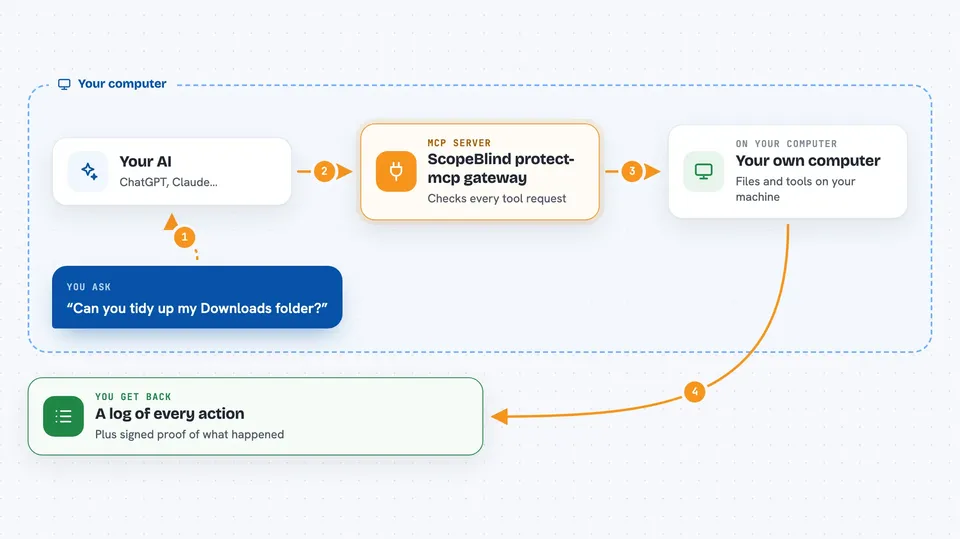
This is a safety layer that sits between your AI assistant and the tools it uses. It watches every tool call and, if you want, blocks or limits the risky ones. It is handy if you let your AI do real things like read files, send email, or touch a server, and you want to know what happened.
What is an MCP server? The 30-second version
On its own, your AI can only chat. An MCP server is a small helper program that gives your AI a new skill, like reaching into another app or service. This one is a helper that stands in the middle: your AI talks to it, and it talks to the other helper behind it. So before any action actually happens, this gateway gets to see it, write it down, and decide whether to let it through.
What this MCP server does
You connect your AI to this gateway instead of connecting it straight to the tool server. When your AI asks to use a tool, the gateway catches that request first. By default it just writes the request into a log and lets it pass, which is called shadow mode. If you add a policy file and turn on enforce mode, it can block certain tools, slow down ones that get used too often, or require a higher trust level. It can also stamp each decision with a signed receipt so you can prove later what happened.
 Click to zoom
What you can do with it
- Log every tool call your AI makes, without blocking anything
- Block specific tools you never want the AI to touch
- Set limits like 5 per hour on tools that cost money or are risky
- Require a higher trust level before certain tools run
- Generate signed receipts for each decision
- Export an audit bundle you can check offline
- Use ready-made policy packs based on real-world incidents
What it gives back to you
You get a stream of log lines in the terminal, one per tool call, showing the tool name, whether it was allowed or blocked, and why. If signing is on, each line is followed by a signed receipt you can verify later. There are also commands that print a summary, recent receipts, or a full audit bundle file. In your AI chat itself, nothing changes: the AI just gets its normal answer, or a refusal if the gateway blocked the call.
Before you start
What you need
- Node.js installed on your computer
- The MCP server you want to protect, already working
- A policy file if you want to enforce rules (the tool can generate a starter one)
Good to know
In enforce mode it can block your AI's actions, so test in shadow mode first and keep your policy file somewhere safe.
Install it with your AI
Add ScopeBlind protect-mcp gateway to your AI, no technical skills needed
You don't install anything by hand. You copy one prompt, paste it into an AI that can work on your computer, and it checks, installs and connects the server for you, asking you when it needs something.
Sign in to get the install prompt
Members get a ready-made prompt that lets the Claude desktop app check ScopeBlind protect-mcp gateway, install it and connect it for them, step by step. You don't need any technical skills: you copy, paste and answer a few questions. Your connected AI can also find and install any of the 4,361 MCP servers here for you.
Who it's for
Anyone who lets an AI assistant use real tools and wants a record of what it did, plus a way to block the dangerous ones.