MCP server · Security
Governed MCP Gateway
by Cubiczan
Adds a named identity to every AI tool call and keeps a list of which tools are allowed.
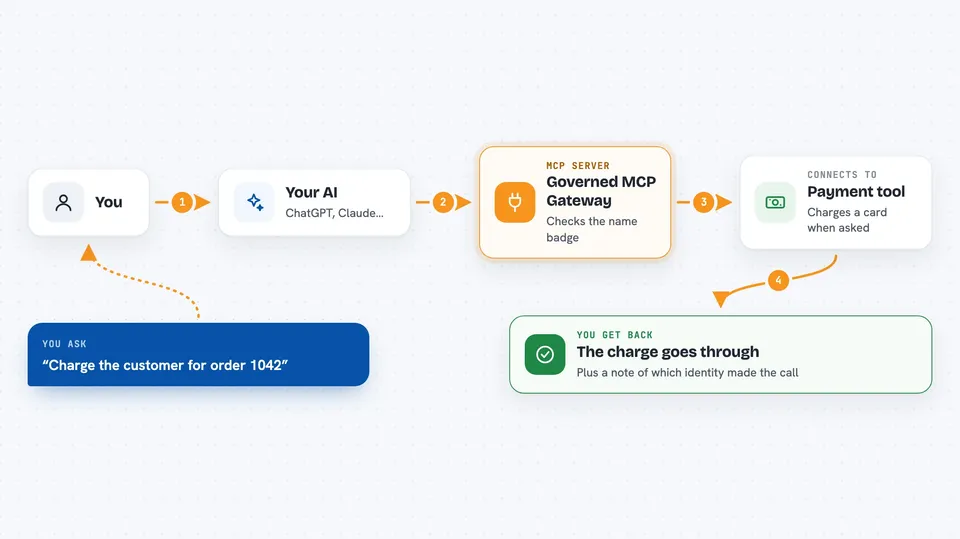
This is a small helper program that sits between your AI assistant and the tools it uses. It makes sure every request carries a name badge, so you can tell who asked for what, and it only lets through tools you have approved. It is handy if you work with AI agents that touch money, credentials, or company data and you want a record of who did what.
What is an MCP server? The 30-second version
On its own, your AI can only chat. An MCP server is a small helper program that gives your AI a new skill or a connection to another service. This one is a gateway: it stands in front of your AI's tool calls and stamps each one with a name badge called a principal, so the request is tied to a real person or agent. It also keeps a list of which tools are allowed and can swap out stored passwords safely.
What this MCP server does
You or your AI send a request to this gateway, and it checks the name badge that came with it. If the badge is valid, the gateway passes the request on to the tool, keeping the badge attached the whole way, including on live updates. It also keeps a list of which tools are allowed for that badge, so a research agent cannot suddenly charge a card. When you ask for a list of tools, the gateway only shows the ones you are allowed to use, which saves space and keeps things tidy. If a stored password needs to change, a human can rotate it, and the old one stops working right away.
 Click to zoom
What you can do with it
- Attach a named identity to every AI tool call
- Keep the same identity on live update streams
- Limit which tools each identity is allowed to use
- Show only the tools a session actually needs
- Rotate stored passwords without changing their names
- Check whether a secret still matches the current one
- Report how much space your tool list is taking up
Try asking your AI
- “Ping the echo tool with the word world”
- “List the tools I am allowed to use in this session”
- “Add the stripe charge tool to my session”
- “Rotate the github token in the vault”
What it gives back to you
You get back answers from the tools you called, plus a note about which identity made the call. When you ask for a tool list, you see only the tools your badge allows. If you rotate a password, you get a confirmation that the old one no longer works. Health checks return a small status message saying the gateway is running.
Before you start
What you need
- Node.js 18 or newer
- A Bearer key for each identity (demo keys are in the README, but you should replace them before sharing a public link)
- The gateway running locally on port 7474, or a hosted URL if you deploy it
Good to know
This gateway can rotate stored passwords and control which tools an agent may use, so treat the human key with care and change the demo keys before sharing a public link.
Install it with your AI
Add Governed MCP Gateway to your AI, no technical skills needed
You don't install anything by hand. You copy one prompt, paste it into an AI that can work on your computer, and it checks, installs and connects the server for you, asking you when it needs something.
Sign in to get the install prompt
Members get a ready-made prompt that lets the Claude desktop app check Governed MCP Gateway, install it and connect it for them, step by step. You don't need any technical skills: you copy, paste and answer a few questions. Your connected AI can also find and install any of the 4,361 MCP servers here for you.
Who it's for
Teams that run AI agents touching money, credentials, or company records and want a clear record of who did what.