MCP server · Apple, iOS and Mac
TRAECNclaw MCP server
by Luckycat133
Lets your AI drive the TraeCN desktop app on your Mac: open workspaces, pick a model, and send messages for you.
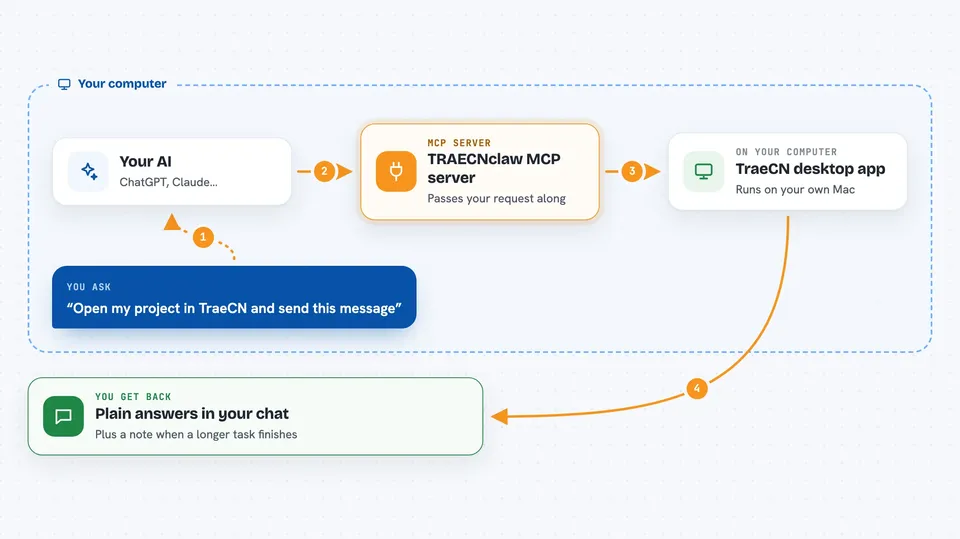
TRAECNclaw is a small helper that connects your AI assistant to the TraeCN desktop app on your Mac. Once it is set up, your AI can open a workspace, choose a model or mode, and send a message inside TraeCN without you clicking around. It is handy if you already use TraeCN and want your AI to run those steps for you.
What is an MCP server? The 30-second version
On its own, your AI can only chat with you. An MCP server is a small helper program that gives your AI a new skill or a connection to an app. This one connects your AI to TraeCN running on your own Mac, so it can look things up and do things there when you ask. You stay in charge: the AI only acts inside TraeCN when you tell it to.
What this MCP server does
You ask your AI to do something in TraeCN, like open a project or send a message. The AI passes that request to this helper, which runs quietly on your Mac. The helper talks to a small local gateway, and the gateway talks to the TraeCN desktop app. TraeCN does the work, and the answer or result comes back into your chat. If a task takes a while, the helper keeps track of it and tells your AI when it is done.
 Click to zoom
What you can do with it
- Open a workspace in TraeCN when you need one
- Pick a model or a mode for the session
- Send a single message into TraeCN
- Check on a task that is still running
- Get a notification when a longer task finishes
- Ask routine questions that do not need a command
Try asking your AI
- “Open my project workspace in TraeCN”
- “Switch TraeCN to the fast model and send this prompt”
- “Send this message to TraeCN and tell me when it is done”
- “Check whether my last TraeCN task finished”
What it gives back to you
You get back plain answers in your chat: whether the workspace opened, which model or mode is set, and the reply from TraeCN. For longer jobs, you get a short note when the task finishes. If something went wrong, you get a message explaining what happened.
Before you start
What you need
- A Mac with the TraeCN desktop app installed and open
- Node.js if you install it with npm
- The Agent host app you use, restarted after setup
Good to know
It controls the TraeCN app on your Mac, so anything you ask it to do happens for real in that app.
Install it with your AI
Add TRAECNclaw MCP server to your AI, no technical skills needed
You don't install anything by hand. You copy one prompt, paste it into an AI that can work on your computer, and it checks, installs and connects the server for you, asking you when it needs something.
Sign in to get the install prompt
Members get a ready-made prompt that lets the Claude desktop app check TRAECNclaw MCP server, install it and connect it for them, step by step. You don't need any technical skills: you copy, paste and answer a few questions. Your connected AI can also find and install any of the 4,361 MCP servers here for you.
Who it's for
People who already use the TraeCN desktop app on a Mac and want their AI assistant to run simple steps inside it for them.