MCP server · Productivity
5dive MCP server
by 5dive-ai
Lets your AI file tasks, message agents, and read the fleet digest for a 5dive agent team.

This is a small connector that lets your AI work with 5dive, a tool for running a team of coding agents. Once it is set up, you can ask your AI to file a task, check on an agent, or read the daily digest, and it will do it for you. It is handy if you already use 5dive and want to manage your agent fleet without leaving your chat window.
What is an MCP server? The 30-second version
On its own, your AI can only chat. An MCP server is a small helper program that gives your AI a new skill or a connection to another tool. This one connects your AI to 5dive, the system that runs your fleet of coding agents. So instead of you typing 5dive commands in a terminal, you just ask your AI, and it passes the request along to 5dive for you.
What this MCP server does
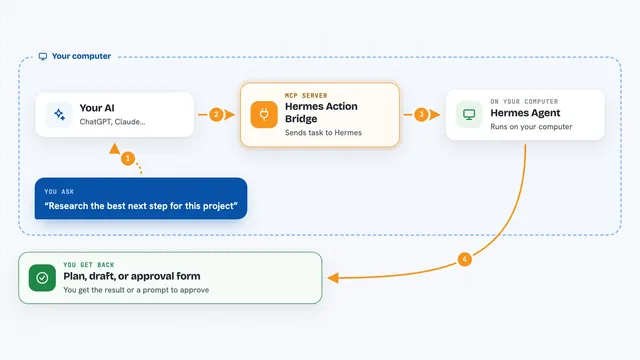
You ask your AI something like "file a task for the billing bug" or "what did the fleet do this week?" The AI uses this helper, which runs the matching 5dive command on your computer. 5dive does the real work, like adding the task to the shared queue or pulling the digest. Then the helper hands the result back to your AI, and your AI shows it to you in plain language in the chat.
 Click to zoom
What you can do with it
- File a new task in the shared queue with a title, body, priority, and assignee
- Look up the full details of one task, including its status, result, and blockers
- List tasks, filtered by status or by which agent they are assigned to
- Send a message to another agent on the fleet
- List every agent with its type, channels, model, and live state
- Read the fleet's daily standup digest, or the weekly view
Try asking your AI
- “File a high priority task called Fix the login redirect and assign it to the frontend agent”
- “Show me the details of task 142”
- “List all open tasks assigned to the backend agent”
- “Give me the fleet digest for the last 7 days”
What it gives back to you
You get back plain answers in the chat: task lists, the full detail of a single task, a list of agents, or the digest text. When you file a task or send a message, it tells you that the action went through. Nothing is shown as raw code unless the underlying command returns it that way.
Before you start
What you need
- Node.js version 18 or newer
- The 5dive command line tool installed and available on your computer
- On managed 5dive boxes, permission to run commands as root (the FIVEDIVE_SUDO setting handles this)
Good to know
This can file tasks and send messages on your behalf, so double check what you ask it to do before it runs.
Install it with your AI
Add 5dive MCP server to your AI, no technical skills needed
You don't install anything by hand. You copy one prompt, paste it into an AI that can work on your computer, and it checks, installs and connects the server for you, asking you when it needs something.
Sign in to get the install prompt
Members get a ready-made prompt that lets the Claude desktop app check 5dive MCP server, install it and connect it for them, step by step. You don't need any technical skills: you copy, paste and answer a few questions. Your connected AI can also find and install any of the 4,361 MCP servers here for you.
Who it's for
People who already run a 5dive agent fleet and want to manage tasks, agents, and digests from inside their AI chat instead of the terminal.