MCP server · Analytics
Lumify MCP server
by lumifyai
Ask your AI for live scores, schedules, odds and betting splits across many sports.

Lumify is a sports data service. This MCP server connects your AI assistant to it, so you can ask about games, scores, odds and betting trends in plain words. It is handy if you follow sports, write about games, or just want quick answers without opening five websites.
What is an MCP server? The 30-second version
On its own, your AI can only chat with you. An MCP server is a small helper that gives your AI a new skill or a connection to an outside service. This one connects your AI to Lumify, a sports data service. Once it is connected, your AI can look up games, scores and odds there for you when you ask.
What this MCP server does
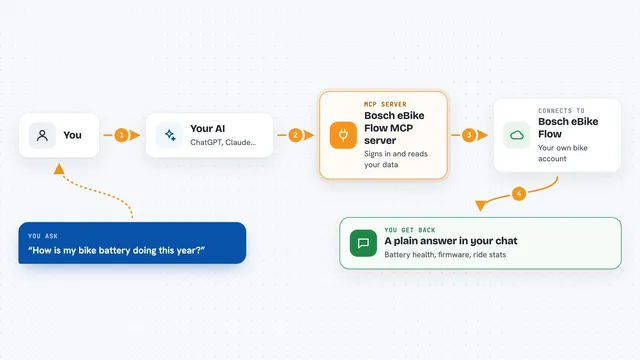
You ask your AI something like what games are on tonight or what the odds are for a team. Your AI sends that question to this helper. The helper talks to Lumify, which keeps live schedules, scores, odds and betting information. Lumify sends the answer back, and your AI shows it to you in the chat. You never have to visit a website or copy numbers yourself.
 Click to zoom
What you can do with it
- Check today's schedules for a sport or league
- Look up live scores for games in progress
- See current odds and how they have moved
- Ask about public betting splits on a game
- Get a plain-language confidence read on a bet
- Compare teams across MLB, NFL, NBA, NHL, tennis and soccer
Try asking your AI
- “What NFL games are on today and what are the current odds?”
- “Show me the live score for the Lakers game right now.”
- “Which way has the line moved on the Chiefs game this week?”
- “What are the public betting splits for tonight's Yankees game?”
What it gives back to you
You get answers in the chat: lists of games, scores, odds numbers, and short explanations. If you ask about a bet, it can come back with a confidence note in plain words. Everything shows up as text you can read right there, no tables to open or files to download.
Before you start
What you need
- A Lumify API key (a kind of password; you can get a free instant trial key at lumify.ai/docs/ai, no signup needed)
- An AI app that supports MCP, like Cursor, VS Code or Claude Desktop
Good to know
It only reads sports data from Lumify, so it will not change anything on your computer, but it does use your API key and your free trial credits run out after a while.
Install it with your AI
Add Lumify MCP server to your AI, no technical skills needed
You don't install anything by hand. You copy one prompt, paste it into an AI that can work on your computer, and it checks, installs and connects the server for you, asking you when it needs something.
Sign in to get the install prompt
Members get a ready-made prompt that lets the Claude desktop app check Lumify MCP server, install it and connect it for them, step by step. You don't need any technical skills: you copy, paste and answer a few questions. Your connected AI can also find and install any of the 4,066 MCP servers here for you.
Who it's for
Sports fans, writers, analysts and anyone who wants quick sports answers from their AI without opening several sites.