
MCP server · Developer tools · official
M00N Report MCP server
by m00nreport · official
Let your AI write test cases, run manual test cycles, cut releases and check test health in M00N Report.
This is a helper that connects your AI assistant to M00N Report, a tool teams use to manage software testing. Once it is connected, you can ask your AI in plain words to write test cases, build a manual test run, or check whether a release is safe to ship. It is handy if you work with testing or releases and already use M00N Report.
What is an MCP server? The 30-second version
On its own, your AI can only chat. An MCP server is a small helper program that gives your AI a new skill or a connection to another app. This one connects your AI to M00N Report, so when you ask it to do something there, it can actually look things up or make changes for you. You do not need to understand how it works under the hood. You just add it once and then talk to your AI like usual.
What this MCP server does
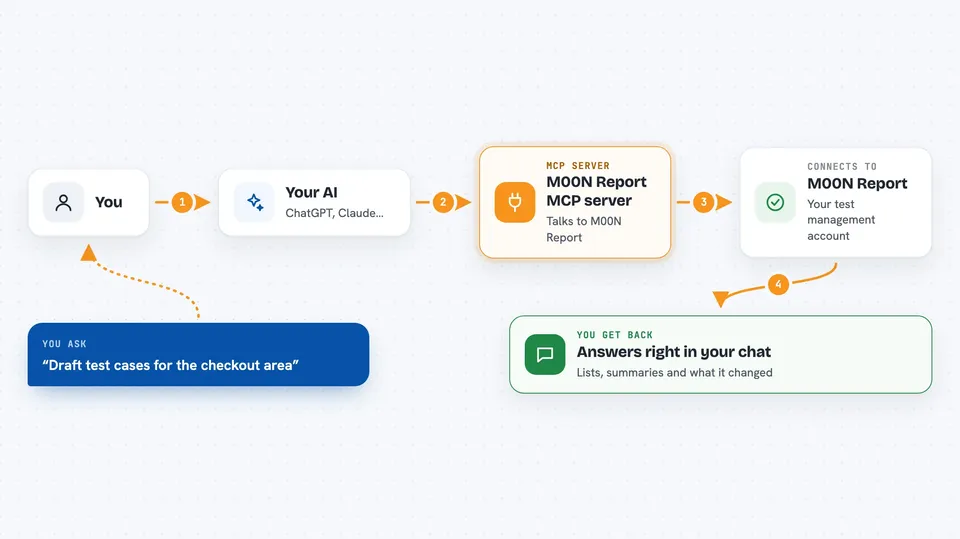
You ask your AI something like "list my M00N Report projects" or "draft test cases for the login area". Your AI passes that request to this helper. The helper talks to your M00N Report account over the internet and does the work there, like creating a test case or building a manual test run. Then it sends the result back to your AI, which shows it to you in the chat. You never leave the conversation.
 Click to zoom
What you can do with it
- List your projects and see launch trends and statistics
- Create, edit, move or delete manual test cases
- Build a manual test execution from suites, collections or single cases
- Record per-case results for a manual test run
- Create releases and attach or detach the launches that belong to them
- Check coverage gaps and get suggested test cases
- Attach Jira or Linear tickets to a test case
Try asking your AI
- “List my M00N Report projects”
- “Draft manual test cases for the checkout area, we have none yet”
- “Which tests are flaky this week? Rank them”
- “Is release 4.2 ready to ship?”
What it gives back to you
You get answers in the chat: lists of projects, test cases, releases or folders, plus summaries and numbers like coverage gaps or flaky test rankings. When you ask it to create or change something, it tells you what it did. Some prompts, like the weekly health report, give you a short written summary. Everything stays in the conversation, so you can ask follow-up questions right away.
Before you start
What you need
- A M00N Report account
- An MCP key from your M00N Report settings (Settings, then MCP Keys)
- Node.js 20 or newer on your computer
- An MCP-capable client like Claude Desktop, Claude Code or Cursor
Good to know
It can create, change and delete test cases, executions and releases in your M00N Report account, so check before you confirm anything destructive.
Install it with your AI
Add M00N Report MCP server to your AI, no technical skills needed
You don't install anything by hand. You copy one prompt, paste it into an AI that can work on your computer, and it checks, installs and connects the server for you, asking you when it needs something.
Sign in to get the install prompt
Members get a ready-made prompt that lets the Claude desktop app check M00N Report MCP server, install it and connect it for them, step by step. You don't need any technical skills: you copy, paste and answer a few questions. Your connected AI can also find and install any of the 4,609 MCP servers here for you.
Who it's for
QA engineers, test leads and release managers who already use M00N Report and want their AI to help with test cases, manual runs and release checks.



