MCP server · Developer tools
smolmux MCP server
by magnusmalm
Let your AI watch and talk to a serial port or debugger on a tiny embedded board.
smolmux is a small helper program for people who work with embedded boards, the kind of tiny computers you plug into a serial port or a debug probe. It keeps one connection to your board open and lets several tools share it at the same time, including your AI assistant. If you bring up boards, poke at UART consoles, or use GDB on Linux, this is made for you.
What is an MCP server? The 30-second version
On its own, your AI can only chat. An MCP server is a small helper program that gives your AI a new skill or a connection to another tool. This one is called smolmux and it connects your AI to a live serial port or debugger attached to a real board. Once it is set up, you can ask your AI things about that board, and the helper goes and looks at the actual wire for you.
What this MCP server does
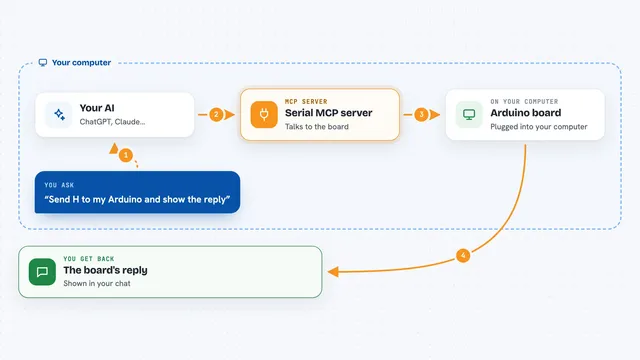
You open a connection to your board with the smolmux broker program, which holds the port open. Then you register the smolmux MCP helper with your AI tool. When you ask your AI something, like what is coming out of the console, it uses the helper to talk to the broker. The broker reads or writes on the real port and sends the answer back. You see the result in your chat, without losing the port for your other tools.
What you can do with it
- Read the recent console output from your board
- Send a command over the serial port and get the reply
- Check which boot stage your board has reached
- Break into U-Boot before it starts the kernel
- Set breakpoints and step through code with GDB
- Decode a Cortex-M fault and list named registers
- Probe an unknown board and get a starter profile
- Hand the port to a flasher tool, then take it back
Try asking your AI
- “What is my board printing on the console right now?”
- “Send the command temp over serial and show me the reply.”
- “Has my board finished booting? If not, which stage is it stuck at?”
- “Break into U-Boot, then show me the boot prompt.”
- “Set a breakpoint at main and tell me if it is hit.”
What it gives back to you
You get answers in the chat: recent console lines, the reply to a command you sent, boot stage names, register values, or a decoded fault summary. Some tools write files for you, like a starter board profile in JSON. For GDB work you get backtraces, memory reads, and breakpoint status as plain text. Everything stays readable, no raw dumps unless you ask for them.
Before you start
What you need
- A Linux machine with a C11 compiler and CMake 3.21 or newer
- Python 3 with kconfiglib installed (used during the build step)
- A board connected over a serial port or a GDB/SWD probe
- A running smolmux broker holding the port you want to use
Good to know
This gives the AI real control over your board: it can write to the console, reset, interrupt the CPU, and change what is running, so keep it pointed at hardware you are happy to have poked.
Install it with your AI
Add smolmux MCP server to your AI, no technical skills needed
You don't install anything by hand. You copy one prompt, paste it into an AI that can work on your computer, and it checks, installs and connects the server for you, asking you when it needs something.
Sign in to get the install prompt
Members get a ready-made prompt that lets the Claude desktop app check smolmux MCP server, install it and connect it for them, step by step. You don't need any technical skills: you copy, paste and answer a few questions. Your connected AI can also find and install any of the 4,361 MCP servers here for you.
Who it's for
Embedded developers and hardware engineers who bring up boards, work with UART consoles or U-Boot, and debug ARM Cortex-M chips.