MCP server · No-code
TracePass MCP server
by malinoto
Let your AI create products, build and check EU Digital Product Passports, and read supply-chain events in TracePass.
This is a helper for TracePass, a platform for EU Digital Product Passports. It lets your AI assistant look after products, passports, company parties and supply-chain events for you. It is handy if you deal with product compliance and want to skip a lot of clicking around.
What is an MCP server? The 30-second version
On its own, your AI can only chat. An MCP server is a small helper program that gives your AI a new skill or a connection to an app or service. This one connects your AI to TracePass, so it can look things up there and do things for you when you ask. You stay in the chat; the helper does the running around.
What this MCP server does
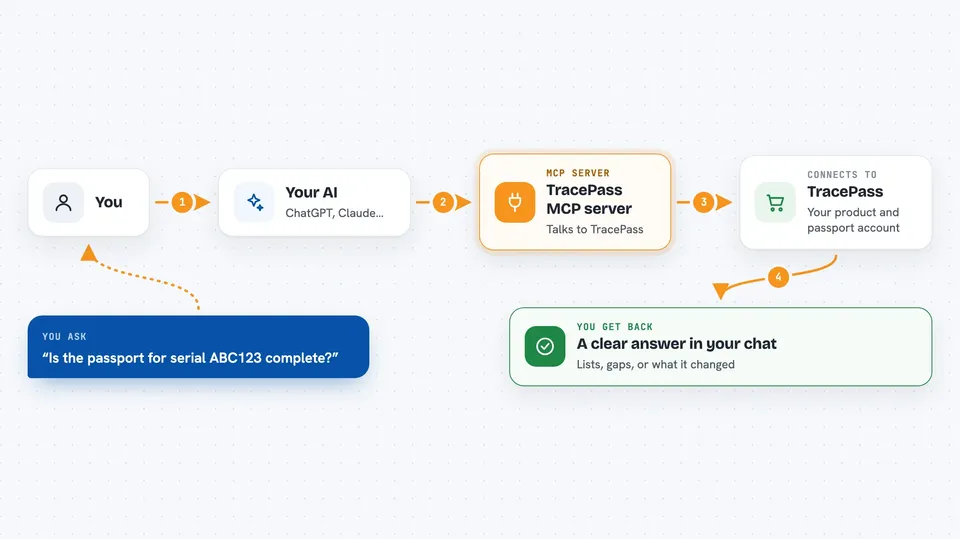
You ask your AI something in plain words, like checking whether a passport is complete. The AI sends that request to this helper, and the helper talks to your TracePass account. TracePass sends back the details, and the AI turns them into a clear answer for you. If you ask it to make a change, like creating a product or setting a party, the helper carries that out in TracePass too.
 Click to zoom
What you can do with it
- List and look up products in your TracePass catalogue
- Create one product or a batch of products
- Check a passport for compliance gaps and registry readiness
- Update a passport's category data fields
- Set or remove economic-operator parties like the manufacturer
- Read, export or capture GS1 EPCIS supply-chain events
- Browse the DPP category field templates and what rules each field comes from
Try asking your AI
- “Show me all my products in TracePass”
- “Is the passport for serial ABC123 complete? List what is missing”
- “Create a product for our new battery model and set up its first passport”
- “Summarise the supply-chain events for this passport”
What it gives back to you
You get answers in the chat: lists of products or passports, a compliance verdict with the specific gaps cited, field values, QR links, or a summary of supply-chain events. When you ask for a change, it tells you what it did, like a product created or a party set. Some checks come back as a simple status such as compliant or incomplete.
Before you start
What you need
- A TracePass account
- An API key from TracePass (find it under Developer then API Keys) or an OAuth connection
- For the local version, Node.js installed on your computer
Good to know
Some actions cost money or cannot be undone: creating a passport can use up paid slots, archiving a passport permanently breaks its public QR code, and the EPCIS capture and query actions need a paid add-on, so check before you let your AI run them.
Install it with your AI
Add TracePass MCP server to your AI, no technical skills needed
You don't install anything by hand. You copy one prompt, paste it into an AI that can work on your computer, and it checks, installs and connects the server for you, asking you when it needs something.
Sign in to get the install prompt
Members get a ready-made prompt that lets the Claude desktop app check TracePass MCP server, install it and connect it for them, step by step. You don't need any technical skills: you copy, paste and answer a few questions. Your connected AI can also find and install any of the 4,361 MCP servers here for you.
Who it's for
People who handle EU product compliance, product data or supply-chain records and want their AI to do the checking and updating for them.