
MCP server · Social media
Bluesky Brand Presence Mapper
by mambalabsdev
Find a company's Bluesky account from its website address and get exact follower, following and post counts.
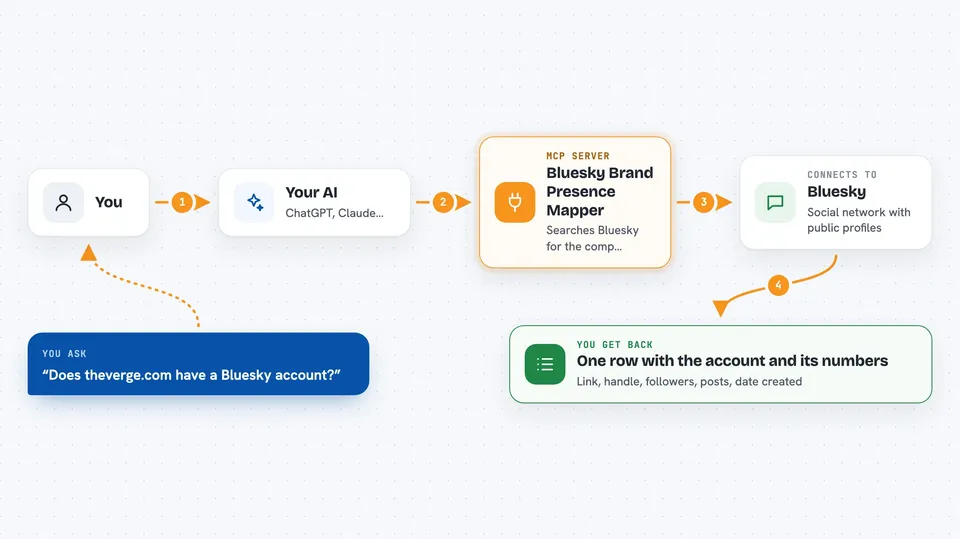
This is a small helper that connects your AI to Bluesky, the social network. You give it a company website address, and it finds that company's official Bluesky account and its numbers. It is handy if you check brands, do marketing research, or keep a list of company social accounts.
What is an MCP server? The 30-second version
On its own, your AI can only chat with you. An MCP server is a small helper program that gives your AI a new skill or a connection to an app or service. This one connects your AI to Bluesky, so it can look up a company's account and its follower counts for you. You just ask in normal words, and the helper does the looking up.
What this MCP server does
You ask your AI something like whether a company has a Bluesky account. The AI passes your question to this helper. The helper talks to Bluesky and searches for the company's official account, starting from the website address you gave. It then pulls the profile details and the exact numbers. You get one tidy row back in the chat with the account link, handle, follower count, post count and creation date.
 Click to zoom
What you can do with it
- Find a company's Bluesky account from its website address
- Get exact follower, following and post counts
- Check whether the account handle matches the company domain
- See when the account was created
- Get the account's profile link and handle
- Confirm that a company has no Bluesky account at all
Try asking your AI
- “Find the Bluesky account for theverge.com and give me its follower count”
- “Does shopify.com have a Bluesky account, and is the handle domain verified”
- “Look up the Bluesky handle for npr.org and tell me when the account was created”
- “Map the Bluesky presence for mamba.bsky.social”
What it gives back to you
You get one flat row of details about the company's Bluesky account. It includes the profile link, handle, follower count, following count, post count, display name, bio and creation date. It also tells you whether the handle is domain verified and how the account was found. If there is no account, it simply says not found, which is a normal answer.
Before you start
What you need
- Node.js 18 or newer
- A free Apify account
- An Apify API token (a kind of password for apps; you get it free from your Apify account page)
Good to know
Each lookup runs on Apify and may use your Apify account credit, so keep an eye on your usage if you run many searches.
Install it with your AI
Add Bluesky Brand Presence Mapper to your AI, no technical skills needed
You don't install anything by hand. You copy one prompt, paste it into an AI that can work on your computer, and it checks, installs and connects the server for you, asking you when it needs something.
Sign in to get the install prompt
Members get a ready-made prompt that lets the Claude desktop app check Bluesky Brand Presence Mapper, install it and connect it for them, step by step. You don't need any technical skills: you copy, paste and answer a few questions. Your connected AI can also find and install any of the 4,609 MCP servers here for you.
Who it's for
Marketing, sales and research people who need to check or track company accounts on Bluesky.




