
MCP server · Research
GTM Tech Stack Signal MCP server
by mambalabsdev
Check which sales and marketing tools a company uses, straight from its website, just by asking your AI.
This is a small helper that lets your AI look at a company's public website and tell you which sales and marketing tools that company seems to use. It is handy if you work in sales, marketing, or research and you want a quick read on a company before you reach out. You do not need to install anything complicated. You just connect it once and then ask questions in plain words.
What is an MCP server? The 30-second version
On its own, your AI can only chat with you. It cannot go and check a website for you. An MCP server is a small helper program that gives your AI a new skill or a connection to another service. This one connects your AI to a tool that scans company websites, so when you ask about a company, your AI can actually go and look instead of guessing.
What this MCP server does
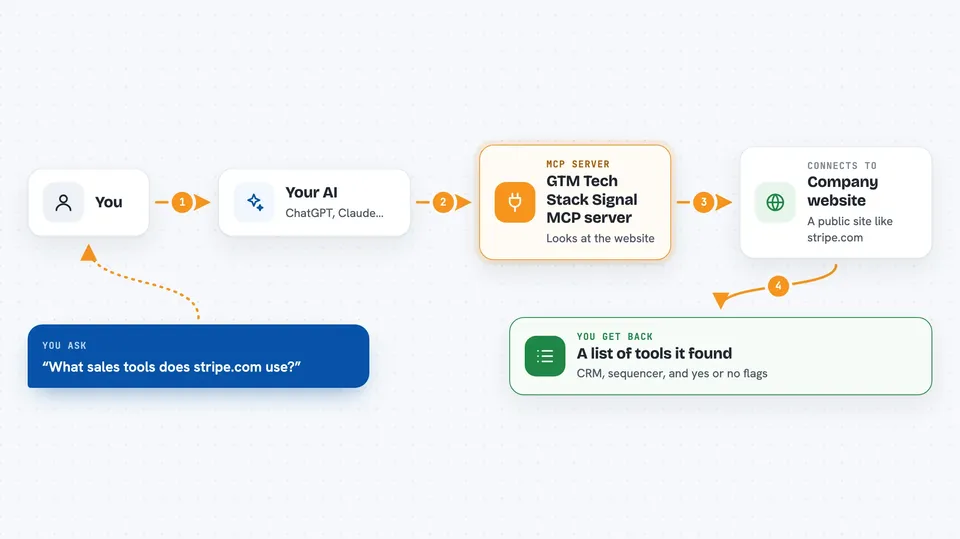
You give your AI a company domain, like stripe.com. Your AI passes that to this helper. The helper sends the domain to a scanning service called Apify, which looks at the public scripts and pages on that website. Apify figures out which sales and marketing tools seem to be in use there. The helper then hands the answer back to your AI, and your AI shows it to you in the chat.
 Click to zoom
What you can do with it
- Check which CRM a company uses, like HubSpot or Salesforce
- See if a company uses a sales sequencer tool like Outreach or Apollo
- Spot marketing automation tools like Marketo or Pardot
- Ask about one specific tool, for example whether a company uses Gong
- Get a simple count of how many sales tools a company seems to run
- Get a rough signal of how tool-heavy a company's setup looks
- Scan a few extra pages like pricing or product pages for better coverage
Try asking your AI
- “What GTM tools does stripe.com run? Check their tech stack.”
- “Does openai.com use HubSpot or Salesforce? Detect their CRM.”
- “Pull the marketing automation and sequencer signals for figma.com.”
- “Detect the GTM tech stack for datadoghq.com and list every tool found.”
What it gives back to you
You get back a flat list of facts about that company. It shows which CRM and which sequencer tool were spotted, plus simple yes or no flags for tools like HubSpot, Salesforce, Apollo, Gong, Intercom, and Marketo. It also gives you a count of how many tools were found and a rough signal of how tool-heavy the setup looks. Your AI shows this as a small table or a short summary in the chat.
Before you start
What you need
- Node.js 18 or newer on your computer
- An Apify account with an API token (a kind of password for apps; you get it free from the Apify website)
Good to know
Each scan runs on your Apify account, so it may use your Apify credits and cost a little money.
Install it with your AI
Add GTM Tech Stack Signal MCP server to your AI, no technical skills needed
You don't install anything by hand. You copy one prompt, paste it into an AI that can work on your computer, and it checks, installs and connects the server for you, asking you when it needs something.
Sign in to get the install prompt
Members get a ready-made prompt that lets the Claude desktop app check GTM Tech Stack Signal MCP server, install it and connect it for them, step by step. You don't need any technical skills: you copy, paste and answer a few questions. Your connected AI can also find and install any of the 4,609 MCP servers here for you.
Who it's for
Sales, marketing, and research people who want a quick read on which tools a company uses before reaching out.


