MCP server · Analytics
ICP Fit Scorer MCP server
by mambalabsdev
Score any company against your ideal customer profile and get a 0 to 100 fit score with a tier and breakdown.
This is a small helper that lets your AI score a company against your ideal customer profile, the kind of customer you most want to sell to. You give it a company website address and a description of your ideal customer, and it comes back with a number from 0 to 100, a letter grade, and a breakdown of why. It is handy for sales and marketing people who spend time deciding which companies are worth chasing.
What is an MCP server? The 30-second version
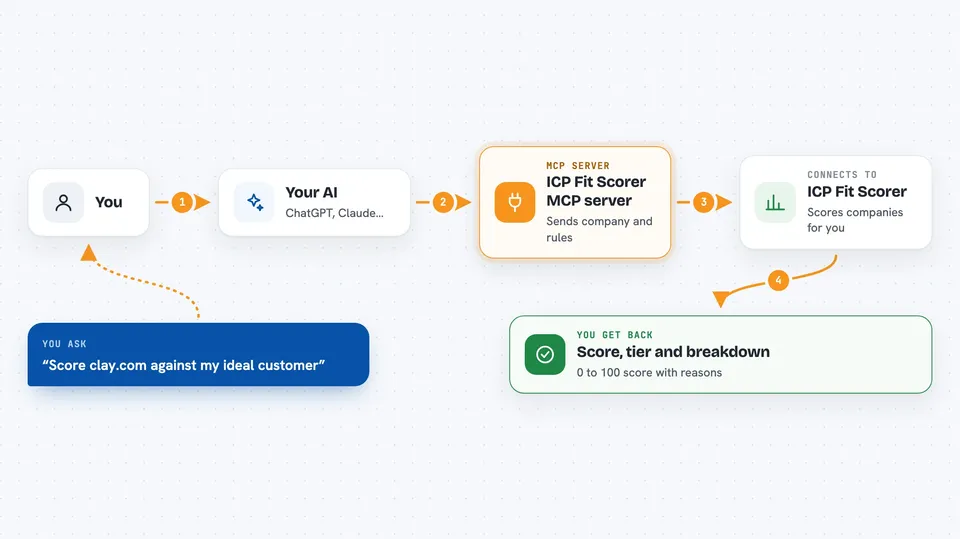
On its own, your AI can only chat with you. An MCP server is a small program that gives your AI one new skill or connection. This one connects your AI to a scoring service from Mamba Labs that runs on Apify, a platform for running small web tasks. So when you ask your AI to score a company, it passes the request to this helper, the helper does the scoring work, and the answer comes back into your chat.
What this MCP server does
You tell your AI which company to score, using its website address like clay.com. You also tell it what your ideal customer looks like, either by picking a ready-made template, pasting in your own scoring rules, or just describing it in plain English. The helper sends all of that to the scoring service, which looks at signals like hiring, tech stack, headcount, funding and industry. Then it adds up the points and hands back one tidy row of results. Your AI shows you the score, the tier, and the breakdown right in the chat.
 Click to zoom
What you can do with it
- Score a company against a ready-made ideal customer template
- Describe your ideal customer in plain English and get a score
- Use your own custom weights for each signal
- See a per-signal breakdown of where the points came from
- Get an A to D tier and a lead tag for each company
- Ask for a written explanation of the score
- Let the service gather hiring and tech-stack signals for you
Try asking your AI
- “Score clay.com against the b2b_saas template and fetch its signals.”
- “How well does stripe.com fit an ICP of mid-market fintech companies? Explain the score.”
- “Score figma.com with my scoring config and include the per-signal breakdown.”
- “Rate openai.com against this ICP description: enterprise AI teams hiring for go-to-market.”
What it gives back to you
You get back one flat row of results for the company you asked about. It includes the score from 0 to 100, a tier from A to D, a lead tag, and a breakdown of points for hiring, tech stack, headcount, funding and industry. If you asked for an explanation, you also get a short written reason for the score. Your AI can then read it out, compare it with other companies, or drop it into a spreadsheet or CRM.
Before you start
What you need
- Node.js 18 or newer on your computer
- An Apify account with an API token (a kind of password for apps; you get it free from your Apify account page)
- The Claude desktop app or another AI app that supports MCP servers
Good to know
Each scoring run uses your Apify account, which may cost money depending on your plan, and if you describe your ideal customer in plain English you also use your own OpenAI or Anthropic key.
Install it with your AI
Add ICP Fit Scorer MCP server to your AI, no technical skills needed
You don't install anything by hand. You copy one prompt, paste it into an AI that can work on your computer, and it checks, installs and connects the server for you, asking you when it needs something.
Sign in to get the install prompt
Members get a ready-made prompt that lets the Claude desktop app check ICP Fit Scorer MCP server, install it and connect it for them, step by step. You don't need any technical skills: you copy, paste and answer a few questions. Your connected AI can also find and install any of the 4,609 MCP servers here for you.
Who it's for
Sales, marketing and go-to-market teams who want a quick, consistent way to judge whether a company is a good fit before reaching out.