MCP server · Analytics
Google Search Console MCP server
by lionkiii
Ask your AI about your Google Search Console data and get plain answers about clicks, pages and keywords.
This is a small helper that connects your AI assistant to Google Search Console, the free tool from Google that shows how your website shows up in search. Once it is set up, you can just ask questions in normal words instead of clicking around reports. It is handy for anyone who looks after a website, even if you are not an SEO expert.
What is an MCP server? The 30-second version
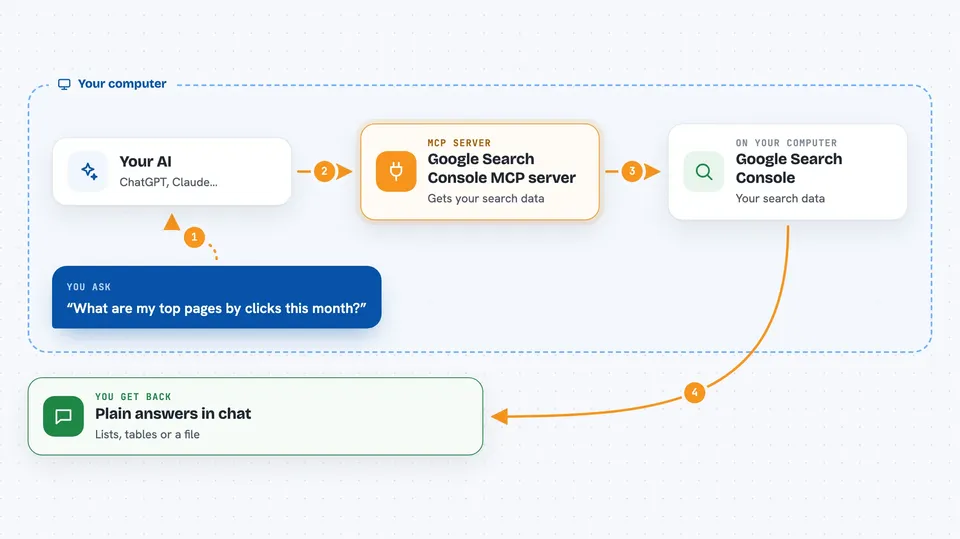
On its own, your AI can only chat with you. It cannot see your website stats. An MCP server is a small helper program that gives your AI a new skill, and here that skill is talking to Google Search Console for you. You ask a question, the AI passes it to this helper, and the helper fetches the answer from Google.
What this MCP server does
You type a question in your AI chat, like which pages got the most clicks this month. The AI sends that request to this helper running on your computer. The helper asks Google Search Console for the numbers, using your own Google login. Then it hands the results back to the AI, which writes them up for you as a list or a short summary. You never have to open the Search Console website yourself.
 Click to zoom
What you can do with it
- See your top pages by clicks, impressions, click rate or average position
- Find keywords with lots of impressions but few clicks, so you know what to improve
- Check whether a specific page is indexed by Google and if there are problems
- Compare this month against last month to spot gains and drops
- Look at your brand versus non-brand search traffic
- List your sitemaps and see their status
- Export your search data as a CSV or JSON file
Try asking your AI
- “What are my top 10 pages by clicks in the last 30 days?”
- “Find keywords where I get many impressions but a low click rate on example.com”
- “Is https://example.com/blog/my-new-post indexed by Google?”
- “Compare my search performance this month versus last month for example.com”
What it gives back to you
You get answers written in plain language in your chat, often as a ranked list or a short table. For example, a list of your top pages with clicks, impressions, click rate and average position for each. If you ask about a URL, you get its indexing status and any issues found. You can also ask for the raw data as a downloadable file.
Before you start
What you need
- Node.js version 18 or newer on your computer
- A Google account that has access to Google Search Console
- An AI app that supports MCP, such as the Claude desktop app
Good to know
It only reads your Search Console data and cannot change anything, but it does use your Google login, so keep your computer and your tokens folder private.
Install it with your AI
Add Google Search Console MCP server to your AI, no technical skills needed
You don't install anything by hand. You copy one prompt, paste it into an AI that can work on your computer, and it checks, installs and connects the server for you, asking you when it needs something.
Sign in to get the install prompt
Members get a ready-made prompt that lets the Claude desktop app check Google Search Console MCP server, install it and connect it for them, step by step. You don't need any technical skills: you copy, paste and answer a few questions. Your connected AI can also find and install any of the 4,361 MCP servers here for you.
Who it's for
Website owners, bloggers, marketers and anyone who checks their Google search traffic without being a technical SEO specialist.