MCP server · Analytics
DC Hub MCP server
by azmartone67
Ask your AI about data centers, power grids, energy prices, fiber routes and deals, with live answers.
DC Hub is a service that keeps live information about data centers, electricity grids, energy prices, fiber routes and infrastructure deals. This MCP server connects that service to your AI assistant, so you can ask plain questions and get real answers instead of links to PDFs. It is handy if you work in site selection, energy analysis, market research or anything touching data center capacity.
What is an MCP server? The 30-second version
On its own, your AI can only chat from what it already learned. An MCP server is a small helper program that gives your AI a new skill or a connection to an outside service. This one connects your AI to DC Hub, so when you ask about a power grid, a facility or a deal, the AI can look it up live and bring the answer back to you. You do not need to understand how it works, you just add it once and then ask questions like normal.
What this MCP server does
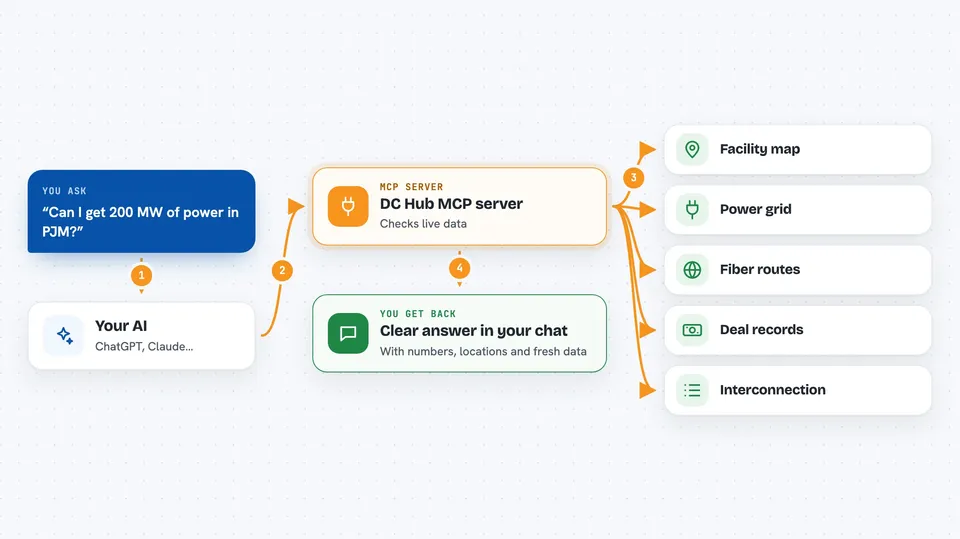
You type a question in your AI chat, like asking whether you can get 200 MW of power in PJM. Your AI sends that question to this helper, which talks to DC Hub's live data. DC Hub checks its facility map, grid telemetry, interconnection queues, fiber routes and deal records, then sends structured results back. Your AI turns those results into a clear answer in the chat, with numbers and locations you can actually use.
 Click to zoom
What you can do with it
- Find data centers by country, operator, capacity or fiber connectivity
- Check live power demand and generation mix across US grid regions
- Compare capacity prices between ERCOT, PJM and other markets
- Look up interconnection queue status and build or avoid verdicts
- Search for capacity to buy or lease by size and location
- Trace fiber routes between two cities or carrier hotels
- Review tracked M&A deals and hyperscaler activity
Try asking your AI
- “Can I get 200 MW in PJM, and how long would it take?”
- “Show me the AWS data center construction pipeline in Ohio”
- “Compare ERCOT vs PJM capacity prices over the last 30 days”
- “Find 5 MW of powered shell I can lease in Texas”
What it gives back to you
You get back plain answers in your chat: lists of facilities, market scores, power and price numbers, queue positions, fiber routes and deal summaries. Many answers come with the source and the time the data was read, so you know how fresh it is. If you ask about capacity to lease, you get listing cards showing size, location and when each listing was updated. When you register a deal interest, DC Hub shares your company name and requirement with the provider, and only if they accept do you get their identity and contact.
Before you start
What you need
- An AI assistant that supports MCP servers, like Claude Desktop, Cursor or Gemini CLI
- A free DC Hub key for full data (you can claim one at dchub.cloud/api/v1/keys/claim)
- Internet access, since the server runs in the cloud
Good to know
Registering a deal interest shares your company name and requirement with the provider, so only do it when you mean it.
Install it with your AI
Add DC Hub MCP server to your AI, no technical skills needed
You don't install anything by hand. You copy one prompt, paste it into an AI that can work on your computer, and it checks, installs and connects the server for you, asking you when it needs something.
Sign in to get the install prompt
Members get a ready-made prompt that lets the Claude desktop app check DC Hub MCP server, install it and connect it for them, step by step. You don't need any technical skills: you copy, paste and answer a few questions. Your connected AI can also find and install any of the 4,361 MCP servers here for you.
Who it's for
People doing data center site selection, energy and power market analysis, infrastructure research or capacity procurement.