
MCP server · Analytics
Amazon Ads MCP server
Let your AI look up your Amazon ad campaigns, keywords, and reports, and answer questions about them.
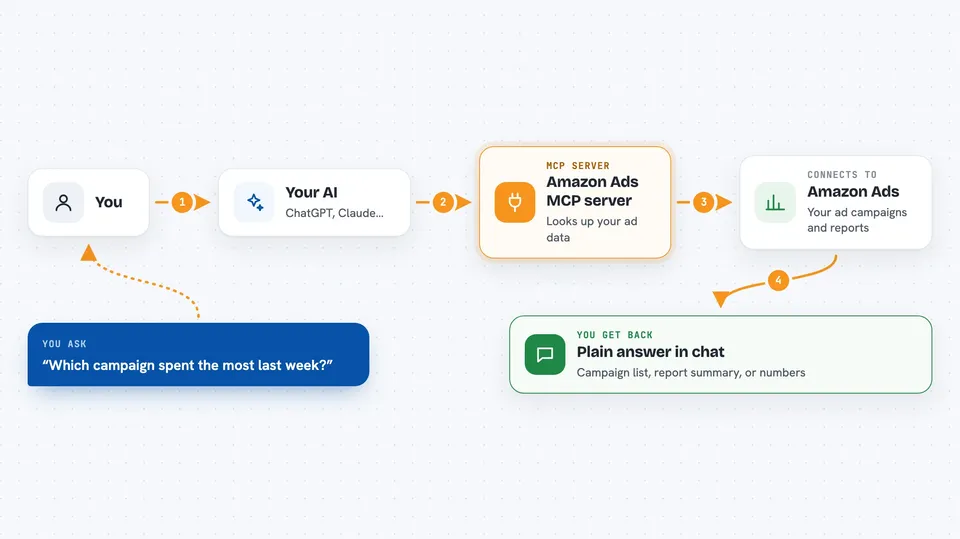
This is a helper that connects your AI assistant to your Amazon Advertising account through a service called MarketplaceAdPros. Once it is set up, you can ask your AI plain questions about your Amazon ads and get real answers from your own data. It is handy for anyone who runs Sponsored Products, Sponsored Brands, or Sponsored Display ads and does not want to click through lots of screens.
What is an MCP server? The 30-second version
On its own, your AI can only chat with you. It cannot see your Amazon ads account. An MCP server is a small helper program that gives your AI a new skill, in this case a connection to your Amazon Advertising data through MarketplaceAdPros. So when you ask a question about your campaigns, your AI asks this helper, and the helper fetches the answer for you.
What this MCP server does
You ask your AI something about your Amazon ads, like how a campaign is doing. Your AI sends that request to this helper. The helper talks to MarketplaceAdPros, which is connected to your Amazon Advertising account. It brings back the campaigns, ad groups, keywords, targeting, or report data you asked about. Then your AI explains it to you in plain words in the chat.
 Click to zoom
What you can do with it
- Look up your Sponsored Products, Sponsored Brands, and Sponsored Display campaigns
- Check ad groups, keywords, product ads, and targeting settings
- Pull reports and ask questions about them in plain English
- See recommendations and experiments if you have a MarketplaceAdPros subscription
- Compare how different campaigns or keywords are performing
- Find which keywords or targets are set up in a campaign
Try asking your AI
- “Which of my Sponsored Products campaigns spent the most last week?”
- “List the keywords in my best performing ad group.”
- “Show me my Sponsored Brands campaigns and their current status.”
- “What recommendations do I have for my Sponsored Display ads?”
What it gives back to you
You get answers in the chat, written in normal sentences. Depending on what you ask, it can be a list of campaigns, a summary of a report, or specific numbers like spend or performance. It can also show you settings and configurations for your ads. Everything comes back as text you can read and copy.
Before you start
What you need
- An Amazon Advertising account
- A MarketplaceAdPros account with a Bearer token (a kind of password the site gives you)
- An AI app that supports MCP servers, like the Claude desktop app
Good to know
This server can read your Amazon Advertising data, so only connect it if you trust MarketplaceAdPros with access to your ad account.
Install it with your AI
Add Amazon Ads MCP server to your AI, no technical skills needed
You don't install anything by hand. You copy one prompt, paste it into an AI that can work on your computer, and it checks, installs and connects the server for you, asking you when it needs something.
Sign in to get the install prompt
Members get a ready-made prompt that lets the Claude desktop app check Amazon Ads MCP server, install it and connect it for them, step by step. You don't need any technical skills: you copy, paste and answer a few questions. Your connected AI can also find and install any of the 4,609 MCP servers here for you.
Who it's for
Amazon sellers, advertisers, and marketing people who manage Amazon ads and want quick answers without digging through the ads console.




