
MCP server · Finance and crypto · official
SECfinapi MCP server
by michalperni11-gif · official
Ask your AI for US public company financials from SEC filings, like revenue, balance sheets and ratios.
This is a small helper that connects your AI assistant to SECfinAPI, a service that turns official SEC filings from US public companies into clean financial numbers. Once it is set up, you can just ask your AI questions about a company's revenue, profit, or balance sheet, and it goes and gets the real data for you. It is handy for anyone who works with company numbers, like analysts, accountants, founders, or students.
What is an MCP server? The 30-second version
On its own, your AI can only chat with you using what it already learned. An MCP server is a small helper program that gives your AI a new skill or a connection to an outside service. This one connects your AI to SECfinAPI, which holds standardized financial data from SEC EDGAR filings. So when you ask about a company's numbers, your AI can actually look them up instead of guessing.
What this MCP server does
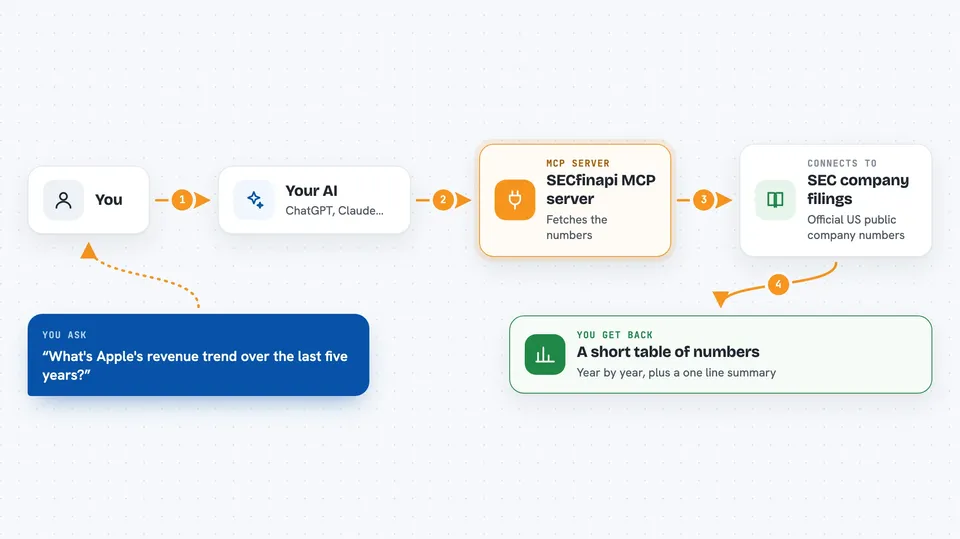
You ask your AI a question in normal words, like how a company's revenue has changed. Your AI passes that request to this helper running on your computer. The helper talks to SECfinAPI over the internet and asks for the right financial statement or ratio. SECfinAPI sends back the numbers, already cleaned up and standardized from the original SEC filings. Your AI then shows you the answer in the chat, often as a small table or a short summary.
 Click to zoom
What you can do with it
- Look up a company's income statement, balance sheet, or cash flow
- Get 40+ financial ratios like ROE, ROIC, and profit margins
- Compare two companies side by side, like MSFT and GOOGL
- See a company's revenue or profit trend over several years
- Find basic company details and a link to its SEC filings
- Search for which US public companies are available
Try asking your AI
- “What's Apple's revenue trend over the last five years?”
- “Compare MSFT and GOOGL operating margins”
- “Show me Tesla's balance sheet for the latest year”
- “What is Amazon's return on equity?”
What it gives back to you
You get back the numbers you asked for, usually as a short table or a list in the chat. For example, a revenue trend comes back as a year-by-year list, and a ratio question comes back as one or a few numbers with the year they apply to. Company info comes back as basic details plus a link to the filings on SEC EDGAR. Your AI often adds a one-line summary on top.
Before you start
What you need
- A free SECfinapi account and API key from secfinapi.com
- The Claude desktop app or another AI assistant that supports MCP, like Cursor or VS Code
- Node.js installed on your computer if you run it with npx or from source
Good to know
It only reads data, so it will not change or delete anything, but it does need your personal SECfinapi API key, so keep that key private.
Install it with your AI
Add SECfinapi MCP server to your AI, no technical skills needed
You don't install anything by hand. You copy one prompt, paste it into an AI that can work on your computer, and it checks, installs and connects the server for you, asking you when it needs something.
Sign in to get the install prompt
Members get a ready-made prompt that lets the Claude desktop app check SECfinapi MCP server, install it and connect it for them, step by step. You don't need any technical skills: you copy, paste and answer a few questions. Your connected AI can also find and install any of the 4,361 MCP servers here for you.
Who it's for
Analysts, accountants, finance students, founders, and anyone who needs quick, reliable numbers from US public company filings.





