
MCP server · Developer tools
ariadne MCP server
by MikhailHal
Tells your AI which Kotlin or Android unit tests are affected by your latest code changes.
ariadne is a helper for people working on Kotlin and Android projects. It looks at the code you changed and tells your AI which unit tests actually need to be run. It is handy if you want quick feedback while you edit, instead of running the whole test suite every time.
What is an MCP server? The 30-second version
On its own, your AI can only chat. An MCP server is a small helper program that gives your AI a new skill or a connection to a tool. This one connects your AI to your Kotlin project and to Git, so it can look at your changes and figure out which tests they touch. Once it is set up, you just ask in plain words and the AI does the rest.
What this MCP server does
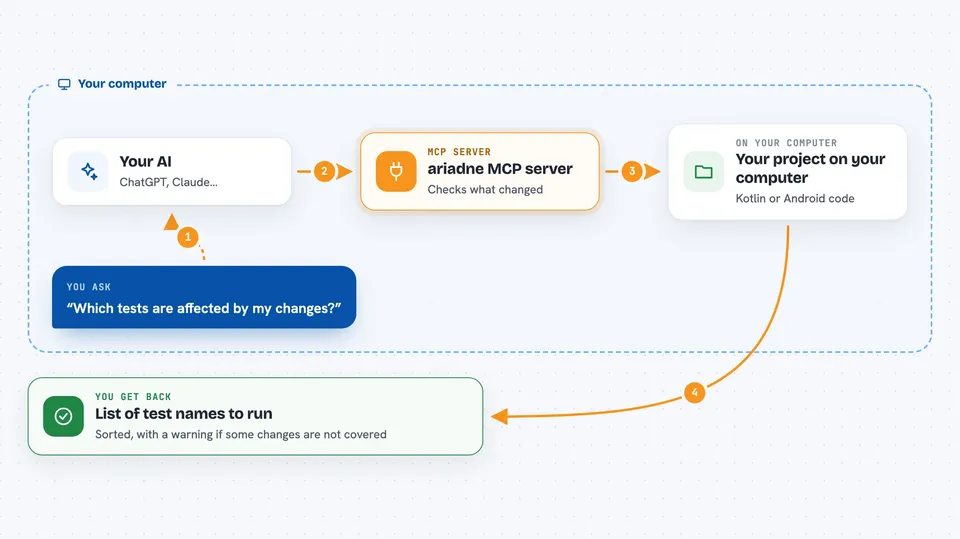
You ask your AI something like which tests are affected by my changes. The AI passes your project folder to ariadne. ariadne runs a Git diff to see what changed, then analyzes the code to trace which tests call into the changed parts. It hands back a list of test names, so you and your AI know exactly what to run.
 Click to zoom
What you can do with it
- Find which unit tests your latest edits affect
- Check only your uncommitted changes for a fast loop
- Compare your whole branch against the main branch
- Get a clean list of test names to run
- See a warning when changes are outside the analyzed code
- Skip running the full test suite while you iterate
Try asking your AI
- “Which tests are affected by my current changes?”
- “Run ariadne on this project and tell me what to test”
- “Only look at my uncommitted changes and list the affected tests”
- “Compare my branch to main and show me the affected tests”
What it gives back to you
You get back a sorted list of test names, like com.example.UserServiceTest.testCreateUser. If your changes touch things ariadne cannot analyze, such as build scripts or resources, it adds a note telling you to run the full suite for those. If the analysis takes too long, it tells you that too instead of guessing.
Before you start
What you need
- A Kotlin or Android project on your computer
- Git installed and your project tracked by Git
- Java 21 or newer installed
- ariadne itself installed, for example with Homebrew
Good to know
ariadne cannot see every kind of dependency, so always keep running your full test suite in CI before merging.
Install it with your AI
Add ariadne MCP server to your AI, no technical skills needed
You don't install anything by hand. You copy one prompt, paste it into an AI that can work on your computer, and it checks, installs and connects the server for you, asking you when it needs something.
Sign in to get the install prompt
Members get a ready-made prompt that lets the Claude desktop app check ariadne MCP server, install it and connect it for them, step by step. You don't need any technical skills: you copy, paste and answer a few questions. Your connected AI can also find and install any of the 4,609 MCP servers here for you.
Who it's for
Kotlin and Android developers who want faster feedback while editing, and anyone using an AI assistant to help with their code.




