
MCP server · Browser automation
AgenticCrawler MCP server
by Mingye-Lu
Lets your AI browse websites, click, fill forms, and pull data back for you.
AgenticCrawler (short name: acrawl) is a helper program that gives your AI a real web browser it can drive. You describe a goal in plain English, like scraping prices from a shop page, and it figures out where to go and what to click. It is handy for anyone who needs to collect information from websites without writing code.
What is an MCP server? The 30-second version
On its own, your AI can only chat with you using what it already knows. An MCP server is a small helper program that gives your AI a new skill or a connection to another tool. This one connects your AI to a web browser and a set of browsing tools, so the AI can open pages, click buttons, and read what is on screen. When you ask for something from a website, your AI passes the job to acrawl, and acrawl does the actual browsing for you.
What this MCP server does
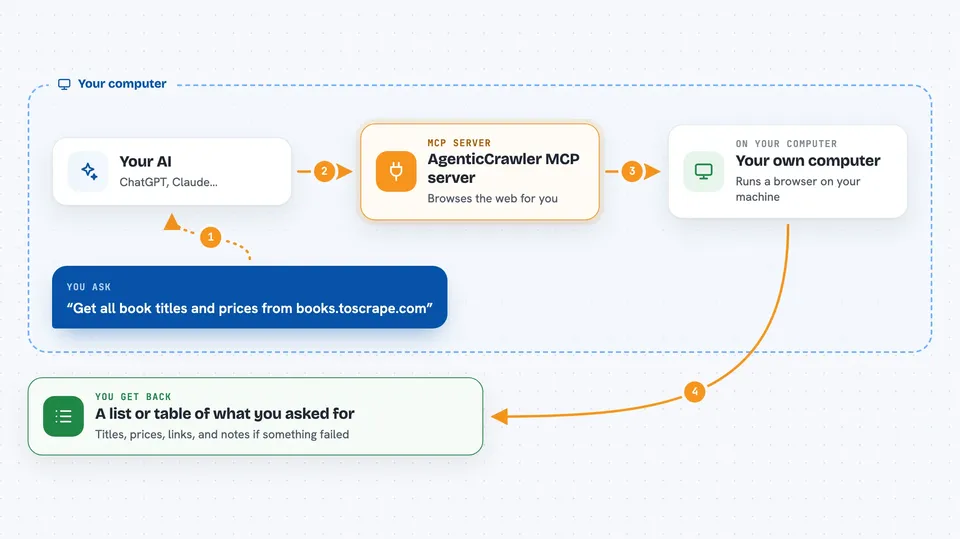
You type a request in plain English, like asking for all the book titles on a page. Your AI sends that goal to acrawl, which opens a browser, visits the site, and works out the steps needed. It can read the page, click links, fill in forms, and move through multiple pages. When it is done, it hands the results back to your AI, which shows them to you in the chat. You do not need to write any code or know how websites are built.
 Click to zoom
What you can do with it
- Scrape titles, prices, and other details from a web page
- Fill in and submit online forms for you
- Click through multiple pages and collect everything into one list
- Read pages that only load properly with JavaScript
- Check a page for broken links, console errors, or slow loading
- Run several pages at the same time to finish faster
- Save a browsing session so you can pick it up later
Try asking your AI
- “Scrape all book titles and prices from books.toscrape.com”
- “Go to example.com/contact, fill in my name, email, and message, then submit the form”
- “Get all repository names and star counts from github.com/trending”
- “Check the current price of Rust in Action on books.toscrape.com”
What it gives back to you
You get back structured results, usually as a list or a table of the things you asked for, like titles, prices, or links. If something went wrong, you may also see notes about errors or pages that did not load. For form filling, it tells you whether the submission worked. Everything shows up right in your chat, so you can copy it or ask follow-up questions.
Before you start
What you need
- The acrawl program installed on your computer (the install script handles this)
- Node.js 20 or newer, needed for the browser part
- An account or key from an AI provider like Anthropic or OpenAI (a kind of password that lets the program talk to the AI)
Good to know
It can click buttons and submit forms on real websites, so check what it is about to do before letting it run on important accounts.
Install it with your AI
Add AgenticCrawler MCP server to your AI, no technical skills needed
You don't install anything by hand. You copy one prompt, paste it into an AI that can work on your computer, and it checks, installs and connects the server for you, asking you when it needs something.
Sign in to get the install prompt
Members get a ready-made prompt that lets the Claude desktop app check AgenticCrawler MCP server, install it and connect it for them, step by step. You don't need any technical skills: you copy, paste and answer a few questions. Your connected AI can also find and install any of the 4,361 MCP servers here for you.
Who it's for
People who need to gather information from websites regularly, like researchers, analysts, marketers, and anyone doing repetitive online data collection.


