
MCP server · Browser automation
AgentRender MCP server
Turn any web link into a screenshot, a PDF, or a clean text summary your AI can read.
AgentRender is a small helper that lets your AI take a picture of a web page, save it as a PDF, or pull out the text and links. It is handy if you often need to grab something from a website and want your AI to do it for you instead of clicking around. You just paste a link and say what you want back.
What is an MCP server? The 30-second version
On its own, your AI can only chat with you. An MCP server is a small helper program that gives your AI a new skill or a connection to another service. This one connects your AI to AgentRender, a web service that visits web pages and turns them into pictures, PDFs, or plain text. Once it is connected, you can ask your AI to grab a page and it will use this helper behind the scenes.
What this MCP server does
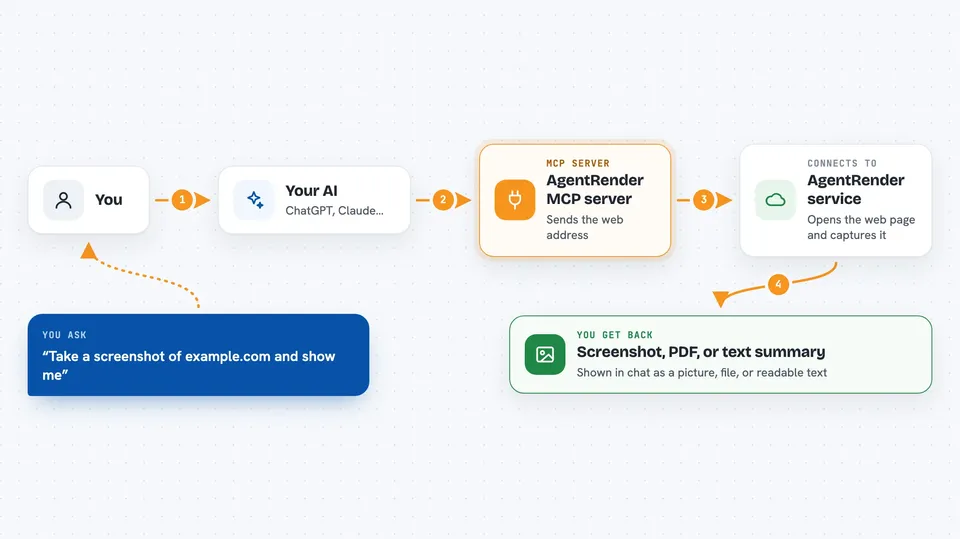
You give your AI a web address and tell it what you want. Your AI passes that request to the AgentRender helper. The helper sends the address to the AgentRender service, which opens the page and captures it. The service sends back a picture, a PDF file, or a tidy list of the page text and links. Your AI shows you the result right in the chat.
 Click to zoom
What you can do with it
- Take a screenshot of any web page as a PNG, JPEG, or WebP image
- Save a web page as a PDF file
- Pull the title, description, main text, and links out of a page
- Compare how two pages look by screenshotting both
- Grab a page for reading later without ads or clutter
- Check what a page says without opening your browser
Try asking your AI
- “Take a screenshot of https://example.com and show it to me”
- “Save this article as a PDF: https://news.example.com/story”
- “What is the title and main text of https://example.com/about”
- “List all the links on https://example.com”
What it gives back to you
You get back either an image, a PDF file, or a block of text with the page title, description, main content, and links. In the chat it shows up as a picture you can view, a file you can download, or a readable summary. Each result also comes with a small receipt so you can see what was done.
Before you start
What you need
- An AgentRender API key that starts with akr_ (you get one from agentrenderapi.com; there is a free waitlist and paid plans)
- Python installed on your computer
- The agentrender-mcp package installed with pip
- A tool that can use MCP servers, like Cursor or Claude Desktop
Good to know
This uses your AgentRender account and may count against your plan limits, so keep an eye on how often you use it.
Install it with your AI
Add AgentRender MCP server to your AI, no technical skills needed
You don't install anything by hand. You copy one prompt, paste it into an AI that can work on your computer, and it checks, installs and connects the server for you, asking you when it needs something.
Sign in to get the install prompt
Members get a ready-made prompt that lets the Claude desktop app check AgentRender MCP server, install it and connect it for them, step by step. You don't need any technical skills: you copy, paste and answer a few questions. Your connected AI can also find and install any of the 4,361 MCP servers here for you.
Who it's for
Anyone who often needs to capture or read web pages, like researchers, marketers, support staff, or writers who want their AI to fetch pages for them.


