
MCP server · Gaming
Unreal Engine 5 Automation MCP server
by miracle1814
Let your AI read, build and edit Unreal Engine 5 Blueprints and check them in PIE.
This is a helper that lets your AI work inside the Unreal Engine 5 editor. It can read Blueprints, build new ones, wire nodes together, make materials and UMG widgets, and then run the game in PIE to check the logic actually works. It is handy for game developers and technical designers who spend a lot of time clicking around the Blueprint editor.
What is an MCP server? The 30-second version
On its own, your AI can only chat with you. An MCP server is a small helper program that gives your AI a new skill or a connection to another app. This one connects your AI to the Unreal Engine 5 editor on your own computer, so it can look at your Blueprints and make changes there when you ask. The helper runs locally and talks to a small plugin inside the editor.
What this MCP server does
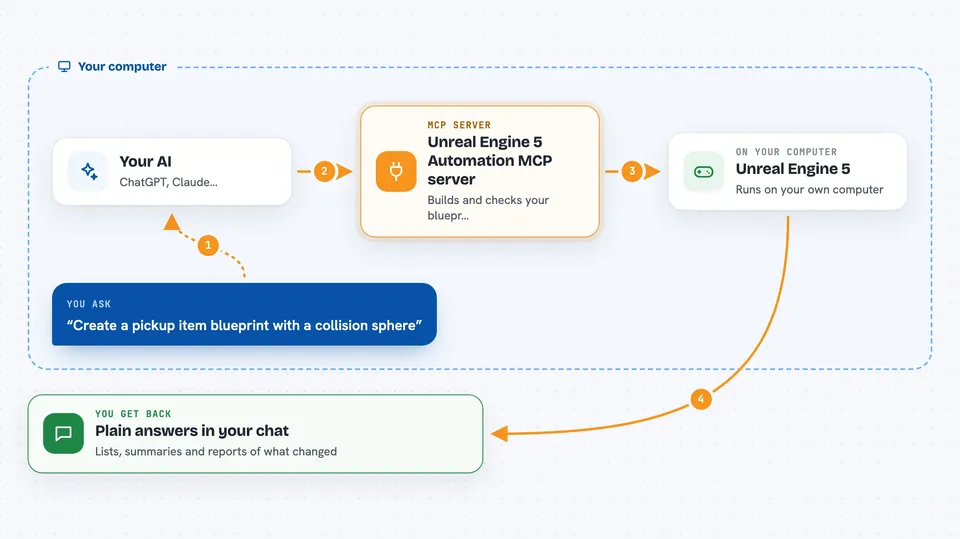
You ask your AI something like create a pickup item blueprint with a collision sphere. Your AI sends that request to this helper, which passes it to a plugin running inside the Unreal editor. The plugin creates the asset, adds the nodes, wires them, and compiles the Blueprint. Then the helper reads the result back to make sure the change really happened, and your AI tells you what it did. If you ask for a runtime check, it can also start PIE and read live actor state.
 Click to zoom
What you can do with it
- Read a Blueprint and get a report of its classes, variables and node graph
- Create a new Blueprint with variables, components, events and function nodes
- Connect or disconnect nodes and verify the wiring against the live graph
- Build materials with expressions and connect them to properties
- Create UMG widget blueprints and set up their widget tree
- Start PIE to check runtime behavior and read live actor state
- Scan a whole project for counts, complexity and circular dependencies
Try asking your AI
- “Create a pickup item blueprint with a collision sphere, then verify the pickup logic in PIE.”
- “Read /Game/BP_Test and show me its variables and node connections.”
- “Add a PrintString node to BeginPlay in /Game/BP_Test and connect them.”
- “Make a simple material with a color parameter and a texture sampler, then compile it.”
What it gives back to you
You get back plain answers in the chat: lists of nodes and variables, short summaries, Markdown reports with Mermaid diagrams, and log diagnostics. When it changes something, it tells you what it changed and whether the read-back check passed. If a write fails, it says so loudly instead of pretending it worked.
Before you start
What you need
- Unreal Engine 5.1 to 5.8 installed (5.1 and 5.8 work without compiling anything)
- Python 3.10 or newer on your computer
- The Python Editor Script Plugin enabled in the Unreal editor
- Remote Execution turned on in the editor settings
Good to know
It can change, wire and delete things in your Unreal project, so keep your work under version control and use a test project first.
Install it with your AI
Add Unreal Engine 5 Automation MCP server to your AI, no technical skills needed
You don't install anything by hand. You copy one prompt, paste it into an AI that can work on your computer, and it checks, installs and connects the server for you, asking you when it needs something.
Sign in to get the install prompt
Members get a ready-made prompt that lets the Claude desktop app check Unreal Engine 5 Automation MCP server, install it and connect it for them, step by step. You don't need any technical skills: you copy, paste and answer a few questions. Your connected AI can also find and install any of the 4,361 MCP servers here for you.
Who it's for
Game developers, technical designers and Unreal Engine users who want their AI to help build and check Blueprints, materials and widgets.





