
MCP server · Developer tools
MDMA MCP server
Lets your AI read the MDMA spec, prompts, and docs so it can help you build interactive Markdown apps.
This is a small helper that connects your AI assistant to MDMA, a way of building interactive Markdown applications. It gives your AI the official rules, ready-made prompts, and the latest documentation. It is handy if you write or review MDMA files and want your AI to follow the real spec instead of guessing.
What is an MCP server? The 30-second version
On its own, your AI can only chat with you. An MCP server is a small helper program that gives your AI a new skill or a connection to a service. This one connects your AI to MDMA, so it can look up the MDMA specification, fetch authoring prompts, and read the live docs. When you ask your AI something about MDMA, it quietly asks this helper, and the helper gives back the right information.
What this MCP server does
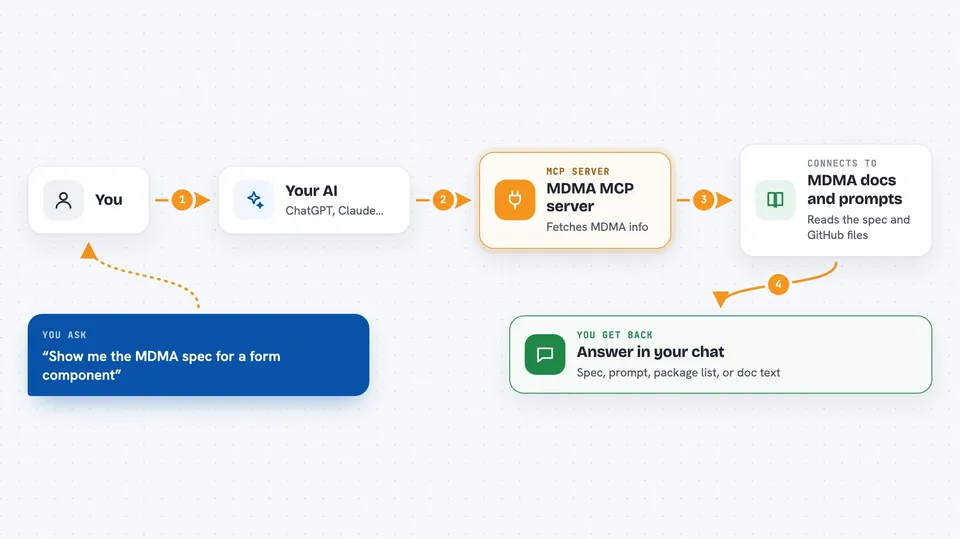
You ask your AI a question about MDMA, like how to write a component or check a prompt. Your AI uses this helper to fetch the MDMA specification, a named prompt, or a documentation file. The helper talks to the MDMA package and the public GitHub repository to get the latest version. Then your AI uses what it found to answer you or help you write your file. You just see the answer in your chat.
 Click to zoom
What you can do with it
- Read the full MDMA specification, including component types and rules
- Fetch ready-made prompts for authoring, reviewing, or fixing MDMA files
- List all available prompt variants for different AI models
- Build a custom MDMA prompt from your own details
- Check a custom prompt against MDMA conventions
- List all MDMA packages with install commands and examples
- Fetch the latest documentation from the public GitHub repo
Try asking your AI
- “Show me the MDMA spec so I can write a form component”
- “Give me the mdma-author prompt”
- “List the MDMA packages and how to install them”
- “Fetch the latest MDMA getting started doc”
What it gives back to you
You get back text in your chat: the specification, a prompt, a list of packages, or a documentation file. Lists come as simple tables or bullet points. Documentation comes as the actual page content. Nothing is changed on your computer or online; it only reads and shows information.
Before you start
What you need
- The Claude desktop app or another AI tool that supports MCP servers
- Node.js installed on your computer (the helper runs through a tool called npx)
Good to know
It only reads information, so it will not change or delete anything, but the docs it fetches come from a public GitHub repo, so treat them as reference material rather than private data.
Install it with your AI
Add MDMA MCP server to your AI, no technical skills needed
You don't install anything by hand. You copy one prompt, paste it into an AI that can work on your computer, and it checks, installs and connects the server for you, asking you when it needs something.
Sign in to get the install prompt
Members get a ready-made prompt that lets the Claude desktop app check MDMA MCP server, install it and connect it for them, step by step. You don't need any technical skills: you copy, paste and answer a few questions. Your connected AI can also find and install any of the 4,609 MCP servers here for you.
Who it's for
People who write or review MDMA files, and anyone who wants their AI to follow the official MDMA rules instead of making things up.




