
MCP server · Developer tools
Claude Managed Agents control MCP server
by modus-agendi
Let your AI start Claude Managed Agents, watch what they do, reply, approve tools and stop them.
This is a small helper that lets your AI control Claude Managed Agents. A Managed Agent is an AI worker that runs on Anthropic's platform in its own sandbox, with its own instructions and tools. If you already use those agents, this helper turns your normal chat into a remote control for them.
What is an MCP server? The 30-second version
On its own, your AI can only chat with you. An MCP server is a small helper program that gives your AI a new skill or a connection to another service. This helper connects your AI to Claude Managed Agents, so it can launch an agent, check what it is doing, send it messages and stop it. You just ask in plain words, and the helper does the back and forth for you.
What this MCP server does
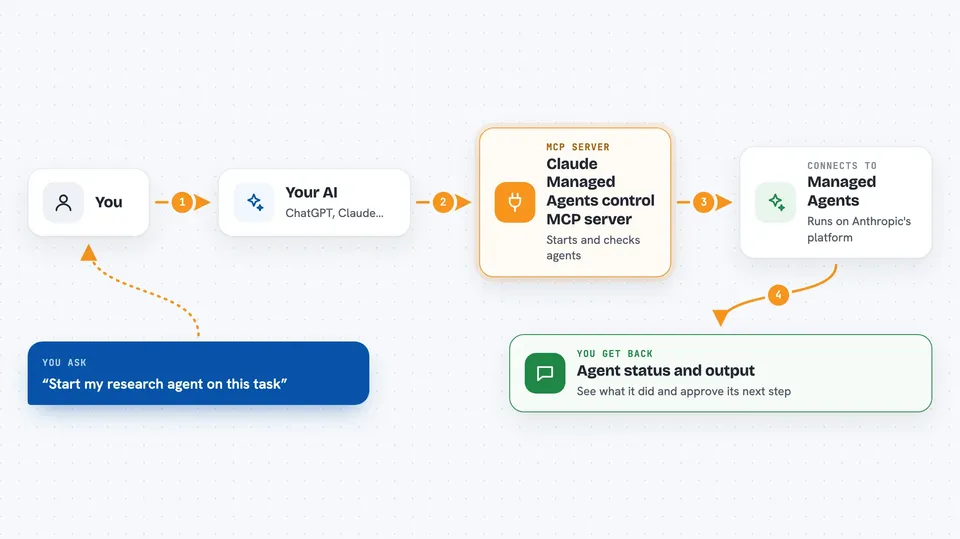
You ask your AI something like start my research agent on this task. Your AI passes that request to this helper. The helper talks to the Managed Agents service on Anthropic's platform, where the agent actually runs. Then it brings back what happened, like the agent's status, its output so far, or a question it is waiting on. Because the connection is request and response, updates come when your AI checks in, not as a live stream.
 Click to zoom
What you can do with it
- Find an agent you have defined and look at its settings
- Start a new session and send the first instruction
- Check a session's status and how many tokens it used
- Read the agent's output and activity as it works
- Send a follow-up message to continue a turn
- Approve or deny a tool the agent is waiting on
- Stop or redirect a running agent, or archive and delete sessions
Try asking your AI
- “List my managed agents and show me what each one does”
- “Start the report-writer agent and ask it to summarize last week's notes”
- “What has my agent done so far? Show me its latest events”
- “The agent is asking to run a tool, go ahead and approve it”
- “Stop the running agent, I want to change the instructions”
What it gives back to you
You get answers in the chat: lists of agents, environments or sessions, a session's status and token usage, and the agent's output and activity. When the agent is waiting for a decision, you see what it wants to do so you can approve or deny it. If you archive or delete a session, you get a short confirmation of what changed.
Before you start
What you need
- An Anthropic API key with Managed Agents access (a kind of password for apps; you get it from your Anthropic account)
- uv installed if you run it locally, or Docker or an AWS account if you deploy it that way
- An MCP client such as Claude.ai, Claude Code or Cursor
Good to know
Anyone who can reach this server can use your Anthropic key to run agents, and the archive and delete actions can remove sessions, so keep it protected and scoped.
Install it with your AI
Add Claude Managed Agents control MCP server to your AI, no technical skills needed
You don't install anything by hand. You copy one prompt, paste it into an AI that can work on your computer, and it checks, installs and connects the server for you, asking you when it needs something.
Sign in to get the install prompt
Members get a ready-made prompt that lets the Claude desktop app check Claude Managed Agents control MCP server, install it and connect it for them, step by step. You don't need any technical skills: you copy, paste and answer a few questions. Your connected AI can also find and install any of the 4,066 MCP servers here for you.
Who it's for
Developers and technical teams who already run Claude Managed Agents and want to drive them from a chat instead of a terminal.


