
MCP server · Developer tools
Infomaniak MCP server
by Mogacode-ma
Lets your AI look after your Infomaniak hosting, mail, domains, DNS and kDrive for you.
This is a helper that connects your AI assistant to your Infomaniak account. Infomaniak is a Swiss cloud company that sells web hosting, email, domains and online storage. If you run a website or email on Infomaniak and you would rather ask in plain words than click around the control panel, this is for you.
What is an MCP server? The 30-second version
On its own, your AI can only chat. It cannot see your hosting or your mailboxes. An MCP server is a small helper program that gives your AI a new skill, and this one gives it a connection to your Infomaniak account. Once it is set up, you can ask your AI to check your domains or create a mailbox, and it will go and do that for you.
What this MCP server does
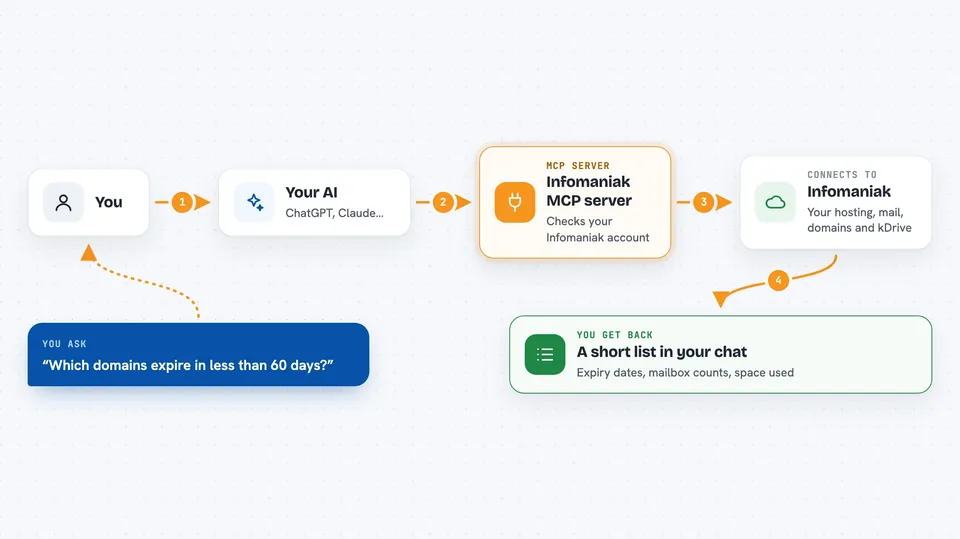
You ask your AI something in normal words, like which domains are about to expire. Your AI passes the request to this helper. The helper talks to Infomaniak using your account details, gathers the answer, and hands it back. Your AI then explains it to you in the chat. For anything that changes or deletes something, the helper first shows you a plan and waits for your yes before touching anything.
 Click to zoom
What you can do with it
- List your domains and see which ones expire soon
- Create or delete a website on your hosting
- Add or remove DNS records
- Create mailboxes and check which ones are nearly full
- See how much space your databases use
- Browse your kDrive storage and see how full it is
- Undo a change you made earlier in the same chat session
Try asking your AI
- “List every domain on my account that expires in less than 60 days”
- “Add a TXT record on example.com for my new email service”
- “Which mailboxes are over 85 percent full?”
- “Show me which kDrives I am an admin on and how full they are”
What it gives back to you
You get answers in the chat, usually as short lists or summaries. For example, a list of domains with their expiry dates, or a count of mailboxes that are nearly full. When it makes a change, it tells you what it did and gives you an id for the new thing. It also keeps a note of changes made during the session so you can undo them.
Before you start
What you need
- An Infomaniak account
- An API token from your Infomaniak profile page (a kind of password for apps; the site gives you one for free)
- The Claude desktop app or Claude Code
- Node.js installed on your computer, so the npx command can run
Good to know
It can create, change and delete real things on your Infomaniak account, so always read the plan it shows you before confirming.
Install it with your AI
Add Infomaniak MCP server to your AI, no technical skills needed
You don't install anything by hand. You copy one prompt, paste it into an AI that can work on your computer, and it checks, installs and connects the server for you, asking you when it needs something.
Sign in to get the install prompt
Members get a ready-made prompt that lets the Claude desktop app check Infomaniak MCP server, install it and connect it for them, step by step. You don't need any technical skills: you copy, paste and answer a few questions. Your connected AI can also find and install any of the 4,609 MCP servers here for you.
Who it's for
People who run websites, email or domains on Infomaniak and want to manage them by chatting instead of clicking through the control panel.



