MCP server · Security
depguard MCP server
by mopanc
Your AI can check npm packages for safety, fake names, and vulnerabilities before you install them.
depguard is a helper for your AI that checks JavaScript packages before you add them to a project. It looks for malware, typosquats (names that look almost like a real package but are fake), known security problems, and packages that do not exist at all. It is handy if you install packages with npm and want a second pair of eyes before you run the install.
What is an MCP server? The 30-second version
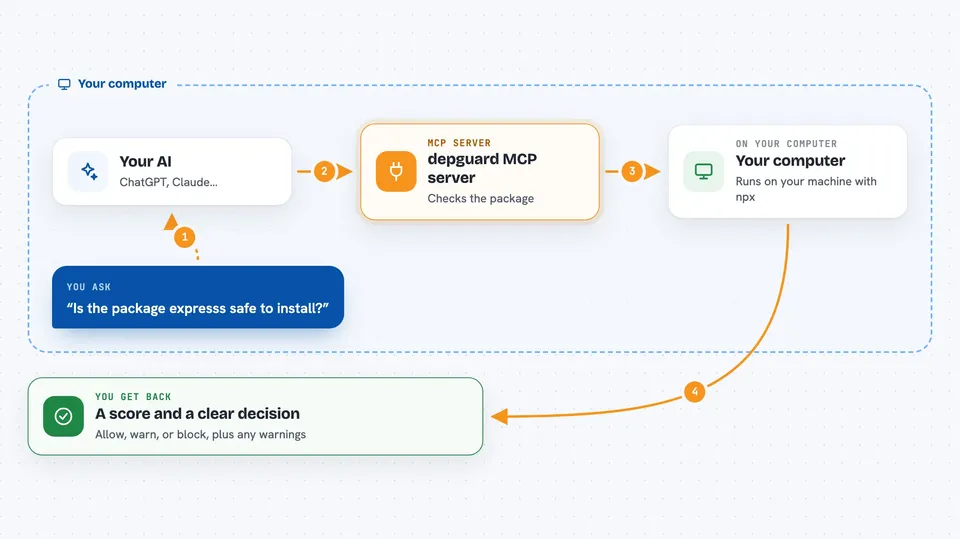
On its own, your AI can only chat with you. An MCP server is a small helper program that gives your AI a new skill or a connection to a service. This one connects your AI to depguard, a tool that inspects npm packages. Once connected, when you ask about a package, your AI can quietly run those checks and tell you what it found.
What this MCP server does
You ask your AI something like whether a package is safe to install. Your AI passes the question to depguard, which looks the package up on npm, checks its name against popular packages, reads its install scripts, and scans its code for known bad patterns. depguard also checks two advisory databases for known vulnerabilities. Then your AI gives you back a short answer with a score, warnings, and a clear allow, warn, or block decision.
 Click to zoom
What you can do with it
- Check a package before you install it and get an allow, warn, or block answer
- Spot typosquats and packages that do not exist on npm at all
- Audit a whole project and see which dependencies have known vulnerabilities
- Find unused dependencies in your project and see how much space they take
- Audit a freshly cloned repo for files that run automatically when you open it
- Generate a CycloneDX SBOM file for security and compliance reviews
- Ask whether you even need a package or could use something built into Node.js
Try asking your AI
- “Is the package expresss safe to install, or is it a fake?”
- “Audit my project and tell me which direct dependencies I should upgrade first.”
- “Check this repo for files that run automatically when I open it in my editor.”
- “Which dependencies in my project are not used anywhere?”
What it gives back to you
You get back a short answer in the chat: a score from 0 to 100, a decision like allow, warn, or block, and a list of any warnings or vulnerabilities found. For project audits you get a summary with counts by severity and suggested version upgrades. For SBOM requests you get a JSON file you can save. Each answer also shows how many AI tokens it saved compared to doing the research by hand.
Before you start
What you need
- Node.js installed on your computer (the tool runs with npx, which comes with Node.js)
- An MCP-compatible AI app such as Claude Desktop, Claude Code, Cursor, or Windsurf
- Optional: a GitHub token to raise the advisory lookup limit (the README says no special permissions are needed)
Good to know
It reads package code and your project files locally and does not run anything, but treat its warnings as guidance rather than a guarantee, and always review what you install.
Install it with your AI
Add depguard MCP server to your AI, no technical skills needed
You don't install anything by hand. You copy one prompt, paste it into an AI that can work on your computer, and it checks, installs and connects the server for you, asking you when it needs something.
Sign in to get the install prompt
Members get a ready-made prompt that lets the Claude desktop app check depguard MCP server, install it and connect it for them, step by step. You don't need any technical skills: you copy, paste and answer a few questions. Your connected AI can also find and install any of the 4,609 MCP servers here for you.
Who it's for
Developers and anyone who installs npm packages, especially people using AI coding agents who want a safety check before adding a dependency.