
MCP server · Security
Malcolm MCP server
by nagameTW
Lets your AI search network traffic, check alerts, and look up devices in your Malcolm setup.
This is a helper that connects your AI assistant to Malcolm, an open-source tool that watches network traffic. If your team runs Malcolm and you want to ask questions about what is happening on the network without learning its query language, this is for you. It is made for security and network people, but you only need to type normal questions.
What is an MCP server? The 30-second version
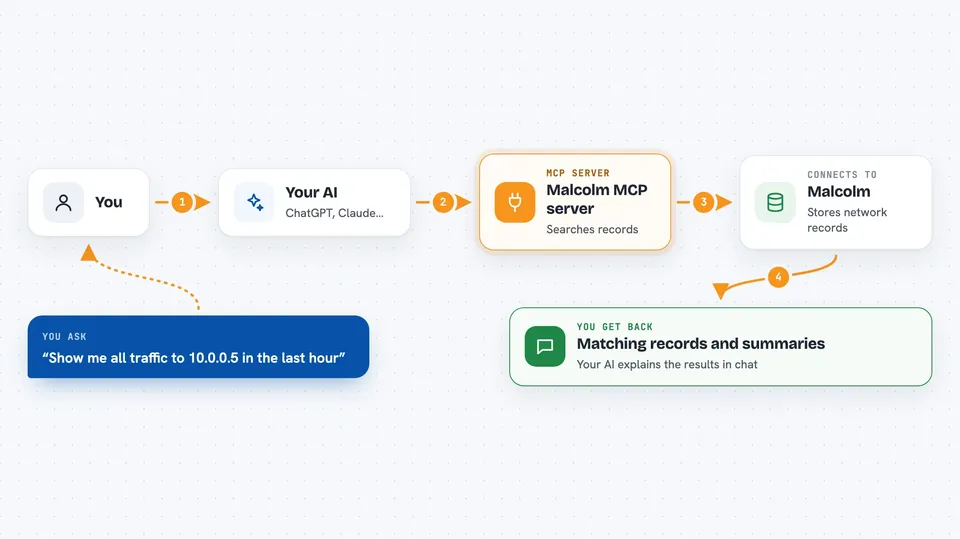
On its own, your AI can only chat with you. An MCP server is a small helper program that gives your AI a new skill or a connection to another app. This one connects your AI to Malcolm, so it can look up network traffic, alerts, and devices for you. You just ask in plain words, and the helper does the looking.
What this MCP server does
You ask your AI a question about your network, like what traffic came from a certain address. The AI passes that request to this helper program running on your computer. The helper talks to your Malcolm system, which stores all the network records. Malcolm sends back the matching records, and the helper hands them to your AI. Your AI then explains the results to you in the chat.
 Click to zoom
What you can do with it
- Search network traffic records by address, port, or time
- Look up Suricata alerts and see what triggered them
- Browse Arkime session records for a specific host
- Check which device or asset an IP address belongs to in NetBox
- Find out what field names Malcolm actually uses before searching
- Check whether your Malcolm system is healthy and responding
- Turn on optional write actions to tag sessions or create alerts
Try asking your AI
- “Show me all traffic to 10.0.0.5 in the last hour”
- “What Suricata alerts fired yesterday?”
- “Which device owns the IP 192.168.1.20?”
- “Is my Malcolm instance healthy right now?”
What it gives back to you
You get back lists of matching records, counts, and short summaries your AI writes from the data. For alerts, you see the rule that fired and the traffic that triggered it. For asset lookups, you get the device name and network segment. Everything shows up as normal text in your chat window.
Before you start
What you need
- A Malcolm instance you can reach, with API access turned on
- A username and password for that Malcolm
- Python 3.11 or newer on the machine running the helper
- A network route (HTTPS) from your computer to Malcolm
Good to know
It is read-only by default, but if you turn on the write options it can create alerts, tag sessions, and upload files, so only enable those if you mean to change things.
Install it with your AI
Add Malcolm MCP server to your AI, no technical skills needed
You don't install anything by hand. You copy one prompt, paste it into an AI that can work on your computer, and it checks, installs and connects the server for you, asking you when it needs something.
Sign in to get the install prompt
Members get a ready-made prompt that lets the Claude desktop app check Malcolm MCP server, install it and connect it for them, step by step. You don't need any technical skills: you copy, paste and answer a few questions. Your connected AI can also find and install any of the 4,609 MCP servers here for you.
Who it's for
Security analysts, network engineers, and IT staff who already run Malcolm and want to ask questions about traffic without writing queries by hand.



