
MCP server · Developer tools
naja-scope MCP server
by najaeda
Let your AI explore a SystemVerilog or Verilog chip design and trace signals without pasting code.
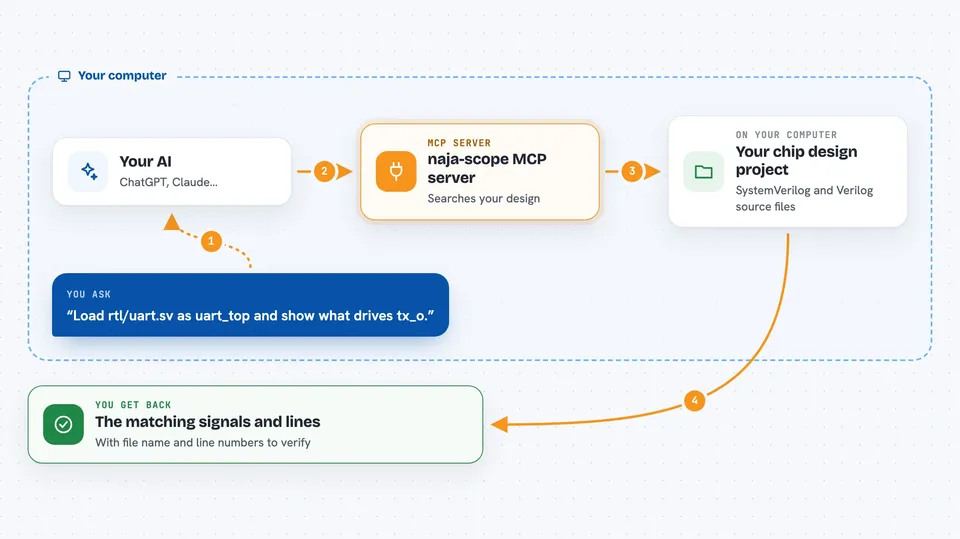
naja-scope is a helper that lets your AI assistant look inside a chip design written in SystemVerilog or Verilog. Instead of pasting thousands of lines of code into the chat, you ask questions and the AI answers with exact file and line references. It is handy for hardware engineers and anyone who reads or reviews chip designs.
What is an MCP server? The 30-second version
On its own, your AI can only chat with you. An MCP server is a small helper program that gives your AI a new skill or a connection to another tool. This one connects your AI to najaeda, a netlist engine that understands elaborated chip designs. Once it is connected, your AI can look up signals, modules and connections in your design when you ask.
What this MCP server does
You ask your AI a question about your chip design, like what drives a certain signal. The AI passes that question to naja-scope. naja-scope uses the najaeda engine to look through the elaborated design and find the answer. It sends back a small, exact result with file and line references. Your AI then explains it to you in the chat.
 Click to zoom
What you can do with it
- Trace what drives or loads any signal across module boundaries
- Walk the module hierarchy and list instances and ports
- Jump to the exact SystemVerilog lines behind any object
- Get a module card with ports, counts, clock and reset
- Trace fan-in and fan-out logic cones up to the register boundary
- Recover state-machine names, struct fields and parameter formulas
- Explore gate-level netlists loaded with a Liberty library
Try asking your AI
- “Load my UART design from rtl/uart.sv with top uart_top, then show me everything that drives tx_o.”
- “What is inside the module ex_stage_i?”
- “Where does the signal data_out come from in my design?”
- “Load the Liberty library pdk/stdcells.lib and the gate netlist build/top.v, then tell me what cells top is built from.”
What it gives back to you
You get short answers in the chat, like a list of signals, a module summary, or the exact lines of code behind an object. Every answer comes with file and line ranges so you can check it yourself. Large results are cut into pages or shortened with clear markers, so your chat stays readable.
Before you start
What you need
- Python 3.10 or newer
- The naja-scope package installed with pip
- An MCP-compatible assistant such as Claude Code or ChatGPT
Good to know
The optional Python tool is off by default because it can run any Python code as the server user, and the HTTP server has no built-in login, so only expose it over a trusted tunnel.
Install it with your AI
Add naja-scope MCP server to your AI, no technical skills needed
You don't install anything by hand. You copy one prompt, paste it into an AI that can work on your computer, and it checks, installs and connects the server for you, asking you when it needs something.
Sign in to get the install prompt
Members get a ready-made prompt that lets the Claude desktop app check naja-scope MCP server, install it and connect it for them, step by step. You don't need any technical skills: you copy, paste and answer a few questions. Your connected AI can also find and install any of the 4,361 MCP servers here for you.
Who it's for
Hardware engineers, verification engineers and anyone who reads or reviews SystemVerilog or Verilog chip designs.





