
MCP server · Developer tools
Gitingest MCP server
by narumiruna
Turn any Git repository into a plain text digest your AI can read and summarize for you.
This is a small helper that lets your AI read the code inside a Git repository. A Git repository is just a project folder stored online, like on GitHub. If you ever need to understand what a code project does, or ask questions about it, this makes that possible without opening any code yourself.
What is an MCP server? The 30-second version
On its own, your AI can only chat with you. An MCP server is a small helper program that gives your AI a new skill or a connection to another service. This one connects your AI to gitingest, a tool that turns a code project into one long text file. So when you ask about a repository, your AI can actually go and read it, then answer you.
What this MCP server does
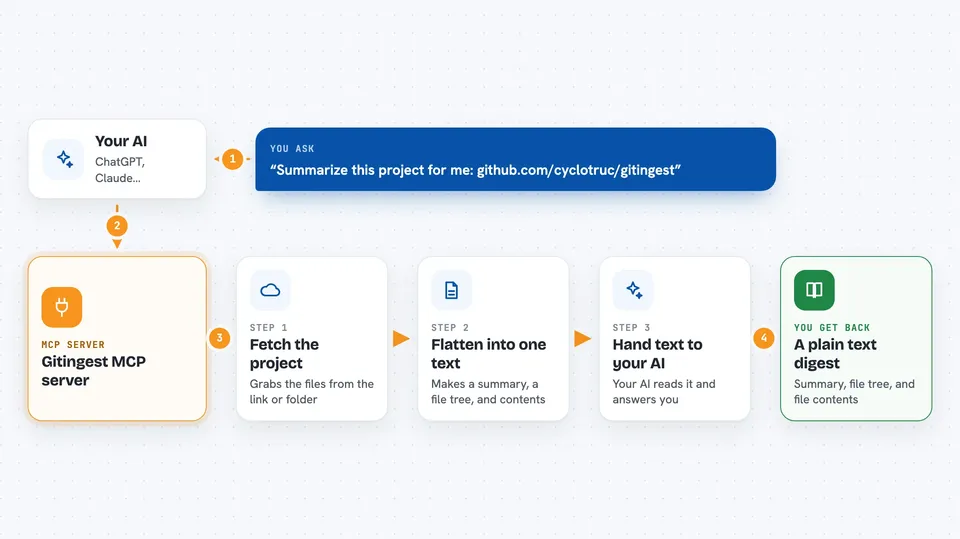
You give your AI a link to a Git repository, or a folder path on your computer. Your AI passes that to this helper. The helper uses gitingest to fetch the project and flatten it into a single text digest, with a short summary, a tree of the files, and the file contents. It hands that text back to your AI, which can then explain, summarize, or answer questions about the code. You can also narrow things down by file size, by file patterns, or by branch.
 Click to zoom
What you can do with it
- Summarize what a Git repository does in plain words
- List the files and folders inside a project
- Show the contents of specific files, like all markdown files
- Skip large files or folders you do not care about
- Look at a specific branch instead of the default one
- Answer questions about a codebase you have never opened
Try asking your AI
- “Summarize the repository at https://github.com/cyclotruc/gitingest for me”
- “What does this project do? Here is the link: https://github.com/narumiruna/gitingest-mcp”
- “Show me only the markdown files in that repository”
- “Ignore the tests folder and tell me what the main code does”
What it gives back to you
You get back a text digest of the repository: a short summary, a tree showing the file structure, and the content of the files. Your AI then turns that into a normal chat answer, like a summary or a list of files. If you asked a question, the answer comes back in the chat, often with quotes from the code.
Before you start
What you need
- An AI assistant that supports MCP servers, like the Claude desktop app
- uv installed on your computer (a tool that runs Python programs)
- Internet access if the repository is online
Good to know
It reads the repository or folder you point it at, so avoid pointing it at private or sensitive code unless you are fine with your AI seeing it.
Install it with your AI
Add Gitingest MCP server to your AI, no technical skills needed
You don't install anything by hand. You copy one prompt, paste it into an AI that can work on your computer, and it checks, installs and connects the server for you, asking you when it needs something.
Sign in to get the install prompt
Members get a ready-made prompt that lets the Claude desktop app check Gitingest MCP server, install it and connect it for them, step by step. You don't need any technical skills: you copy, paste and answer a few questions. Your connected AI can also find and install any of the 4,609 MCP servers here for you.
Who it's for
Anyone who needs to understand a code project without reading code, like managers, writers, support staff, or curious beginners.




