
MCP server · Finance and crypto
Yahoo Finance MCP server
by narumiruna
Ask your AI for stock prices, news, charts and company data from Yahoo Finance.
This is a helper that connects your AI assistant to Yahoo Finance data. Once it is set up, you can ask your AI about a stock, a fund or a sector in normal words, and it will fetch the numbers and news for you. It is handy for anyone who checks share prices, follows companies or looks at funds as part of their day.
What is an MCP server? The 30-second version
On its own, your AI can only chat with you using what it already learned. An MCP server is a small helper program that gives your AI a new skill or a connection to an app or service. This one connects your AI to Yahoo Finance, so it can look up prices, company details, news and charts when you ask. You do not need to understand how it works inside; you just talk to your AI like normal.
What this MCP server does
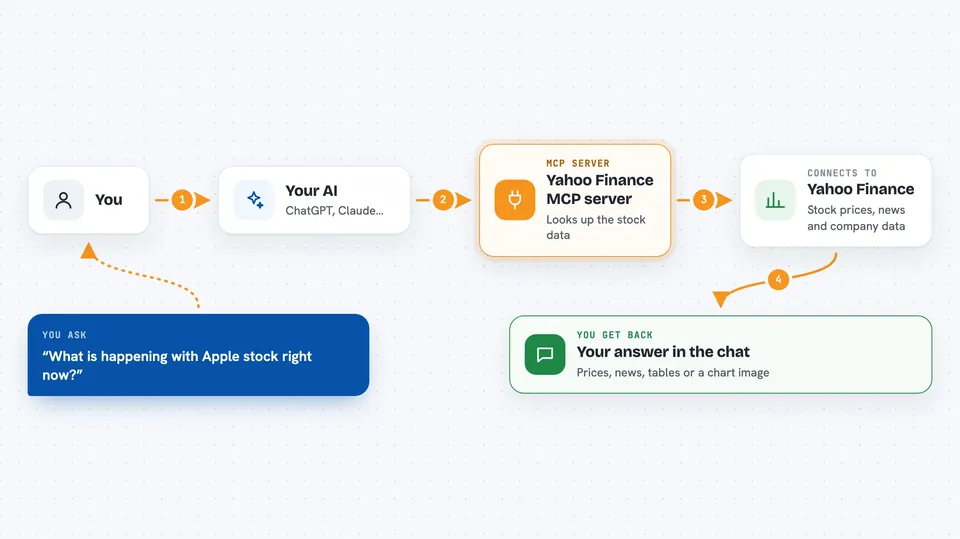
You ask your AI something like what is happening with Apple stock. Your AI passes that request to this helper. The helper talks to Yahoo Finance and pulls back the data, such as the price, company facts, analyst targets or recent news. Your AI then shows you the answer in the chat, often as a table or a short summary. If you ask for a chart, it can even send back a picture of the price history.
 Click to zoom
What you can do with it
- Look up a company's basic info, price and valuation numbers
- Read recent news and press releases for a stock
- See analyst price targets and rating changes
- Get income statements, balance sheets and cash flow figures
- Check who owns a stock, including big funds and insiders
- Fetch option expiration dates and option chains
- Generate price charts as images
Try asking your AI
- “What is the current price and recent news for Microsoft?”
- “Show me the analyst price targets for Tesla.”
- “Give me the last month of price history for Apple as a table.”
- “What are the top technology companies right now?”
What it gives back to you
You get answers in your chat: tables of numbers, short summaries, lists of news headlines, or a chart image. For example, asking about a stock can return its price, company details and recent headlines together. If you ask for financials, you get the figures for each year or quarter. Everything appears as normal text or a picture you can read right there.
Before you start
What you need
- An AI assistant that supports MCP servers, such as the Claude desktop app
- Python 3.10 or newer if you install it yourself
- The uv tool if you use the uvx method
Good to know
The data comes from Yahoo Finance and can be delayed, incomplete or occasionally wrong, so do not treat it as financial advice or as a live trading feed.
Install it with your AI
Add Yahoo Finance MCP server to your AI, no technical skills needed
You don't install anything by hand. You copy one prompt, paste it into an AI that can work on your computer, and it checks, installs and connects the server for you, asking you when it needs something.
Sign in to get the install prompt
Members get a ready-made prompt that lets the Claude desktop app check Yahoo Finance MCP server, install it and connect it for them, step by step. You don't need any technical skills: you copy, paste and answer a few questions. Your connected AI can also find and install any of the 4,361 MCP servers here for you.
Who it's for
Anyone who follows stocks, funds or markets at work, like analysts, finance staff or curious office workers.




