MCP server · Health and learning
MacroFactor MCP server
Ask your AI whether you recovered well and how your eating matched your training, using your MacroFactor and Garmin data.
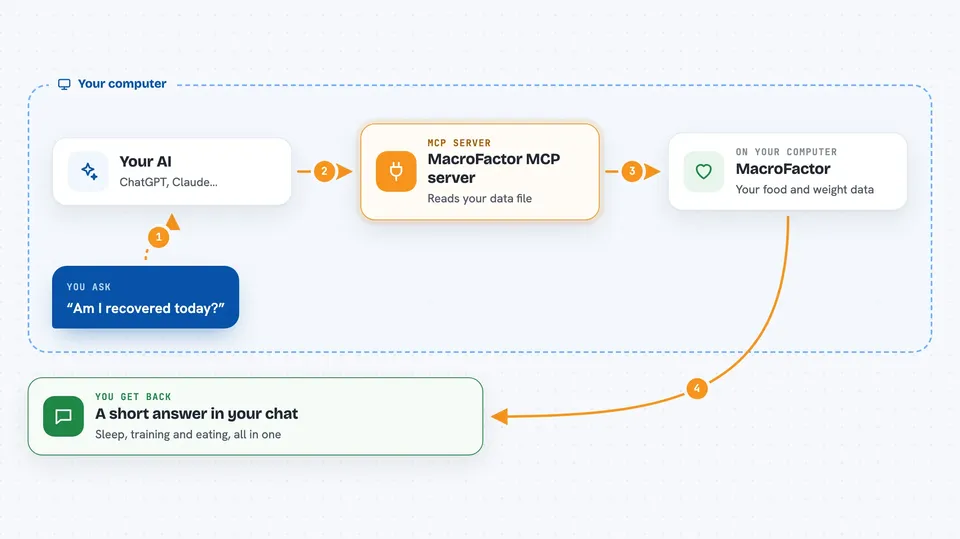
This is a small helper that lets your AI read your MacroFactor nutrition export and, if you want, your Garmin training data. Then you can just ask questions like "am I recovered?" or "did my fueling work?" instead of flipping between apps. It is handy if you track what you eat and how you train, and you want one straight answer.
What is an MCP server? The 30-second version
On its own, your AI can only chat. An MCP server is a small helper program that gives your AI a new skill or a connection to an app or service. This one connects your AI to your own MacroFactor nutrition data, and optionally your Garmin training data, kept on your computer. So when you ask a question, the AI can look things up in your data and answer with real numbers.
What this MCP server does
You export your data from MacroFactor and drop the file in a folder on your computer. You tell your AI client to use this helper, and it reads that file into a small local database. When you ask something like "am I recovered?", the helper pulls together your sleep, training load, and yesterday's eating, and hands the AI a short summary. If you also connect Garmin, it can add sleep, HRV, body battery, and workouts. You get a plain answer in the chat, not a spreadsheet.
 Click to zoom
What you can do with it
- Check whether you look recovered today based on sleep, training load, and yesterday's eating
- Get a daily briefing that shows nutrition and training signals together
- Get a weekly report on calories, protein, weight, workouts, and sleep
- See whether higher-protein days lined up with better next-day recovery
- Use it with MacroFactor only, or add Garmin for sleep and training details
- Run a setup check to confirm everything is wired up
Try asking your AI
- “Am I recovered today?”
- “Give me my daily briefing for yesterday.”
- “Write my weekly report for last week.”
- “Did my fueling work? Compare my protein intake with next-day recovery.”
What it gives back to you
You get short text summaries in the chat, like a recovery check with sleep, HRV, training load, and yesterday's targets. Daily briefings show intake, adherence, body battery, sleep, and training in one block. Weekly reports give averages and a suggestion for next week. The correlation view shows paired days and small comparisons, and it tells you how many days it used.
Before you start
What you need
- Python 3.10 or newer
- uv installed (the tool that runs the helper)
- A MacroFactor data export file (.xlsx)
- Optional: a local Garmin token folder if you want Garmin data
Good to know
The answers your AI gives are sent to whichever model or app you connected, so avoid asking for more personal detail than you want to share, and remember these are observations, not medical advice.
Install it with your AI
Add MacroFactor MCP server to your AI, no technical skills needed
You don't install anything by hand. You copy one prompt, paste it into an AI that can work on your computer, and it checks, installs and connects the server for you, asking you when it needs something.
Sign in to get the install prompt
Members get a ready-made prompt that lets the Claude desktop app check MacroFactor MCP server, install it and connect it for them, step by step. You don't need any technical skills: you copy, paste and answer a few questions. Your connected AI can also find and install any of the 4,361 MCP servers here for you.
Who it's for
People who track their eating in MacroFactor and their training in Garmin and want quick, plain answers about recovery and fueling.