MCP server · Research
Webotee Amazon Research MCP server
by ncosic
Ask your AI about Amazon brands, sellers, niches and buy-box history, and it pulls answers from Webotee's research data.
Webotee is a research service for Amazon sellers. This connector lets your AI look things up in Webotee's collected marketplace data for you. It is handy if you sell on Amazon and want quick answers about brands, sellers and niches without clicking around a dashboard.
What is an MCP server? The 30-second version
On its own, your AI can only chat with you using what it already knows. An MCP server is a small helper that gives your AI a new skill or a connection to a service. This one connects your AI to Webotee's Amazon research data. So when you ask a question, your AI can actually look it up in Webotee and answer with real numbers instead of guessing.
What this MCP server does
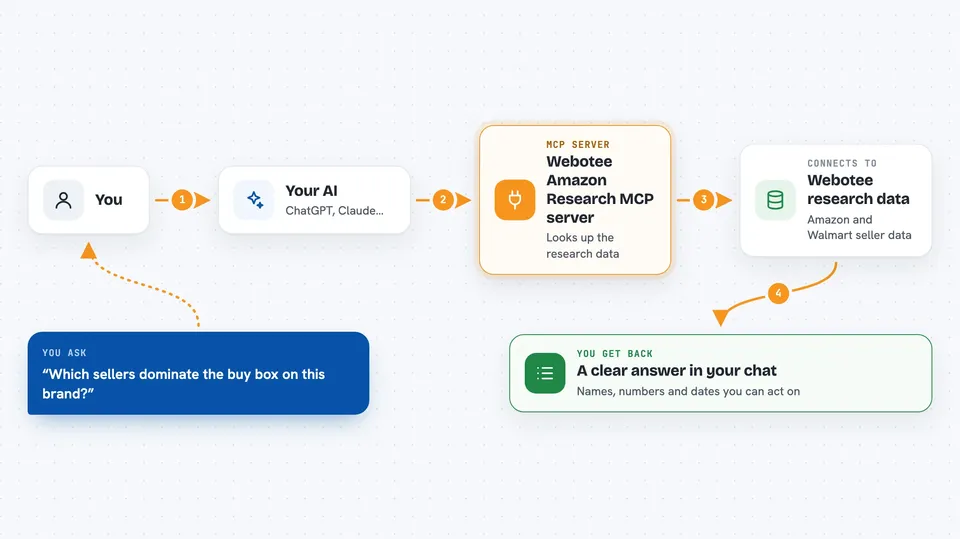
You ask your AI a question in plain words, like which sellers dominate a brand's buy box. Your AI passes that question to the Webotee connector. The connector searches Webotee's collected Amazon and Walmart data. Then your AI writes the answer back to you in the chat as a list, a summary or a set of numbers. It only reads and explains, it does not change anything on Amazon.
 Click to zoom
What you can do with it
- See which sellers control the buy box on a brand
- Find under-competed sub-categories worth sourcing
- Check what other brands a seller carries
- Look at buy-box history for an ASIN over time
- Score an ASIN for FBA sourcing
- Spot new sellers flooding a brand's listings
- Compare an ASIN's price on Amazon and Walmart
Try asking your AI
- “Which sellers dominate the buy box on this brand?”
- “Find under-competed sub-categories worth sourcing in home and kitchen.”
- “What other brands does this seller carry, by estimated sales?”
- “Who has controlled the buy box on this ASIN over the past 24 months?”
What it gives back to you
You get answers written out in the chat, usually as a short summary plus a list or table of names, numbers or dates. For example, a list of sellers with their share of the buy box, or a set of sub-categories with a score. It does not change anything, so what you see is research you can act on yourself.
Before you start
What you need
- A paid Webotee plan (Starter or higher, with a 7-day free trial)
- An AI client that supports remote connectors, like Claude, ChatGPT with Developer Mode, Cursor, VS Code or Claude Code
- A Webotee account to sign in with (the sign-in happens in your browser)
Good to know
Each question your AI asks counts as one AI Connect call against your daily plan limit, and answers come from collected historical data, so treat them as a starting point to check, not a guarantee.
Install it with your AI
Add Webotee Amazon Research MCP server to your AI, no technical skills needed
You don't install anything by hand. You copy one prompt, paste it into an AI that can work on your computer, and it checks, installs and connects the server for you, asking you when it needs something.
Sign in to get the install prompt
Members get a ready-made prompt that lets the Claude desktop app check Webotee Amazon Research MCP server, install it and connect it for them, step by step. You don't need any technical skills: you copy, paste and answer a few questions. Your connected AI can also find and install any of the 4,609 MCP servers here for you.
Who it's for
Amazon sellers, brand owners and sourcing researchers who want fast answers about brands, sellers and niches.