MCP server · Developer tools
MCP Triage
by neufagents
Check and repair the settings files that tell your AI tools how to connect to helper programs.

MCP Triage is a small tool that looks at the setup files for AI clients like Claude Desktop, Cursor, and VS Code, finds what is broken, and explains it in plain English. It can also fix simple problems for you. It is handy if an AI tool suddenly stops working or a helper program you added never shows up.
What is an MCP server? The 30-second version
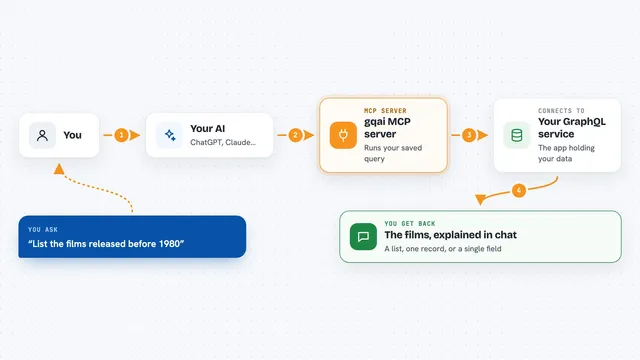
On its own, your AI can only chat. An MCP server is a small helper program that gives your AI a new skill or a connection to an app. This one connects your AI to the settings files on your own computer, so it can look at them and tell you what is wrong. You can also run MCP Triage as an MCP server itself, so your AI can run the check for you.
What this MCP server does
You ask your AI to check your MCP setup, or you run the tool yourself in a terminal. The tool then reads the settings files for the AI clients on your machine. It looks for common problems like a missing comma, a command it cannot find, or a path that points to the wrong place. It writes back a short report in plain English. If you ask it to fix things, it only repairs the simple, safe problems and keeps a backup first.
 Click to zoom
What you can do with it
- Scan the settings of eight AI clients at once
- Spot broken JSON, like a trailing comma
- Check whether a command actually exists on your computer
- Find missing environment variables and relative paths
- Compare the same server across different clients
- Repair simple file problems and keep a backup
- Run as a helper so your AI can check itself
Try asking your AI
- “Check my MCP setup and tell me what is broken”
- “Why is my filesystem server not showing up in Claude Desktop?”
- “Fix the simple problems in my config files and show me what changed”
- “Compare my Codex and Cursor settings for the same server”
What it gives back to you
You get a short report listing each settings file it found and whether it looks healthy or broken. Problems are listed with a plain English explanation and a hint for what to do. If you asked it to fix things, it tells you exactly what it changed and where the backup was saved.
Before you start
What you need
- Node.js 20 or newer on your computer
- The AI client you want to check, already installed
Good to know
The fix option changes your settings files, so it always keeps a backup first and only touches files that fail to read.
Install it with your AI
Add MCP Triage to your AI, no technical skills needed
You don't install anything by hand. You copy one prompt, paste it into an AI that can work on your computer, and it checks, installs and connects the server for you, asking you when it needs something.
Sign in to get the install prompt
Members get a ready-made prompt that lets the Claude desktop app check MCP Triage, install it and connect it for them, step by step. You don't need any technical skills: you copy, paste and answer a few questions. Your connected AI can also find and install any of the 4,609 MCP servers here for you.
Who it's for
Anyone who uses AI desktop apps and has tried to add a helper program, especially people who are not developers.