MCP server · Finance and crypto
PulseFeed MCP server
by Nikolife2016
Check if an x402 payment endpoint is safe to pay, and whether an MCP server or npm package changed after people trusted it.
PulseFeed is a free safety checker for two things: x402 payment endpoints (is this one safe to pay?) and MCP servers or npm packages (did this one change in a bad way after people started using it?). It is handy if you or your AI are about to pay an online service or install a tool, and you want a second opinion first. No account and no key needed.
What is an MCP server? The 30-second version
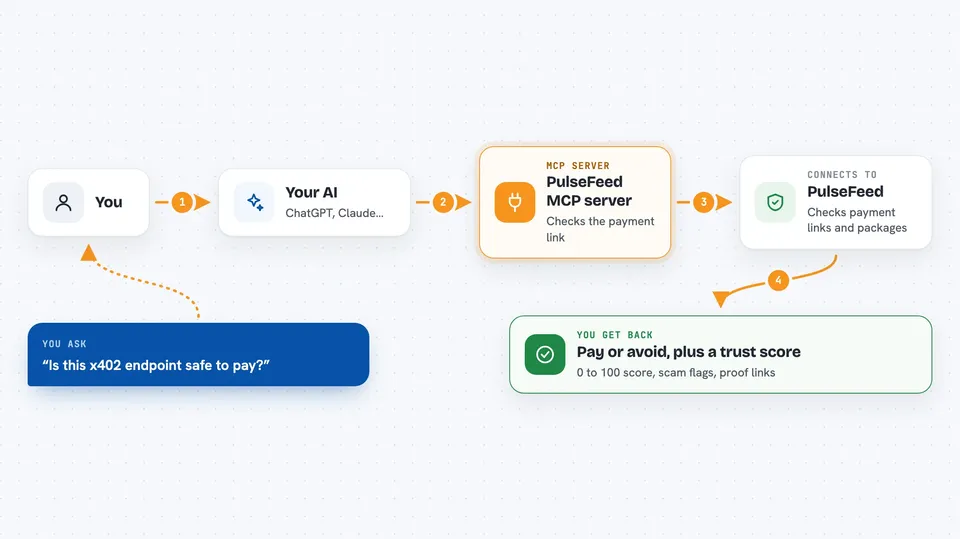
On its own, your AI can only chat with you. An MCP server is a small helper program that gives your AI a new skill or a connection to an outside service. This one connects your AI to PulseFeed, a free checking service. Once connected, your AI can ask PulseFeed whether an x402 endpoint is safe to pay, or whether a package you depend on has changed in a risky way, and then tell you the answer in plain words.
What this MCP server does
You ask your AI something like: is this x402 endpoint safe to pay? Your AI passes the question to this helper. The helper talks to PulseFeed, which checks that endpoint for things like whether it is alive, whether the receiver address was swapped, whether the price in the catalog matches the price in the challenge, and whether it looks like a honeypot. PulseFeed also re-checks the whole MCP registry every night and compares it to yesterday, so it can spot a package that added an install script or changed owner after people adopted it. Your AI then gives you back a verdict, a trust score from 0 to 100, and links to the proof on Base.
 Click to zoom
What you can do with it
- Check whether an x402 endpoint is safe to pay
- Get a 0 to 100 trust score and a pay or avoid verdict
- See scam flags like receiver swapped or honeypot receiver
- Audit an MCP server before you install it
- Check if a package you already depend on changed dangerously
- Look up recent x402 incidents and changes
- Get on-chain proof links on Base for a check
Try asking your AI
- “Is this x402 endpoint safe to pay? https://example.com/pay”
- “Check this MCP server before I install it: io.github.someone/some-server”
- “Have any of my npm packages changed dangerously in the last 7 days? Here is my list: pkg-a, pkg-b”
- “Show me recent x402 incidents and changes”
What it gives back to you
You get back a short answer in the chat: a pay or avoid verdict, a trust score from 0 to 100, and any scam flags that were found. For package checks, you get a list of what changed since the previous day's snapshot, like an install script added or an owner swapped. When there is proof, you also get links to the on-chain record on Base so you can look yourself. If PulseFeed has no snapshot for a package, it says so honestly instead of pretending it is clean.
Before you start
Good to know
PulseFeed gives you a check and a score, not a guarantee, and its own README says it has published wrong numbers before and corrected them, so treat the result as one input before you pay or install.
Install it with your AI
Add PulseFeed MCP server to your AI, no technical skills needed
You don't install anything by hand. You copy one prompt, paste it into an AI that can work on your computer, and it checks, installs and connects the server for you, asking you when it needs something.
Sign in to get the install prompt
Members get a ready-made prompt that lets the Claude desktop app check PulseFeed MCP server, install it and connect it for them, step by step. You don't need any technical skills: you copy, paste and answer a few questions. Your connected AI can also find and install any of the 4,609 MCP servers here for you.
Who it's for
People who pay for online services with x402 or who install MCP servers and npm packages, and want a quick safety check before they trust them.