MCP server · Finance and crypto
x402 Bazaar MCP server
by sukrutkrdg
Lets your AI check Base tokens for safety, prices, and risks before you trade.

This is a helper that gives your AI a set of safety checks for tokens on Base, a blockchain network. It is handy if you or your AI look at crypto tokens and want a quick read on whether one is risky, fake, or hard to sell. You do not need to be technical to use it, and you can start for free.
What is an MCP server? The 30-second version
On its own, your AI can only chat with you using what it already knows. An MCP server is a small helper program that gives your AI a new skill or a connection to a service. This one connects your AI to a catalog of paid token-safety and market-data services on Base. When you ask a question, the AI uses this helper to look things up and bring the answer back to you.
What this MCP server does
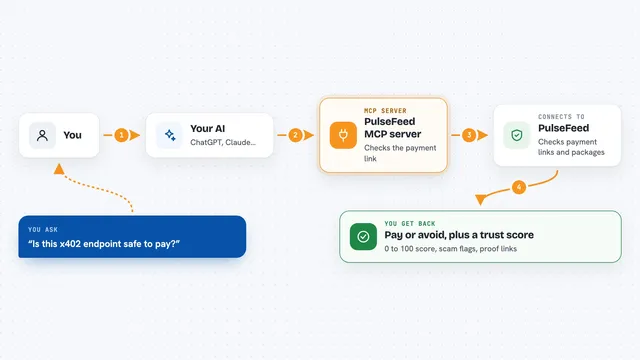
You ask your AI something about a token, like whether it is safe to buy. The AI picks the right tool from this server, such as a risk check or a price lookup. The helper then talks to the live service behind that tool and pays a tiny amount in USDC, a stablecoin, for the call. The answer comes back and your AI explains it to you in plain words. You can also run it with no wallet at all and use a free daily call on many services.
 Click to zoom
What you can do with it
- Check if a Base token is a honeypot or hard to sell
- Get a GO, HOLD, or STOP verdict before a trade
- See the current price and liquidity of a token
- Audit a wallet and its token approvals
- Screen an address against the OFAC sanctions list
- Look up top holders and whale concentration
- Get a written due-diligence report on a token
Try asking your AI
- “Is 0x833589fCD6eDb6E08f4c7C32D4f71b54bdA02913 a safe token to buy on Base? Check the risk and current price.”
- “Is this NVDA token on Base the real Coinbase one?”
- “Show me the top holders and LP lock for this token.”
- “Screen this wallet address for sanctions before I send funds.”
What it gives back to you
You get back clear answers in the chat, like a risk score, a list of top holders, a price, or a GO/HOLD/STOP verdict. Some tools return a written report or a structured summary you can read. The AI explains what the numbers mean and flags anything that looks off. If a tool makes a change, like registering a price alert, it tells you that it was set.
Before you start
What you need
- Node.js version 20 or newer
- Optional: a prepaid credit token (a code you buy once, then use for many calls)
- Optional: a Base wallet private key with USDC if you want to pay per call
Good to know
Some tools can spend real money from your wallet or credit balance, and a few can register alerts or make changes, so check the price and what a tool does before you approve it.
Install it with your AI
Add x402 Bazaar MCP server to your AI, no technical skills needed
You don't install anything by hand. You copy one prompt, paste it into an AI that can work on your computer, and it checks, installs and connects the server for you, asking you when it needs something.
Sign in to get the install prompt
Members get a ready-made prompt that lets the Claude desktop app check x402 Bazaar MCP server, install it and connect it for them, step by step. You don't need any technical skills: you copy, paste and answer a few questions. Your connected AI can also find and install any of the 4,609 MCP servers here for you.
Who it's for
People who trade or hold tokens on Base and want their AI to run quick safety and price checks before acting.