MCP server · Developer tools
Novence MCP server
by Novence-ai
Let your AI build a website and put it online at a real web address in seconds.
Novence is a hosting service for simple websites. This MCP server connects your AI assistant to Novence so it can create a site, upload the pages, and publish it live for you. It is handy if you want a small website online without learning how hosting works.
What is an MCP server? The 30-second version
On its own, your AI can only chat with you. An MCP server is a small helper that gives your AI a new skill or a connection to another service. This one connects your AI to Novence, a place that hosts websites. Once it is connected, you can ask your AI to build and publish a site, and it can actually do it through Novence instead of just telling you how.
What this MCP server does
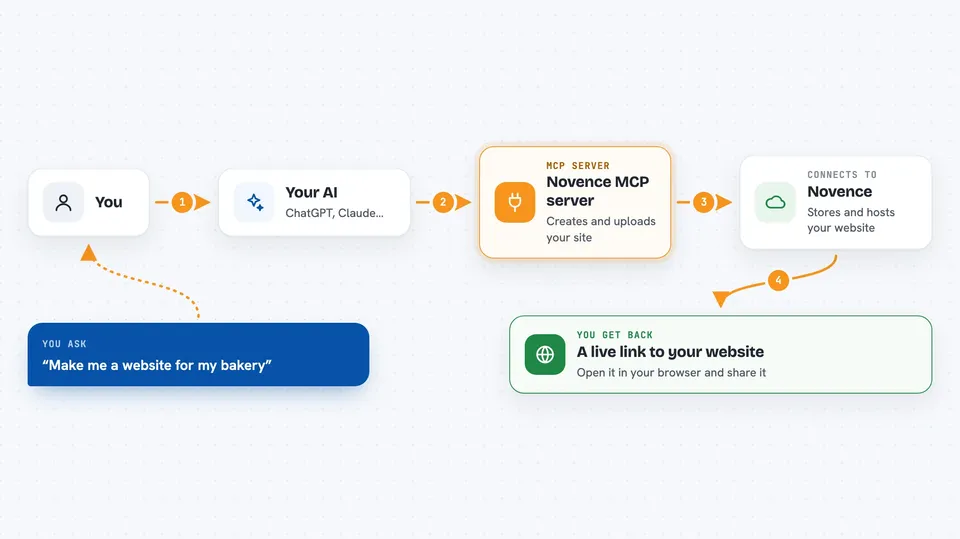
You ask your AI to make a website, and it writes the pages for you. The AI then uses this helper to talk to Novence, where it creates a project and uploads the files. Novence stores those files and puts them online at a web address. You get a link back in the chat that you can open in your browser and share with anyone.
 Click to zoom
What you can do with it
- Create a new website project on Novence
- Upload your site's pages and files
- Publish the site and get a live web address
- Check how the site looks with quality checks like speed and broken links
- Roll back to an earlier version if something goes wrong
- Add a contact form to your site
- Connect your own domain name to the site
What it gives back to you
You get back plain answers in the chat: the live web address of your site, a list of your projects, or the results of checks like speed and broken links. When it uploads or deploys, it tells you whether it worked. If something fails, it explains what went wrong so you can try again.
Before you start
What you need
- An email address (used to sign up and verify your account)
- An AI assistant that can connect to MCP servers, like Claude Code or Cursor
- Nothing to install on your computer, since the server runs online
Good to know
This server can create, change, and delete your website files and publish them live, so check what your AI is about to do before you confirm.
Install it with your AI
Add Novence MCP server to your AI, no technical skills needed
You don't install anything by hand. You copy one prompt, paste it into an AI that can work on your computer, and it checks, installs and connects the server for you, asking you when it needs something.
Sign in to get the install prompt
Members get a ready-made prompt that lets the Claude desktop app check Novence MCP server, install it and connect it for them, step by step. You don't need any technical skills: you copy, paste and answer a few questions. Your connected AI can also find and install any of the 4,066 MCP servers here for you.
Who it's for
Anyone who wants a small website online without dealing with hosting setup, like freelancers, small business owners, and people who just want a simple page published.