
MCP server · Finance and crypto
NyxDocs MCP server
by nyxn-ai
Lets your AI look up cryptocurrency project docs and details across Ethereum, BSC, Polygon and Solana.
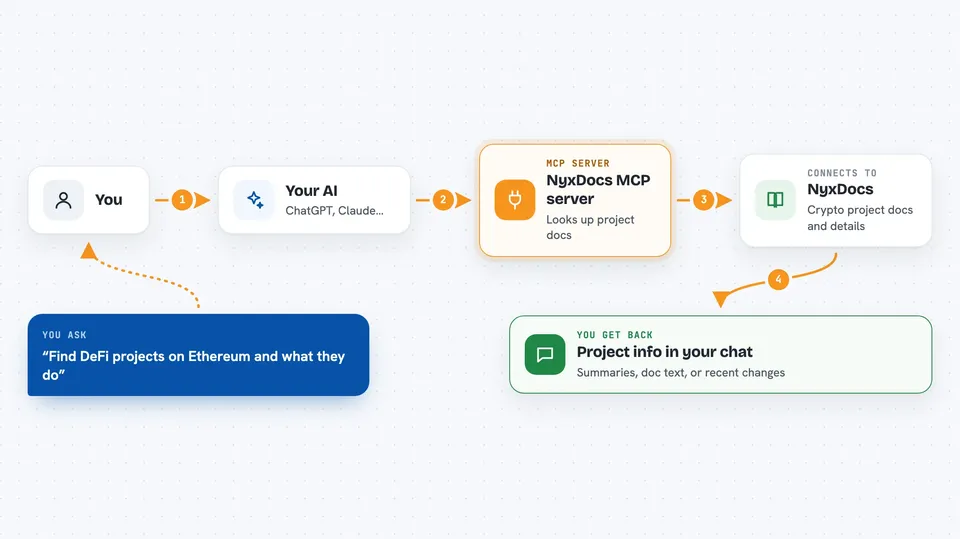
NyxDocs is a helper that connects your AI assistant to a library of cryptocurrency project documentation. You can ask about a coin, a DeFi project or a blockchain, and your AI can pull the details and docs for you. It is handy if you follow crypto projects and want quick answers without opening ten browser tabs.
What is an MCP server? The 30-second version
On its own, your AI can only chat with what it already knows. An MCP server is a small helper program that gives your AI a new skill or a connection to an outside service. This one connects your AI to crypto project documentation and blockchain information, so it can look things up for you when you ask. You stay in the chat, and the helper does the fetching behind the scenes.
What this MCP server does
You ask your AI something about a crypto project, like what it does or where its docs live. Your AI passes that request to NyxDocs. NyxDocs then searches its stored project information and pulls documentation from sources like GitHub, GitBook, Notion or official websites. It hands the result back to your AI, which shows it to you in the chat. It can also tell you about recent documentation changes.
 Click to zoom
What you can do with it
- Search crypto projects by name, category or blockchain
- Get a project overview with its blockchain context
- Pull the actual documentation text for a project
- List the blockchains it covers
- Check which project docs changed recently
Try asking your AI
- “Find DeFi projects on Ethereum and tell me what they do”
- “Get me the documentation for Uniswap in markdown”
- “What blockchains does NyxDocs cover?”
- “Show me documentation updates since January 2024”
What it gives back to you
You get answers in the chat: lists of matching projects, short project summaries, or chunks of documentation text. You can ask for documentation as markdown if you want to copy it somewhere. Update checks come back as a list of recent changes with dates.
Before you start
What you need
- Python 3.11 or newer
- uv (recommended) or pip to install it
- A CoinGecko API key (a kind of password for apps; CoinGecko gives you one when you sign up)
- A GitHub token (a kind of password for apps; GitHub lets you create one in your account settings)
Good to know
It needs your CoinGecko and GitHub keys to work, and it reads public project docs and repo files, so keep those keys private and only share them with the app you trust.
Install it with your AI
Add NyxDocs MCP server to your AI, no technical skills needed
You don't install anything by hand. You copy one prompt, paste it into an AI that can work on your computer, and it checks, installs and connects the server for you, asking you when it needs something.
Sign in to get the install prompt
Members get a ready-made prompt that lets the Claude desktop app check NyxDocs MCP server, install it and connect it for them, step by step. You don't need any technical skills: you copy, paste and answer a few questions. Your connected AI can also find and install any of the 4,361 MCP servers here for you.
Who it's for
People who follow or work with crypto projects and want quick, sourced answers about them without digging through many websites.


