MCP server · Analytics
Zigbee2MQTT MCP server
by alexpfau
Lets your AI check and fix your Zigbee network: weak signals, batteries, pairing, firmware.
This is a helper that connects your AI assistant to Zigbee2MQTT, the software many people use to run Zigbee smart home devices. It is handy if you already have Zigbee lights, sensors and remotes and you want to ask questions about how the network is doing instead of clicking around the Zigbee2MQTT web page. You do not need Home Assistant for it to work.
What is an MCP server? The 30-second version
On its own, your AI can only chat. An MCP server is a small helper program that gives your AI a new skill or a connection to an app or service. This one connects your AI to Zigbee2MQTT, so it can look up the state of your Zigbee devices and, if you allow it, make changes like opening the network for pairing. You just ask in normal words, and the helper does the technical part in the background.
What this MCP server does
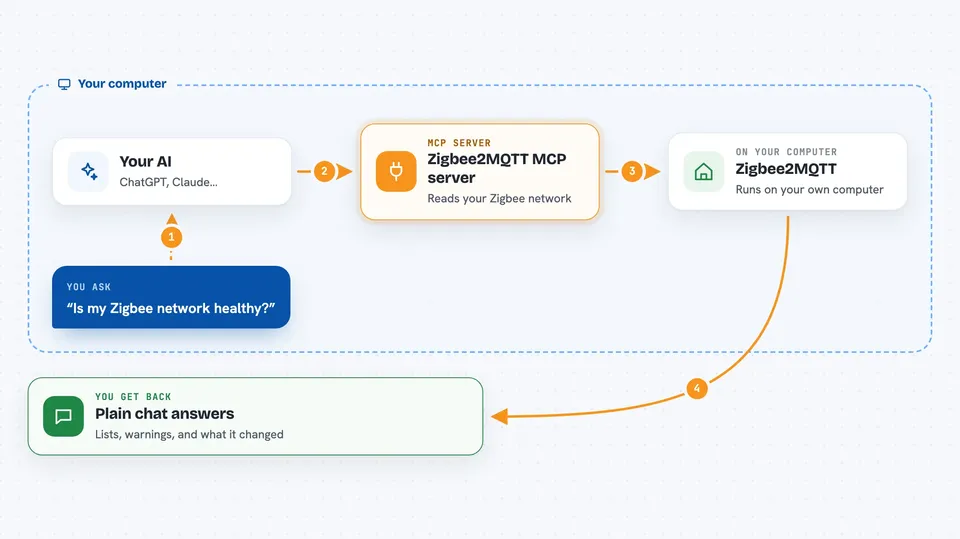
You ask your AI something like whether your Zigbee network is healthy. The AI passes that question to this helper program. The helper talks to your MQTT broker, which is the message service Zigbee2MQTT uses, and reads the latest information Zigbee2MQTT publishes there. It then hands the answer back to the AI, which explains it to you in the chat. If you have turned on write access, it can also send small commands back, like telling a device to pair or updating a setting.
 Click to zoom
What you can do with it
- Check the overall health of your Zigbee network
- Find devices with weak signal or low battery
- See which devices have firmware updates waiting
- Open the network for pairing a new device for a set time
- Rename a device or change its settings
- Bind a remote directly to a light so it still works if the bridge is down
- Look at the mesh map to see which devices talk through which
Try asking your AI
- “Is my Zigbee network healthy?”
- “Which devices have the weakest signal?”
- “Which batteries need replacing?”
- “Any firmware updates available?”
What it gives back to you
You get answers in plain chat text: lists of devices, short health summaries, warnings about weak links or low batteries, and notes about anything that looks off. When you ask it to change something, it tells you what it did. For bigger questions it can give you a whole-estate report in one go.
Before you start
What you need
- A running Zigbee2MQTT setup with an MQTT broker
- The address of your MQTT broker (for example mqtt://192.168.1.10:1883)
- Broker username and password if your broker needs them
- Node.js 22 or newer on the computer where your AI app runs
Good to know
In the default safe mode the AI can still change things on your network, including turning devices on or off, and in full mode it can remove devices or flash firmware, which cannot be undone.
Install it with your AI
Add Zigbee2MQTT MCP server to your AI, no technical skills needed
You don't install anything by hand. You copy one prompt, paste it into an AI that can work on your computer, and it checks, installs and connects the server for you, asking you when it needs something.
Sign in to get the install prompt
Members get a ready-made prompt that lets the Claude desktop app check Zigbee2MQTT MCP server, install it and connect it for them, step by step. You don't need any technical skills: you copy, paste and answer a few questions. Your connected AI can also find and install any of the 4,066 MCP servers here for you.
Who it's for
People who run a Zigbee smart home with Zigbee2MQTT and want an easier way to keep an eye on it, especially if they already use an AI assistant for other tasks.