
MCP server · Finance and crypto
Bitcoin Benji MCP server
by ocbenji
Lets your AI check live Bitcoin fees and mempool data, and run AI text, code, vision and OCR tasks, paid per use.
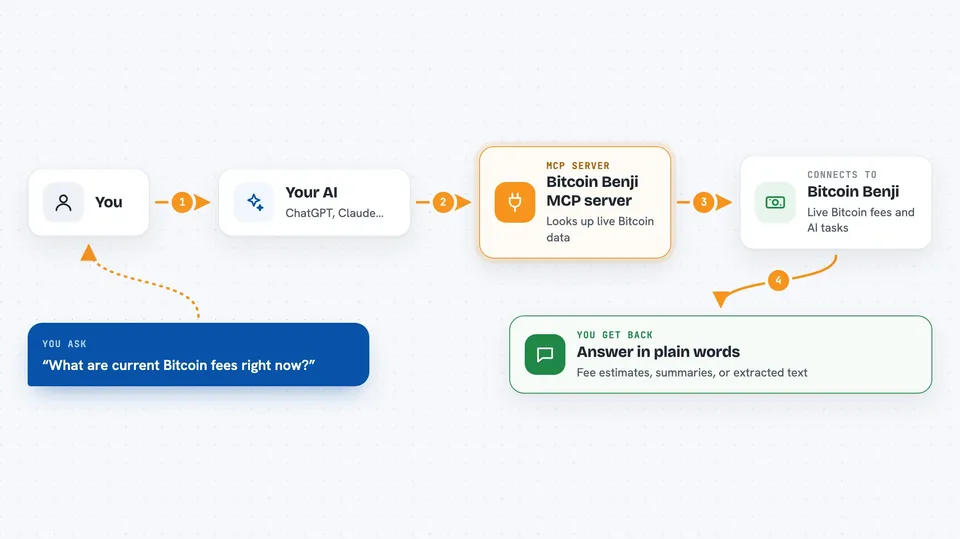
This is a helper that plugs into your AI app and gives it two new skills. First, it can look up live Bitcoin network information like current fees and big transactions. Second, it can run AI jobs for you, such as summarizing text, reviewing code, or reading text off an image. It is handy if you follow Bitcoin fees or if you want AI tasks done without signing up for a big subscription.
What is an MCP server? The 30-second version
On its own, your AI can only chat with you using what it already knows. An MCP server is a small helper program that gives your AI a new skill or a connection to a service. This one connects your AI to the Bitcoin Benji service, which watches the Bitcoin network and runs AI models on its own machines. Once it is set up, your AI can ask that service for live data or run a task for you, and you just see the answer in the chat.
What this MCP server does
You ask your AI a question, like what Bitcoin fees look like right now. Your AI passes that request to this helper, which sends it to the Bitcoin Benji service. The service looks up the live mempool (the waiting room of Bitcoin transactions) or runs the AI task you asked for. Each call costs a small amount, paid in Bitcoin sats over Lightning or in USDC, and the service handles the payment step. Then the result comes back and your AI shows it to you in plain words.
 Click to zoom
What you can do with it
- Check current Bitcoin fee estimates and whether fees are trending up or down
- See whale alerts and large consolidation transactions in the mempool
- Look up the status of any Bitcoin transaction by its ID
- Get a fee quote for a transaction you are planning
- Summarize, translate, rewrite or check the grammar of text
- Review or generate code, and extract or classify information
- Read text from images, transcribe tables, and run longer research tasks
Try asking your AI
- “What are current Bitcoin fees right now?”
- “Are there any whale alerts in the mempool today?”
- “Summarize this paragraph for me in three sentences.”
- “Read the text off this image and give it back to me as plain text.”
What it gives back to you
You get answers in the chat, in normal sentences or short lists. For Bitcoin questions, that means numbers like fee estimates, a trend note, or details about a transaction. For AI tasks, you get the finished text, summary, code, or extracted content back. If a payment is needed, the service returns a Lightning invoice and asks you to pay it before the call finishes.
Before you start
What you need
- Node.js installed on your computer (the free program that runs this helper)
- A Lightning wallet to pay small amounts, or an API key you pre-fund once
- Optionally, a USDC balance on Base if you want payments to happen automatically
Good to know
Each call costs a small amount of real money, so keep an eye on how often your AI uses it, especially if you set up automatic payments.
Install it with your AI
Add Bitcoin Benji MCP server to your AI, no technical skills needed
You don't install anything by hand. You copy one prompt, paste it into an AI that can work on your computer, and it checks, installs and connects the server for you, asking you when it needs something.
Sign in to get the install prompt
Members get a ready-made prompt that lets the Claude desktop app check Bitcoin Benji MCP server, install it and connect it for them, step by step. You don't need any technical skills: you copy, paste and answer a few questions. Your connected AI can also find and install any of the 4,609 MCP servers here for you.
Who it's for
People who follow Bitcoin fees or run small AI jobs and want to pay per use instead of signing up for a monthly subscription.



