
MCP server · Research
Scout MCP server
Lets your AI research companies, markets, competitors, trends, and products and hand you a clean summary.
Scout MCP is a helper that gives your AI a research skill. You ask it about a company, a market, or a product, and it goes and gathers information from the web for you. It is handy for anyone who needs quick background on a business topic without opening twenty browser tabs.
What is an MCP server? The 30-second version
On its own, your AI can only chat with you using what it already knows. An MCP server is a small helper program that gives your AI a new skill or a connection to an outside service. This one connects your AI to public web sources like search results, news, and Wikipedia. So when you ask about a company or a trend, your AI can actually go look it up instead of guessing.
What this MCP server does
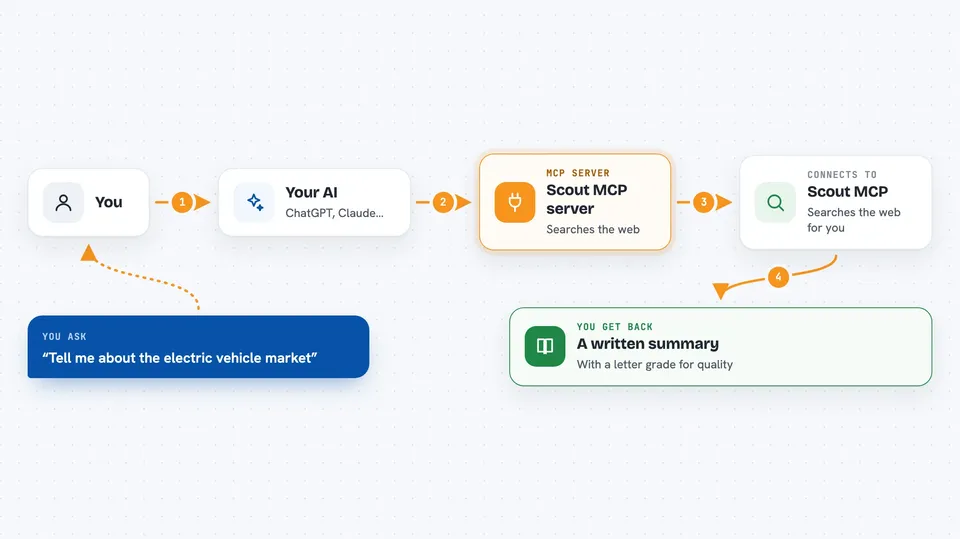
You ask your AI something like "tell me about Stripe" or "what is happening in the electric vehicle market." Your AI passes that question to Scout MCP. Scout MCP then searches the web, news articles, Wikipedia, and company websites, and pulls the useful bits together. It hands the results back to your AI, which turns them into a readable answer for you. Every answer also comes with a quality grade so you know how solid the information is.
 Click to zoom
What you can do with it
- Research a company and get its industry, size, funding, and recent news
- Find competitors for a company or product and see how they differ
- Look up market size, growth rate, and key players in an industry
- Track how a topic is trending and whether the mood is positive or negative
- Get details on a product, including pricing, features, and alternatives
- See which sources were used and how confident the answer is
Try asking your AI
- “Give me a quick profile of the company Notion”
- “Who are the main competitors for Slack and what makes them different”
- “What is the current sentiment around generative AI this week”
- “Tell me about the electric vehicle market and its main players”
What it gives back to you
You get back a written summary in your chat, built from the data Scout MCP collected. It usually includes things like company details, competitor lists, market numbers, or trending topics. Each answer also shows a letter grade from A+ down to F, so you can tell at a glance how reliable the information is. If the grade is low, your AI can tell you the data was thin.
Before you start
What you need
- Python installed on your computer if you self-host it
- A free NewsAPI key (a kind of password for apps; the NewsAPI site gives you one for free)
- An MCP client like Claude Desktop, Cursor, or VS Code
Good to know
The information comes from public web sources and can be incomplete or out of date, so check the quality grade and verify anything important before you rely on it.
Install it with your AI
Add Scout MCP server to your AI, no technical skills needed
You don't install anything by hand. You copy one prompt, paste it into an AI that can work on your computer, and it checks, installs and connects the server for you, asking you when it needs something.
Sign in to get the install prompt
Members get a ready-made prompt that lets the Claude desktop app check Scout MCP server, install it and connect it for them, step by step. You don't need any technical skills: you copy, paste and answer a few questions. Your connected AI can also find and install any of the 4,361 MCP servers here for you.
Who it's for
Best for salespeople, marketers, analysts, and anyone who needs fast background research on companies, markets, or products.


