
MCP server · Finance and crypto
PulseChain Analytics MCP server
Ask your AI about PulseChain tokens: prices, safety scores, honeypots, whales and bridge flows.
This is a small helper that connects your AI assistant to live PulseChain data. PulseChain is a blockchain, and this helper lets your AI look up token prices, check if a token is a scam, and see what big wallets are doing. It is handy if you follow crypto on PulseChain and want quick answers without jumping between websites.
What is an MCP server? The 30-second version
On its own, your AI can only chat with you. An MCP server is a small helper program that gives your AI a new skill or a connection to an app or service. This one connects your AI to PulseChain analytics, so it can look up token prices, safety scores, and wallet activity for you. You just ask in normal words, and the helper fetches the real data.
What this MCP server does
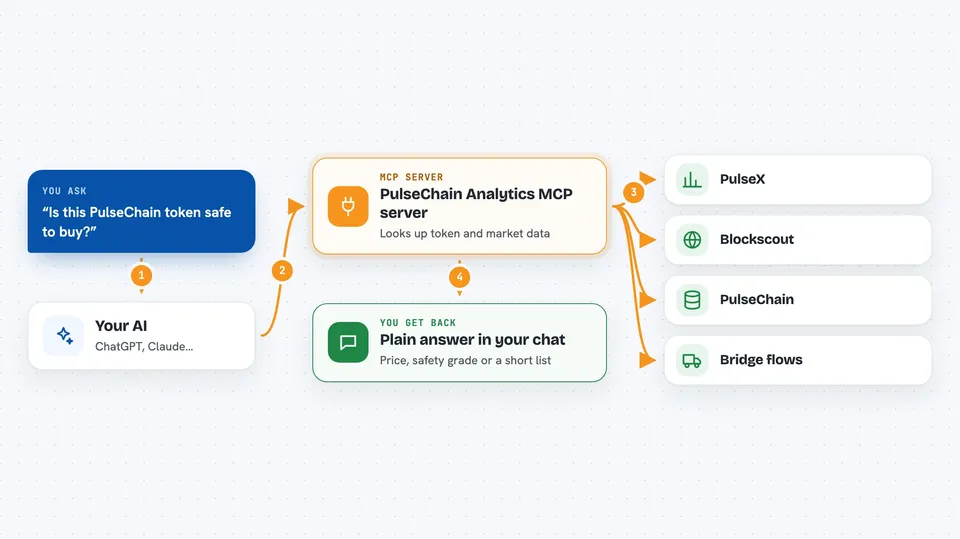
You ask your AI a question about PulseChain, like the price of a token or whether an address looks risky. The AI passes your question to this helper program. The helper talks to the OpenPulseChain data services, which read from PulseX, Blockscout and the chain itself. The answer comes back and your AI explains it to you in the chat. Some tools work right away, and a few extra ones need a paid key.
 Click to zoom
What you can do with it
- Check the current price and 24h change of a PulseChain token
- See if a token is a honeypot or has high buy/sell taxes
- List the top tokens and top trading pairs on PulseX
- View the network overview with TVL, volume and top gainers
- Look at recent honeypot tokens that were detected
- See bridge inflows and outflows over the last 7 days
- Track whale and smart money activity (needs a paid key)
Try asking your AI
- “What is the current price of HEX on PulseChain?”
- “Is this token safe? 0x1234abcd...”
- “Show me the top PulseX trading pairs by volume”
- “What is the bridge net flow for the last 7 days?”
What it gives back to you
You get plain answers in the chat, like a price, a percentage change, or a safety grade from A to F. For lists, your AI shows a short table or bullet list of tokens, pairs, or recent alerts. If you ask about a wallet, you get balances or a short history. Nothing is changed on the chain, it only reads and reports.
Before you start
What you need
- The Claude desktop app or another AI tool that supports MCP servers
- Node.js installed on your computer (the free software that runs npx)
- An OpenPulseChain API key only if you want the 9 Pro tools (paid, from their pricing page)
Good to know
It only reads data and never touches your wallet, but the safety scores are estimates, so always do your own research before buying any token.
Install it with your AI
Add PulseChain Analytics MCP server to your AI, no technical skills needed
You don't install anything by hand. You copy one prompt, paste it into an AI that can work on your computer, and it checks, installs and connects the server for you, asking you when it needs something.
Sign in to get the install prompt
Members get a ready-made prompt that lets the Claude desktop app check PulseChain Analytics MCP server, install it and connect it for them, step by step. You don't need any technical skills: you copy, paste and answer a few questions. Your connected AI can also find and install any of the 4,609 MCP servers here for you.
Who it's for
Crypto users and traders who follow PulseChain and want quick, plain answers about tokens, safety and wallet activity.



