MCP server · API
OpenAPI to MCP server
by ouvreboite
Turn any API described by an OpenAPI file into tools your AI can call for you.
This is a small helper program that reads an OpenAPI description of an API and turns each of its endpoints into a tool your AI can use. It is handy if you already have an OpenAPI file (or a link to one) for a service you use, and you want your AI to be able to talk to that service directly. You do not need to write any code, just point it at the file.
What is an MCP server? The 30-second version
On its own, your AI can only chat. An MCP server is a small helper program that gives your AI a new skill or a connection to an outside service. This one connects your AI to any API that has an OpenAPI description, so the AI can look things up or make changes there when you ask. Think of it as a translator that turns a technical API manual into simple actions your AI can perform.
What this MCP server does
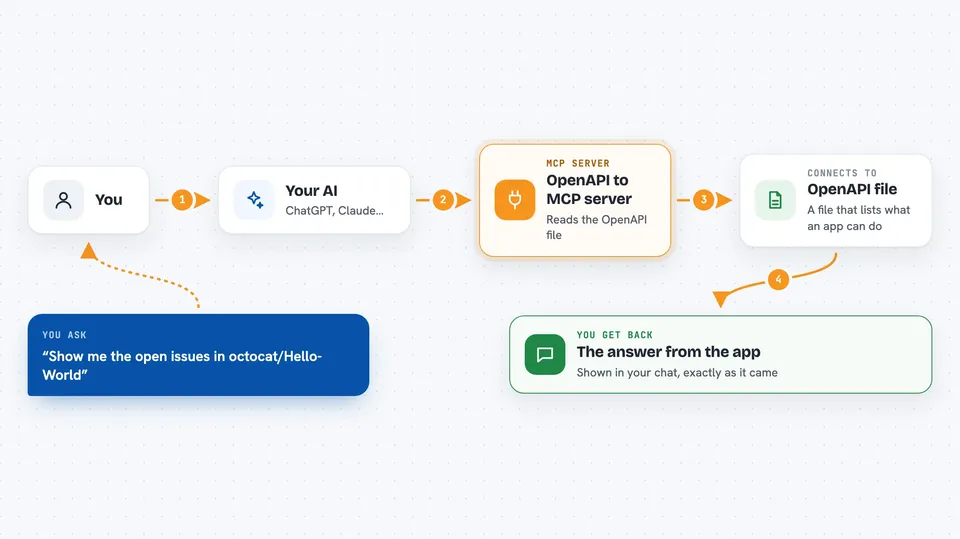
You give this helper the address of an OpenAPI file, either a web link or a file on your computer. The helper reads it and creates a list of tools, one for each endpoint in that API. When you ask your AI something, the AI picks the right tool and calls it. The helper then sends the actual request to the real API and brings the answer back into your chat.
 Click to zoom
What you can do with it
- Call any endpoint listed in an OpenAPI file
- Send parameters and request bodies exactly as the API expects
- Use a bearer token or OAuth2 to log in to the API
- Rename or hide specific endpoints with small notes in the OpenAPI file
- Point at a local file or a web link for the OpenAPI description
- Work with OpenAPI 2.0 and 3.0 files in JSON or YAML
Try asking your AI
- “List all pets available in the petstore”
- “Show me the open issues in the github repository octocat/Hello-World”
- “Create a new pet named Fluffy with status available”
- “What is the status of order 12345 in the petstore”
What it gives back to you
You get back whatever the API returns, shown right in your chat. That could be a list of items, a single record, a status message, or an error if something went wrong. The helper does not change or summarize the answer, it passes it through as is.
Before you start
What you need
- An OpenAPI file or a link to one (your service or its docs usually provide this)
- The .NET runtime if you install it as a dotnet tool, or just download the ready-made program
- A token or login details if the API requires them
Good to know
This helper can make real changes to the API it connects to, so be careful with tools that create, update, or delete things.
Install it with your AI
Add OpenAPI to MCP server to your AI, no technical skills needed
You don't install anything by hand. You copy one prompt, paste it into an AI that can work on your computer, and it checks, installs and connects the server for you, asking you when it needs something.
Sign in to get the install prompt
Members get a ready-made prompt that lets the Claude desktop app check OpenAPI to MCP server, install it and connect it for them, step by step. You don't need any technical skills: you copy, paste and answer a few questions. Your connected AI can also find and install any of the 4,609 MCP servers here for you.
Who it's for
People who already have an OpenAPI description for a service and want their AI to use that service without writing code.