MCP server · Coding
Capsule MCP server
by mavdol
Let your AI write and run Python or JavaScript code safely, without touching your computer.
This is a small helper that lets your AI actually run Python and JavaScript code for you, inside a safe little box. It is handy when you want a quick calculation, a small data task, or a script checked without installing anything or risking your own machine.
What is an MCP server? The 30-second version
On its own, your AI can only chat. It can write code in the reply, but it cannot run it. An MCP server is a small helper program that gives your AI a new skill. This one gives it a safe place to run Python and JavaScript, so when you ask for a calculation or a small script, the AI can actually try it and hand you the result.
What this MCP server does
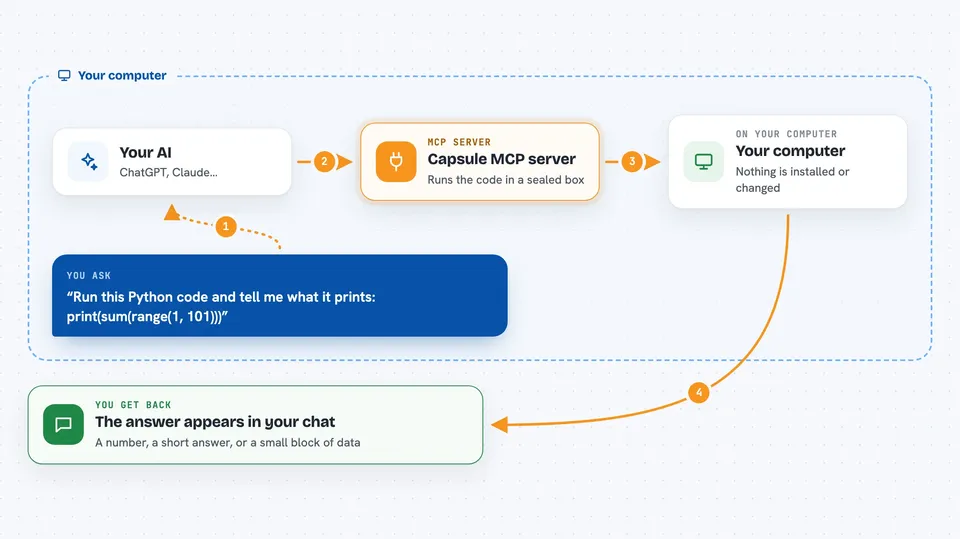
You ask your AI something that needs a bit of code, like working out an average or testing a small script. The AI writes the code and sends it to this helper. The helper runs that code inside its own sealed sandbox, with no access to your files or the internet. A moment later, the result comes back and the AI shows it to you in the chat.
 Click to zoom
What you can do with it
- Run a short Python script and get the output
- Run a small JavaScript snippet and see what it returns
- Do quick math on a list of numbers you paste in
- Test a piece of code before you use it yourself
- Try out an idea without installing Python or Node on your computer
- Get a result as data you can copy into a spreadsheet
Try asking your AI
- “I have monthly revenue of 12400, 15800, 14200, 18900, 21000, 19500. What is the average and which month grew the most?”
- “Run this Python code and tell me what it prints: print(sum(range(1, 101)))”
- “Write and run a small JavaScript function that reverses a string, then show me the output for hello world”
- “Use Python to count how many times the word invoice appears in this text and give me the number”
What it gives back to you
You get the result of the code back in the chat, usually as a short answer, a number, or a small block of data. If the code fails, you get the error message so you and the AI can fix it. Each run is separate, so if you want to build on a previous result, ask the AI to pass it into the next run.
Before you start
What you need
- An MCP client that can run local servers, like the Claude desktop app
- Node.js installed on your computer (the setup uses npx, which comes with Node.js)
Good to know
Each run starts fresh with no memory of the last one, and Python code cannot use normal internet libraries inside the sandbox.
Install it with your AI
Add Capsule MCP server to your AI, no technical skills needed
You don't install anything by hand. You copy one prompt, paste it into an AI that can work on your computer, and it checks, installs and connects the server for you, asking you when it needs something.
Sign in to get the install prompt
Members get a ready-made prompt that lets the Claude desktop app check Capsule MCP server, install it and connect it for them, step by step. You don't need any technical skills: you copy, paste and answer a few questions. Your connected AI can also find and install any of the 4,361 MCP servers here for you.
Who it's for
Anyone who wants quick calculations or small code checks done for them, especially office workers, analysts, and people learning to code.