
MCP server · Security · official
Panther MCP server
by panther-labs · official
Ask your AI to search Panther security logs, check alerts, and review detections in plain English.
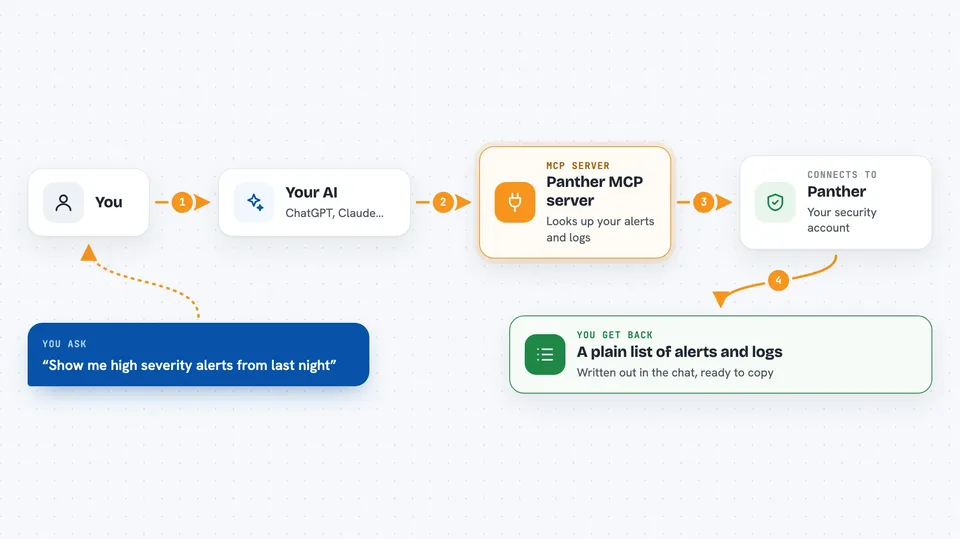
This is a helper that connects your AI assistant to Panther, a security platform that companies use to watch their logs and catch suspicious activity. Once it is set up, you can ask your AI questions about your alerts and logs in normal words instead of clicking around dashboards. It is handy for security analysts and anyone on a security team who spends a lot of time in Panther.
What is an MCP server? The 30-second version
On its own, your AI can only chat with you. An MCP server is a small helper program that gives your AI a new skill or a connection to another app. This one connects your AI to Panther, so when you ask a question, the AI can look things up in your Panther account and bring answers back. You do not need to understand how it works under the hood. You just ask, and the AI uses this helper to do the work.
What this MCP server does
You type a question in your AI chat, like asking which high severity alerts came in overnight. The AI passes that request to this Panther helper. The helper talks to your Panther account and pulls back the alerts, log results, or detection details you asked about. Then the AI writes it all up for you in the chat in plain language. You can also ask it to make changes, like adding a comment to an alert or marking one as resolved.
 Click to zoom
What you can do with it
- List alerts filtered by severity, status, or date range
- Read the events behind a specific alert
- Add comments to alerts and mark them resolved
- Query security logs with SQL through the data lake
- Look up detection rules and their details
- Check log source health and configuration
- See alert counts grouped by rule or severity
Try asking your AI
- “Show me all high severity alerts from the last 24 hours”
- “Add comment 'Looks pretty bad' to alert abc123”
- “Query AWS CloudTrail logs for failed login attempts in the last day”
- “Show top 10 rules by alert count”
What it gives back to you
You get answers written out in the chat, like a list of alerts with their status and severity, or a summary of what happened in a set of log events. For log queries, it shows the rows that matched your search. When you ask it to change something, like adding a comment or resolving an alert, it tells you what it did. Everything comes back as normal text you can read and copy.
Before you start
What you need
- A Panther account with access to your company's instance
- An API token created in Panther (Settings, then API Tokens)
- Your Panther instance URL, starting with https://
- Docker installed, or the UV tool if you prefer the Python route
Good to know
This helper can change things in your Panther account, like resolving alerts, adding comments, or disabling detections, so check with your team before letting it make changes.
Install it with your AI
Add Panther MCP server to your AI, no technical skills needed
You don't install anything by hand. You copy one prompt, paste it into an AI that can work on your computer, and it checks, installs and connects the server for you, asking you when it needs something.
Sign in to get the install prompt
Members get a ready-made prompt that lets the Claude desktop app check Panther MCP server, install it and connect it for them, step by step. You don't need any technical skills: you copy, paste and answer a few questions. Your connected AI can also find and install any of the 4,609 MCP servers here for you.
Who it's for
Security analysts and security team members who work with Panther and want to ask questions or make changes without clicking through dashboards.



