MCP server · Health and learning
Withings MCP server
by partymola
Lets your AI read your Withings health data and spot trends over time.
This is a small helper that connects your AI assistant to your Withings account. Once it is set up, you can ask plain questions about your weight, sleep, workouts and heart readings, and your AI will look them up for you. It is handy if you use a Withings scale, watch or sleep tracker and want to see how things change over weeks and months.
What is an MCP server? The 30-second version
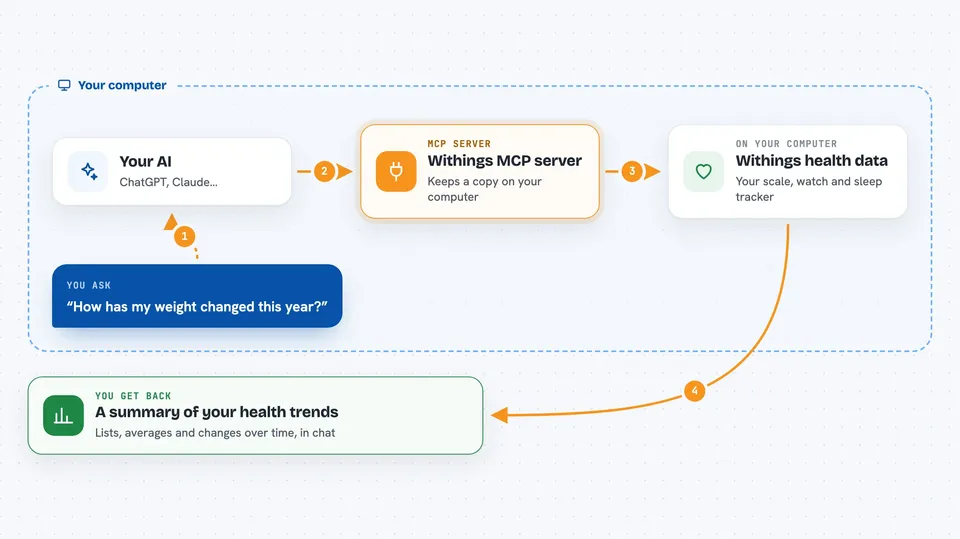
On its own, your AI can only chat. It has no way to see your real health numbers. An MCP server is a small helper program that gives your AI a new skill, here a connection to Withings. You ask a question, the AI passes it to this helper, the helper talks to Withings, and the answer comes back into the chat.
What this MCP server does
You ask your AI something like how your weight changed this year. The AI sends that request to this helper. The helper keeps a copy of your Withings data in a small local file on your computer, so it can answer quickly without asking Withings every time. When the copy is out of date, it quietly fetches just the new data. Then it hands back a summary, a list of numbers or a trend, and your AI explains it to you.
 Click to zoom
What you can do with it
- Check your weight, body fat, muscle and bone mass over time
- Review your sleep, including detailed night-time phases
- See your daily steps, distance and calories
- List your workouts with type, duration and heart rate
- Look at ECG recordings and AFib detection results
- Compare this month with last month or this year with last year
- See which Withings devices are connected and their battery levels
Try asking your AI
- “Sync my Withings data”
- “Show my weight for the last 3 months”
- “How has my sleep changed this year?”
- “Compare my body composition this month vs last month”
- “What workouts did I do in March?”
What it gives back to you
You get answers in the chat: lists of readings, short summaries, averages and trends. For example, it might say your average weight dropped a little over three months, or that your sleep was longer on weekends. If you ask for detail, it can show night-by-night sleep phases or a list of workouts. It never changes anything in your Withings account.
Before you start
What you need
- Python 3.13 or newer
- uv or pip to install the helper
- A Withings developer account with an app registered (free, done on the Withings developer site)
- Your Withings Client ID and Client Secret (like a username and password for the app you create)
Good to know
It reads your private health data, so keep the config folder with your tokens safe and do not share it.
Install it with your AI
Add Withings MCP server to your AI, no technical skills needed
You don't install anything by hand. You copy one prompt, paste it into an AI that can work on your computer, and it checks, installs and connects the server for you, asking you when it needs something.
Sign in to get the install prompt
Members get a ready-made prompt that lets the Claude desktop app check Withings MCP server, install it and connect it for them, step by step. You don't need any technical skills: you copy, paste and answer a few questions. Your connected AI can also find and install any of the 4,609 MCP servers here for you.
Who it's for
People who track their health with Withings devices and want their AI to read and summarise that data for them.