MCP server · Video editing · official
Pedra MCP server
by pedra-ai · official
Let your AI edit real estate photos and build virtual tours through Pedra, right from the chat.
This is a small helper that connects your AI assistant to Pedra, a service that edits real estate photos and videos with AI. Once it is set up, you can ask your assistant in plain words to stage an empty room, swap a grey sky for blue, or build a 360 degree virtual tour. It is handy for real estate agents, photographers, and anyone who prepares property listings.
What is an MCP server? The 30-second version
On its own, your AI can only chat. An MCP server is a small helper program that gives your AI a new skill or a connection to an app or service. This one connects your AI to Pedra, so the AI can send your photos to Pedra and bring the edited results back to you. You just ask in normal words, and the helper does the back and forth.
What this MCP server does
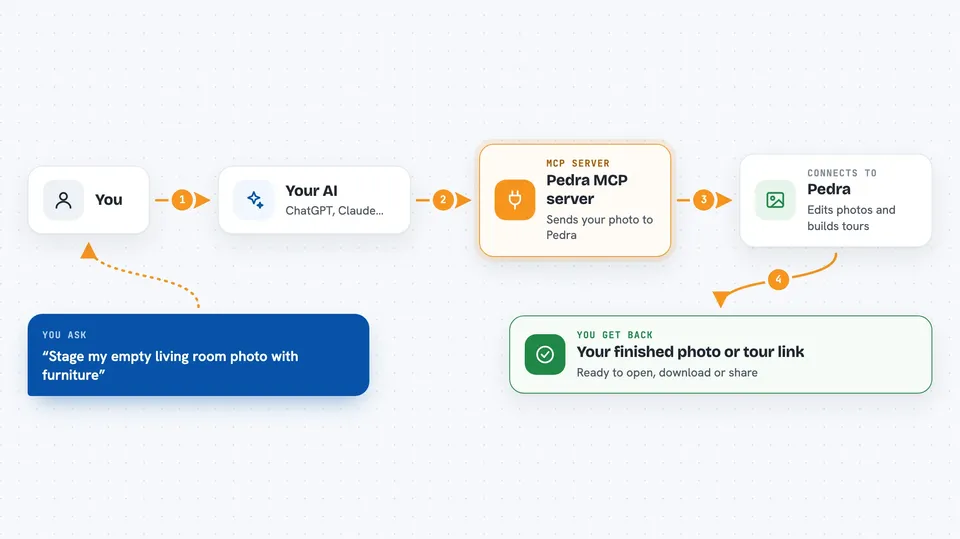
You ask your AI for something, like staging a photo or making a video. The AI uses this helper to send your request and your image to Pedra. Pedra does the edit and sends back the finished file. The helper hands that result to your AI, and your AI shows it to you in the chat. For virtual tours, the helper starts the build and then checks back until the tour is ready.
 Click to zoom
What you can do with it
- Virtually stage an empty room with furniture
- Empty a room by removing all furniture and objects
- Improve lighting, color, and sharpness in a photo
- Replace a dull sky with a clear blue one
- Blur faces or license plates in an image
- Render a property video from a set of photos
- Build a hosted 360 degree virtual tour with room names and links
Try asking your AI
- “Use Pedra to virtually stage /Users/me/Desktop/empty-living-room.jpg as a minimalist living room.”
- “Replace the sky in this photo with clear blue using Pedra.”
- “Make a Pedra virtual tour from my 360 photos and give me the share link.”
- “How many Pedra credits do I have left?”
What it gives back to you
You get back links to the finished images or videos, ready to open or download. For virtual tours, you get a share link and an embed code, plus the list of rooms. For simple questions like your credit balance, you get a short answer in the chat. If something goes wrong, like not enough credits, you get a clear message instead of a crash.
Before you start
What you need
- A Pedra account (you can start one through the assistant if you do not have one yet)
- Your Pedra API key from your account settings (a kind of password for apps)
- An MCP client like Claude Desktop, Cursor, or another app that supports MCP
- Node.js installed on your computer if you run it with npx
Good to know
Each edit, video, and tour uses Pedra credits, which can cost money on paid plans, so check your balance before running many jobs.
Install it with your AI
Add Pedra MCP server to your AI, no technical skills needed
You don't install anything by hand. You copy one prompt, paste it into an AI that can work on your computer, and it checks, installs and connects the server for you, asking you when it needs something.
Sign in to get the install prompt
Members get a ready-made prompt that lets the Claude desktop app check Pedra MCP server, install it and connect it for them, step by step. You don't need any technical skills: you copy, paste and answer a few questions. Your connected AI can also find and install any of the 4,361 MCP servers here for you.
Who it's for
Real estate agents, listing photographers, and marketing people who prepare property photos and tours and want to edit them by just asking their AI.