MCP server · Security
Proof of Commitment MCP server
by piiiico
Check how risky your npm, PyPI, Cargo and Go packages are before you install them.
Proof of Commitment is a helper that scores software packages on how safe they look, based on who publishes them and how they are maintained. It works with npm (JavaScript), PyPI (Python), Cargo (Rust) and Go packages. It is handy if you install packages for a project and want to know which ones carry extra risk.
What is an MCP server? The 30-second version
On its own, your AI can only chat with you. An MCP server is a small helper program that gives your AI a new skill or a connection to an app or service. This one connects your AI to Proof of Commitment, a service that checks software packages for risk. Once it is connected, you can ask your AI about a package and it will look up the answer for you.
What this MCP server does
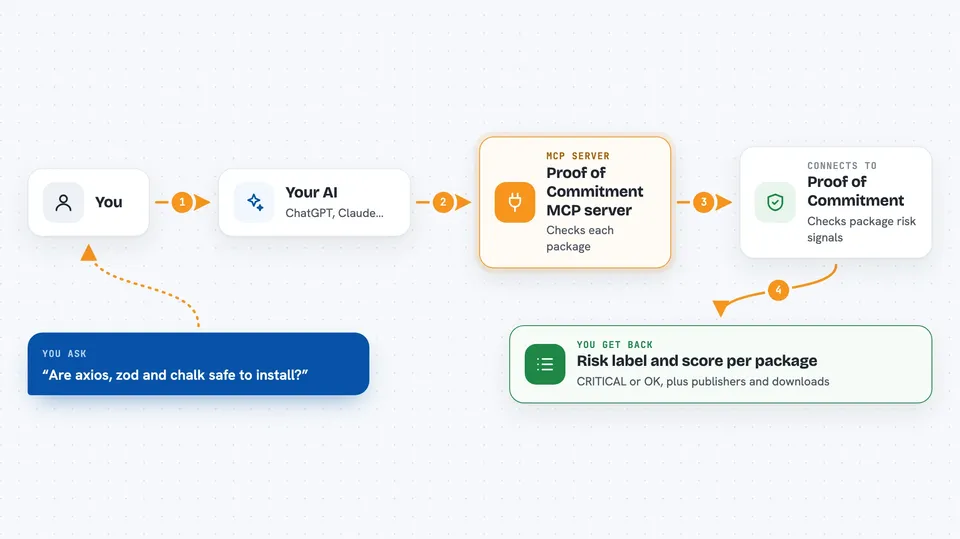
You ask your AI something like which of these packages are risky. Your AI sends the package names to this helper. The helper talks to the Proof of Commitment service, which looks at signals like how many people can publish the package, how often it is updated, and whether it has been involved in an attack. The service sends back a risk score and a short label for each package. Your AI shows you the results in the chat.
 Click to zoom
What you can do with it
- Check the risk score of one or more packages
- See how many people can publish a package
- Spot packages that have been involved in a known attack
- Compare risk across npm, PyPI, Cargo and Go packages
- Get a short list of the riskiest packages in a project
Try asking your AI
- “Check the risk of axios, zod and chalk”
- “Which of these npm packages are critical”
- “Is litellm safe to use”
- “Score the packages in my package.json”
What it gives back to you
You get a short table or list in the chat. Each package shows a risk label like CRITICAL or OK, a score, how many publishers it has, and how many times it is downloaded each week. If a package has been in a known attack, that is shown too.
Before you start
What you need
- An MCP-compatible AI tool like Claude Desktop or Cursor
- Nothing else for basic use, no login required
Good to know
This tool only gives advice, it does not install or change anything for you.
Install it with your AI
Add Proof of Commitment MCP server to your AI, no technical skills needed
You don't install anything by hand. You copy one prompt, paste it into an AI that can work on your computer, and it checks, installs and connects the server for you, asking you when it needs something.
Sign in to get the install prompt
Members get a ready-made prompt that lets the Claude desktop app check Proof of Commitment MCP server, install it and connect it for them, step by step. You don't need any technical skills: you copy, paste and answer a few questions. Your connected AI can also find and install any of the 4,609 MCP servers here for you.
Who it's for
Anyone who installs software packages for a project and wants a quick risk check, especially developers and people who manage dependencies.