
MCP server · Finance and crypto
Spraay x402 MCP server
by plagtech
Lets your AI look up onchain data, run AI models, and send USDC payments on Base, paying per request.
This is a helper that connects your AI assistant to Spraay, a service that does onchain and payment jobs on the Base network. Once it is connected, your AI can check prices, look up wallet balances, get swap quotes, and even send USDC payments to one or many people. It is handy if you work with crypto payments, payroll, or onchain data and want your AI to handle the lookups and transfers for you.
What is an MCP server? The 30-second version
On its own, your AI can only chat. An MCP server is a small helper program that gives your AI a new skill or a connection to an app or service. This one connects your AI to Spraay, which runs onchain data lookups and USDC payments on Base. So when you ask your AI to check a token price or send a payment, it uses this helper to talk to Spraay and get the job done.
What this MCP server does
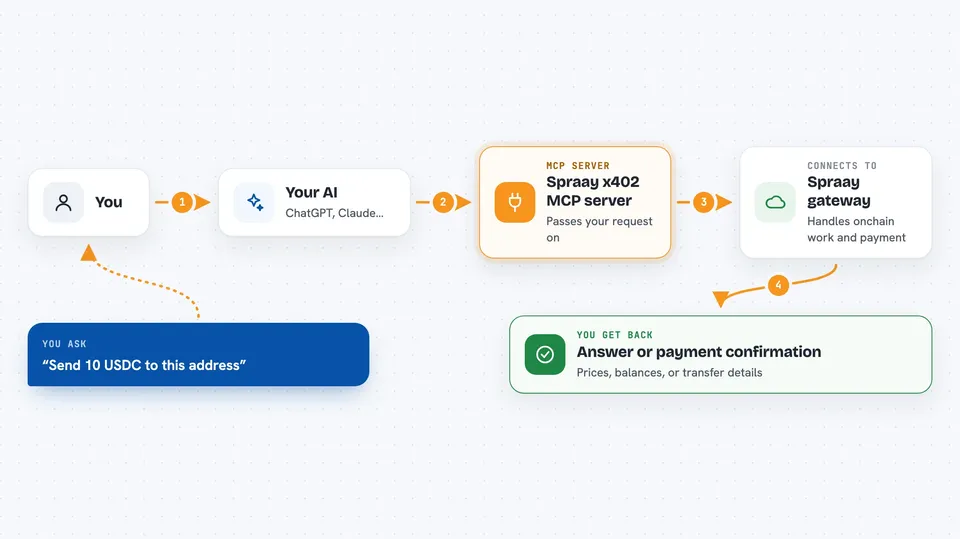
You ask your AI something like what is the price of this token or send 5 USDC to this address. Your AI passes the request to this helper program. The helper talks to the Spraay gateway, which handles the onchain work and the payment. Some jobs are free, and for the paid ones the gateway charges a small amount of USDC from a wallet. Then you get the answer or the confirmation back in your chat.
 Click to zoom
What you can do with it
- Get swap quotes for tokens on Base
- Check token prices and wallet balances
- Send USDC payments to one or many recipients
- Run stablecoin payroll across several chains
- Resolve ENS and Basename names to wallet addresses
- Look up decoded transaction history for a wallet
- Run AI models for text, image, or embeddings
Try asking your AI
- “What is the current price of USDC on Base?”
- “Show me the balance of this wallet address 0x...”
- “Send 10 USDC to these three addresses”
- “Get me a swap quote for 100 USDC to ETH on Base”
What it gives back to you
You get answers in your chat: prices, balances, swap quotes, or lists of transactions. For payments, you get a confirmation that the transfer went through, along with the details. For AI model jobs, you get the text, image, or numbers the model produced. Everything shows up as a normal reply from your AI.
Before you start
What you need
- Node.js 20 or newer
- An MCP client like Claude Desktop or Cursor
- USDC on Base in the wallet the server creates (even $1 covers many calls)
Good to know
These tools can send real USDC payments, so only fund the wallet with what you are willing to let the AI spend, and keep the session key file safe.
Install it with your AI
Add Spraay x402 MCP server to your AI, no technical skills needed
You don't install anything by hand. You copy one prompt, paste it into an AI that can work on your computer, and it checks, installs and connects the server for you, asking you when it needs something.
Sign in to get the install prompt
Members get a ready-made prompt that lets the Claude desktop app check Spraay x402 MCP server, install it and connect it for them, step by step. You don't need any technical skills: you copy, paste and answer a few questions. Your connected AI can also find and install any of the 4,609 MCP servers here for you.
Who it's for
People who work with crypto payments, payroll, or onchain data and want their AI to handle lookups and transfers.



