MCP server · Privacy
Platfone MCP server
by platfone-com
Let your AI rent a temporary phone number and read the SMS code that arrives on it.
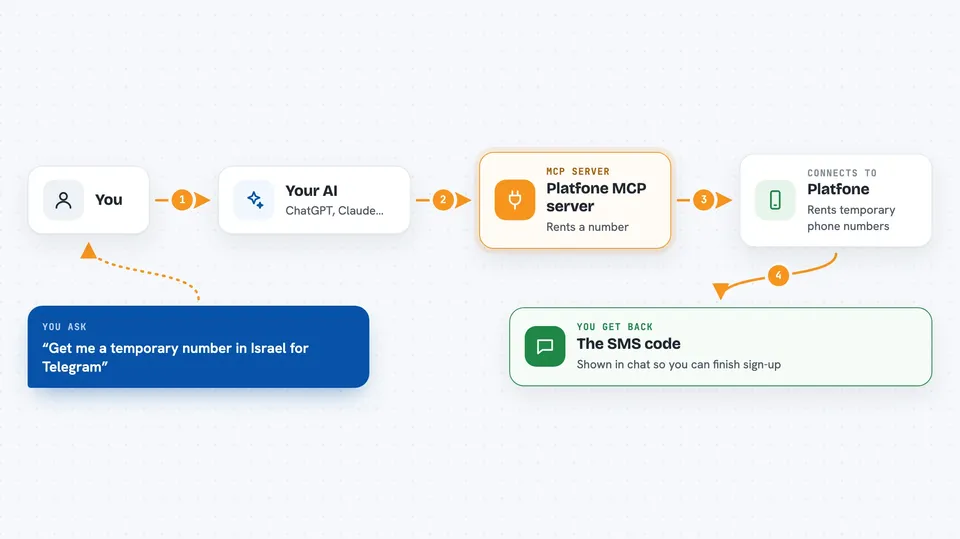
Platfone is a service that rents out temporary phone numbers, the kind people use to receive a one-time verification code. This MCP server connects that service to your AI, so your AI can order a number, wait for the text message, and hand you the code. It is handy if you often need to verify accounts or test sign-up flows and do not want to use your own phone number.
What is an MCP server? The 30-second version
On its own, your AI can only chat with you. An MCP server is a small helper program that gives your AI one new skill or one new connection. This helper connects your AI to Platfone, the phone number rental service. Once it is connected, you can just ask in plain words and the AI will go and rent a number or check for a text message for you.
What this MCP server does
You ask your AI for a temporary number for a certain country and a certain app, like a number in Israel for Telegram. The AI uses this helper to check the price and availability first. If it looks good, the helper asks Platfone to rent the number, and you get back a phone number and an activation reference. Then the AI keeps checking whether the text message with the code has arrived. When it does, the code is shown to you in the chat, and you can use it wherever you need it.
 Click to zoom
What you can do with it
- Check your Platfone account balance before you start
- Check the price and availability of a number for a country and an app
- Rent a temporary phone number in a country you choose
- Wait for and read the SMS verification code that arrives
- Ask for another SMS on the same number if the first one never came
- Cancel an activation before the code arrives to get your money back
Try asking your AI
- “Get me a temporary number in Israel for Telegram and tell me the code when it arrives”
- “How much would a number in the UK for WhatsApp cost right now?”
- “Check if my Platfone balance is enough for one more number”
- “Cancel that activation, the code never came and I do not need it anymore”
What it gives back to you
You get short, clear answers in the chat: a price, a phone number, a status like waiting or expired, and finally the SMS code itself. It also tells you your balance when you ask. Nothing complicated, just the facts you need to finish the sign-up.
Before you start
What you need
- A Platfone account with some balance on it
- A Platfone API key (a kind of password for apps; you get one free from your Platfone account page)
- An MCP-compatible app like Claude Desktop, VS Code Copilot, or Codex
- Node.js installed if you run it with npx
Good to know
Renting a number costs money from your Platfone balance, so check the price first and cancel activations you no longer need.
Install it with your AI
Add Platfone MCP server to your AI, no technical skills needed
You don't install anything by hand. You copy one prompt, paste it into an AI that can work on your computer, and it checks, installs and connects the server for you, asking you when it needs something.
Sign in to get the install prompt
Members get a ready-made prompt that lets the Claude desktop app check Platfone MCP server, install it and connect it for them, step by step. You don't need any technical skills: you copy, paste and answer a few questions. Your connected AI can also find and install any of the 4,361 MCP servers here for you.
Who it's for
People who verify or test accounts often, like QA testers, growth and support teams, and anyone who needs a throwaway number without using their own.